The Section 508 Standards apply the Web Content Accessibility Guidelines (WCAG) 2.0 to web content and other electronic content. Issued by the W3C, WCAG 2.0 is a globally recognized, technology-neutral standard. The next webinar in the Section 508 Best Practices Webinar Series will take place July 27 from 1:00 to 2:30 (ET) and will feature new and differing approaches to web accessibility requirements proposed for the next generation of these guidelines, the draft WCAG 3.0, (or WCAG3).
Presenters will discuss various topics, including the purpose of an accessibility standard, digital accessibility and technical requirements, and approaches to developing an accessibility standard. The conversation will include candid discussion about the concerns and difficulties various stake holders have with current web accessibility standards. Section 508 (and EN 301 549) applied the WCAG 2.0 web standards to other digital content, which has implications for the development of WCAG3. Presenters will address both pre-submitted and live session questions.
For more details or to register, visit www.accessibilityonline.org. Questions can be submitted in advance of the session or can be posed during the live webinar. Webinar attendees can receive a participation certificate for attending the 90-minute session.
Registration closes 24 hours before the start of the session. Instructions for accessing the webinar on the day of the session will be sent via email to registered individuals in advance of the session. Communication Access Realtime Translation (CART) and Video Sign Language Interpreters are available for the session and will be broadcast via the webinar platform. A telephone option (not toll-free) for receiving audio is also available.
The Section 508 Best Practices Webinar Series provides helpful information and best practices for federal agencies in meeting their obligations under Section 508 of the Rehabilitation Act which ensures access to information and communication technology in the federal sector. This webinar series is made available by the Accessibility Community of Practice of the CIO Council in partnership with the U.S. Access Board. All webinars are archived and available on the archives webpage.
When you welcome people who are blind or partially sighted to use your self-service kiosks, it’s a win for your customers and a win for your brand.
Deliver a positive experience for all customers and make your self-service stations accessible with SuperNova Kiosks.
More than 30 years of expertise means the Dolphin team of assistive technology specialists are here to help make your kiosk project a success.
A complete solution for all levels of sight.
The World Health Organisation estimates that there are 285 million people who are living with sight loss worldwide. This includes 39 million people who are blind and 246 million people who are partially sighted.
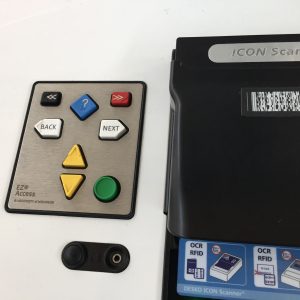
Empower people who are blind to explore your kiosks using tactile buttons. SuperNova loads automatically when headphones are inserted, announcing each option on the screen as the user navigates.
Customise SuperNova for your bespoke kiosk project – choose magnification, speech or both. Work with Dolphin to ensure your kiosk application works seamlessly with speech and magnification.
More Info
A partnership of expertise in assistive technology
Whether you need advice or technical support to deliver an accessible kiosk experience, the Dolphin team of assistive technology experts are here to help.
Right from design stage, your developers can rely on Dolphin’s proven expertise to enhance the accessibility of your kiosk application. Dolphin offers flexible support, service and licensing terms to ensure the long-term success of your kiosk project.
Section 508 Best Practices Webinar: New approaches to web accessibility requirements under WCAG3
The Section 508 Standards apply the Web Content Accessibility Guidelines (WCAG) 2.0 to web content and other electronic content. Issued by the W3C, WCAG 2.0 is a globally recognized, technology-neutral standard. The next webinar in the Section 508 Best Practices Webinar Series will take place July 27 from 1:00 to 2:30 (ET) and will feature new and differing approaches to web accessibility requirements proposed for the next generation of these guidelines and the draft WCAG 3.0 (or WCAG3).
Presenters will discuss various topics, including the purpose of an accessibility standard, digital accessibility and technical requirements, and approaches to developing an accessibility standard. The conversation will include candid discussion about the concerns and difficulties various stakeholders have with current web accessibility standards. Section 508 (and EN 301 549) applied the WCAG 2.0 web standards to other digital content, which has implications for the development of WCAG3. Presenters will address both pre-submitted and live session questions.
For more details or to register, visit www.accessibilityonline.org. Questions can be submitted in advance of the session or can be posed during the live webinar. Webinar attendees can receive a participation certificate for attending the 90-minute session.
Registration closes 24 hours before the start of the session. Instructions for accessing the webinar on the day of the session will be sent via email to registered individuals in advance of the session. Communication Access Realtime Translation (CART) and Video Sign Language Interpreters are available for the session and will be broadcast via the webinar platform. A telephone option (not toll-free) for receiving audio is also available.
The Section 508 Best Practices Webinar Series provides helpful information and best practices for federal agencies in meeting their obligations under Section 508 of the Rehabilitation Act which ensures access to information and communication technology in the federal sector. This webinar series is made available by the Accessibility Community of Practice of the CIO Council in partnership with the U.S. Access Board. All webinars are archived and available on the archives webpage.
With the pandemic and now the Delta virus we now have actual vaccine passport kiosks available for sale and deployment. The impact being both on the general public in the role of customer, and with employees coming back to the office to work.
The arguments against disclosing vaccination status have, at times, focused on HIPAA. We have educated people telling people that “due to HIPAA, I cannot disclose my status”. It’s actually more of Herman Melville Bartleby tactic where the fact is they prefer not to disclose.
The usual applications where HIPAA comes into play for kiosks can be Epic Welcome Kiosks for patient check-in for example, or any type of patient check-in. Generally unit collecting or touching patient information in health care provider, hospitals, nursing home or service providers. Telehealth kiosks is another example.
Good article discussing.
In brief:
#1 — It is not a HIPAA violation to ask someone their vaccine status
Who does HIPAA regulate?
Health insurance companies, Medicare, Medicaid or employers who run self-funded health plans
Business associates, such as health care providers, hospitals, nursing homes or anyone actually delivering a health care service
Subcontractors of business associates, such as health care clearinghouses or billing companies that may transfer patient data
You can ask. They do not have to answer.
Some states are passing “Can’t Ask” laws and conflating them with HIPAA (e.g. home state of Oklahoma)
As we return to learn and work in person, you might be wondering how to talk to others about whether they’ve gotten a COVID-19 vaccine — or if it’s even legal to ask.
When Rep. Marjorie Taylor Greene, R-Ga., was asked last month if she had been vaccinated against COVID-19, she said the question itself was “in violation of my HIPAA rights.”
“You see, with HIPAA rights, we don’t have to reveal our medical records and that also involves our vaccine records,” said Greene, who has previously pushed false claims about vaccines.
“HIPAA applies in many fewer circumstances than people think.”
Actually, that’s not true. “It is not a HIPAA violation to ask someone their vaccine status,” said Kayte Spector-Bagdady, who helps direct the University of Michigan’s Center for Bioethics & Social Sciences in Medicine. “HIPAA applies in many fewer circumstances than people think.”
HIPAA, or the Health Insurance Portability and Accountability Act, protects people’s private health information from being shared by certain health care entities without patient consent. But this 1996 law is far more narrowly defined than most people realize, Spector-Bagdady said.
Here’s what several health law experts say about the relevance of HIPAA and other rules when navigating interactions with others.
What does HIPAA cover?
Most people encounter HIPAA when signing consent forms at their doctor’s office. Typically, that is the extent of their exposure to this law or any other that governs health care and their privacy. So “there’s a lot of misapplication and misunderstanding in terms of what HIPAA does,” said Matthew Fisher, who serves as general counsel for Carium, a telehealth platform company, and has practiced health care law for more than a decade.
Here’s who HIPAA regulates:
Health insurance companies, Medicare, Medicaid or employers who run self-funded health plans
Business associates, such as health care providers, hospitals, nursing homes or anyone actually delivering a health care service
Subcontractors of business associates, such as health care clearinghouses or billing companies that may transfer patient data
That’s it. It doesn’t apply to conversations you might have on the street, said Margaret Riley, a professor of law at the University of Virginia and serves as legal advisor for the school’s Health Sciences Institutional Review Board.
“I can ask you on the street what your vaccine status is. I can ask you in my business what your vaccine status is. If I’m not your supervisor, that’s not a violation because I have no impact on you,” Riley said. “On the other hand, you have no obligation to answer me.”
The National Football League announced late last month it would penalize teams if they had COVID-19 outbreaks among unvaccinated players.
The decision came as more employers mandate that employees get vaccinated against COVID-19 to prevent outbreaks traced back to the workplace, preserving public health and productivity levels in one fell swoop. When New England Patriot quarterback Cam Newton was asked soon after in a news conference if he had been inoculated against the coronavirus, he sidestepped the question: “I think it’s too personal for each and every person to kind of discuss it, and I’ll just keep it at that,” he said.
“If I’m not your supervisor, that’s not a violation because I have no impact on you. On the other hand, you have no obligation to answer me.”
Newton is fully within his rights to not divulge his vaccine status to the news media. But there are many contexts where people might want to know if others with whom they have regular contact have gotten shots.
Claire Talltree, a retired epidemiologist and farmer in Snohomish, Washington, serves on the board of a nonprofit organization that meets regularly to discuss business. During much of the pandemic, those meetings took place virtually, but once vaccines became available and Washington lifted restrictions for social distancing, Talltree said the nonprofit’s board members suggested they all meet in person in restaurants and hold hourslong meetings over meals (which she said typically results in lax mask use). Because she was caring for vulnerable loved ones with compromised immune systems, Talltree, 64, asked if everyone had been vaccinated against COVID-19.
“I’ve been told it’s HIPAA, and they don’t have to tell me,” said Talltree, who added she is getting lots of pushback and has lost friends who died of COVID-19. “They want me to quit being fearful,” she said. “I’m not fearful. I just don’t want to catch this disease.”
Confusion beyond HIPAA
If HIPAA does not prevent you from asking most other people if they are vaccinated, new laws going into effect around the country may contribute to stifling conversation, if indirectly.
State lawmakers have submitted more than 150 bills tied to vaccine passports and mandates for employers and schools, according to the National Academy for State Health Policy. These orders come as the delta variant pushes the number of new infections to more than 100,000 each day — levels last seen in February before vaccines were widely available — and largely affecting unvaccinated swaths of the country.
In Oklahoma, Gov. Kevin Stitt signed into law on May 28 a mandate that prohibits colleges from requiring students to be vaccinated or wear masks, or from asking students if they are vaccinated.
That means that college instructor Dinah Cox, who is fully vaccinated but asthmatic, cannot even request that students in her English class wear a face covering. When classes resume in mid-August at Oklahoma State University in Stillwater, Cox said, she must teach in person in a windowless lecture hall. She is concerned that her preexisting health conditions might complicate an otherwise mild breakthrough infection. She has applied for medical accommodations to continue teaching virtual classes, but Cox said it is unclear if her request will be granted before school starts in mid-August.
“I prefer to teach in person. I just want to be protected when I do so and have my students protected,” she said. But she said she feels she must choose between her job and her health.
These state-based rules are creating confusion beyond what is often — and inaccurately — attributed to HIPAA, Riley said. “In that context, you’re going to have a lot of these conversations when people are seeking ways to protect themselves.”
This response is a “classic American public health response” with critical decisions being made at the “most local level possible,” said Jason Schwartz, an associate professor in the Yale School of Public Health.
“We’ve seen unhelpful restrictions in some states that have limited the ability of institutional leaders at schools, businesses and colleges to have the information they need about risk present in their community and ability to respond to it,” Schwartz said.
During a global pandemic with a highly infectious variant causing more infections, these incremental choices can ultimately hinder greater progress and harm more people, he added.
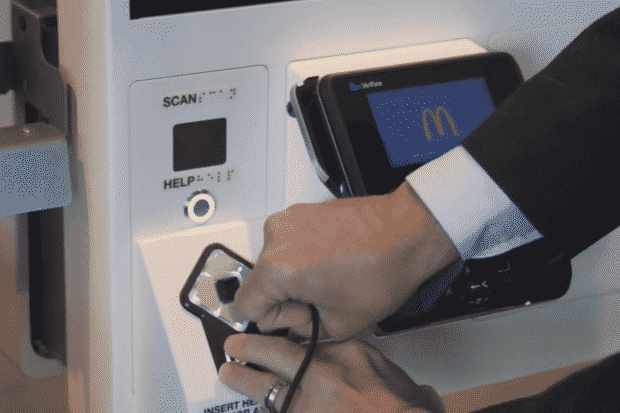
McDonalds has taken the lead in testing and evaluating at large scale providing accessibility features for the blind. One of the improvements is by adding in a screen reader (JAWS Kiosk by Vispero) and coupling that with Storm Interface AudioNav assistive technology.
Providing accessibility to every user group has taken on an even more pronounced imperative with the recent legal suit and class action which the DOJ is pursuing against Quest Diagnostics. The probable outcome there is a nationwide retrofit of literally thousands of units. See our Legal News summary page.
Kiosk Marketplace wrote up their recent Lunch And Learn which talked about the new McDonalds kiosk accessibility features.
Highlights
Kelsey Hall, senior product manager, global digital accessibility, McDonald’s, and Matt Ater, vice president of business development and software engineering at Vispero, demonstrated how McDonald’s digital accessibility works.
The demo used headphones. Note in the video above the NFB opts for public audio. Ambient noise can make it more difficult for a human to hear, or for a microphone with noise cancellation to discrimminate.
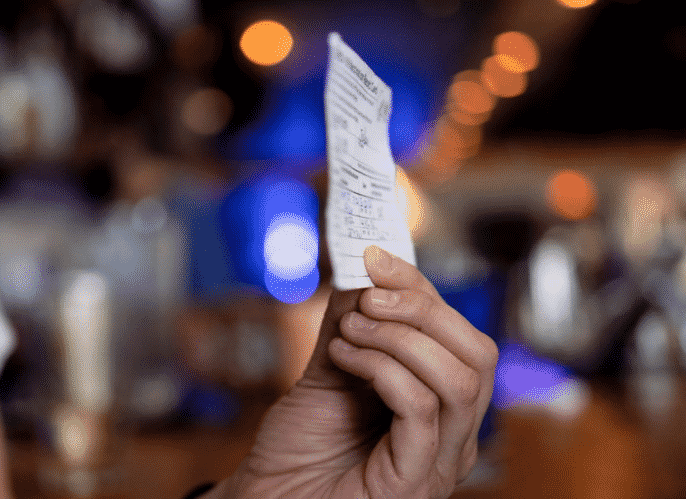
Mentioned too is the kiosk also has Braille labels at any point of actionable contact, such as the scan area, the headphone insert, the receipt area and the payment pad.
Asked about the possibility of offering voice recognition, Hall said voice recognition cannot replace the current solution. “Even if you have voice recognition options there are some limitations based on connectivity.”
February 2022 Denver – The kiosk association is continuing to serve as an official media partner for the Infocomm tradeshow June 8-10 in Las Vegas. InfoComm 2022 is the once-a-year opportunity to see the latest audiovisual technology, learn the skills that will advance your career, and grow your professional network. We first became a media sponsor in 2021.
infocomm 2022
“The members of the kiosk association are much more diverse than just kiosks. Digital signage technology both hardware and software are integral to their complex business opportunities”, says Craig Keefner, manager for the association. InfoComm, ISE and now DSE are the new “must-be involved” list for our sponsors with strong digital signage and digital display technology.
There will be many more members “embedded” in the booths. That could be 22Miles software in the CISCO booth e.g.
For more information and a free exhibits-only registration contact info@kioskindustry.org
ABOUT INFOCOMM
InfoComm is the most comprehensive event for audiovisual solutions that enable integrated experiences, with products for audio, conferencing and collaboration, digital signage, content, production and streaming, video capture and production, control, and live events.
More specific details on an implementation schedule, company-owned versus franchisees, new kiosk versus existing kiosks expected prior to NRF 2022 which at the KMA Booth 1606 Storm will be showing the latest in accessibility technology.
Worth noting that in hospitality, Marriott uses the AudioNav now. Airline check-in such as Southwest Airlines has been using for a long time.
Storm Interface is also leading an open conference call later this month which will be a discussion session on strategies for extending accessibility to all manner of self-service. October 28th at 11 am CT. Contact craig@kma.global for invite. Limited seating available.
The technology will be added to all existing kiosks in company-owned restaurants in California, and 25% of existing kiosks in other U.S. states. [company-owned restaurants]
McDonald’s only operates around 5% of its roughly 14,000 U.S. restaurants, the company said. The rest are run by franchisees.
The company said it would add the new accessibility function to all new kiosks installed in any U.S. restaurant after July 1, including those sold to franchised restaurants.
“Initiatives to improve accessibility to products and information for those with disabilities or impairments should be recognized and applauded”, say Storm Interface.
Storm Interface, manufacturers of the AudioNav system interface, are working with McDonald’s to accelerate improvements in the accessibility of McDonald’s restaurant kiosks. McDonald’s was recently recognized by the National Federation of the Blind for its achievements in accessibility. Storm are pleased to have had an opportunity to work with McDonald’s delivering an effective audible and tactile customer interface.
“From the first meeting it was clear that the McDonald’s team had recognized the challenges faced by those who could not see, read or interact with a touchscreen” said Peter Jarvis SEVP at Storm Interface. “We were (and remain) impressed by their willingness to explore and implement new ideas and new technologies. Storm are delighted that the AudioNav device was chosen by McDonald’s to provide the integrated audio connection and tactile interface for navigation of restaurant menu options.”
“Inclusion is at the core of our values,” said Kelsey Hall, Senior Manager of Global Digital Accessibility at McDonald’s. “Implementing new options for our customers to be able to order independently is vitally important to ensuring the restaurant experience is accessible for everyone.”
Storm Interface’s AudioNav device is currently being deployed to McDonald’s corporate owned stores and select franchise locations across the US.
Background Information:
About Storm Interface
For more than 35 years Storm Interface have designed and manufactured secure, rugged and reliable keypads, keyboards and interface devices. Storm products are built to withstand rough use and abuse in unattended public-use and industrial applications. Storm Assistive Technology Products are recognized by the Royal National Institute of Blind People under their ‘RNIB Tried and Tested’ program. https://www.storm-interface.com
Long Answer — Technically all of the regulations mandated today apply to any form of unattended self-service. In the case of some there may not be a touchscreen per se but interaction with the terminal whether via mobile or transponder still shares those regulations. Accessing a large smart city interactive screen with a mobile phone proxy is interaction without any direct physical touching of the terminal for example. In the definition of a kiosk we point out how legal sanctions often become part of the defining process. For example, in normal like we may not consider a burrito a sandwich right? However, when it comes to nutrition and food safety the FDA considers a burrito the same, legally, a sandwich. Sounds silly for sure but it illustrates equivalents.
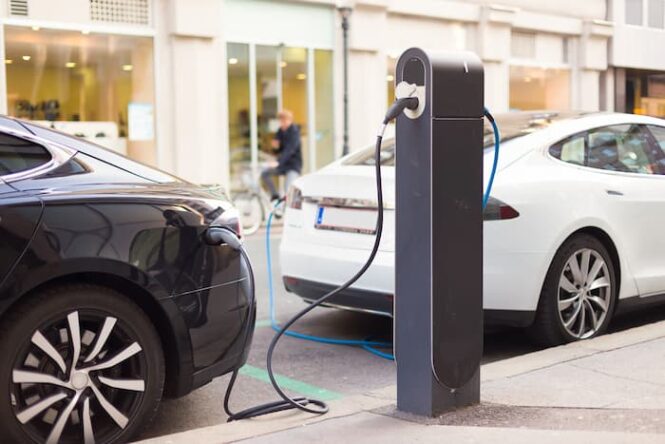
One of the biggest challenges for EV Charging is simply location. They tend to be on existing curbs where there are no ramps
The liability is two-part:
that which the DOJ has basis to file interest (typically using ADA2010)
and that which you still might be sued for (hot coffee wasn’t regulated until suit was brought e.g.)
We think the more relevant current laws will be regarding mounting and placement. The USPS Postal Buddy kiosks are perfectly accessible, however, they were sometimes installed in less-than-accessible locations/areas. The usual height dimensions were fine.
Here are the specific regs that come into play (as referenced in the KMA Code of Practice)
3.1.1.1. 305 – Maneuvering and More ADA2010
3.1.1.2. 306 – Depth and Clearance ADA 2010
3.1.1.3. 303 – Changes in level ADA2010 (generally not permitted)
3.1.1.4. Protruding Objects ADA2010 [refers to 307]
3.1.1.5. [Suggestion] Kiosks must be visually and tactilely identifiable to users as accessible (e.g., an international symbol of accessibility affixed to the front of the device
3.1.1.6. General Reach Ranges — ADA2010 – [reach ranges specified in 508 Guidelines and Operable Parts and included in 407.8 — refer to those]
3.1.1.7. Operable Parts — ADA2010 [refer to Section 508 for complete most current]
305.7.1 Maneuvering Clearance in Alcove ADA2010
403 Clear Width — ADA2010
404 Maneuvering Clearances — ADA2010
902.3 Work Surfaces, Countertop, Table Top, Voting
Under Section 508 review
3.1.2.1. 402 – Closed Functionality — Section 508 Final Rule
3.1.2.2. 407 – Operable Parts — Section 508 Final Rule
And for reference Audio is more often than most the largest litigated accessibility issue.
Disabled people need access to all technology, including kiosks. Access to information and services on kiosks is a civil right. That means that kiosks have to be designed so people can use them if they are blind, deaf, use a wheelchair, or have other disabilities. This post includes resources that can help make kiosks accessible.
Disabled people and their lawyers are using the law to make sure kiosks work for everyone. There have been cases about health care kiosks and new technology that lets people pay for their meals at the table. Accessible kiosks guarantee privacy and confidentiality. Government agencies that buy kiosks should only buy accessible ones so everyone can use them.
This article is updated whenever there is a new legal development about accessible kiosks for people with disabilities. The most recent update was posted on December 31, 2021.
Article updated
This article has been updated since it was first published on January 30, 2018. The most recent update was added on December 31, 2021. Read the updates for this article.
Website accessibility is important. Website accessibility is something that receives significant attention in the legal space. But digital accessibility is not just about websites, and the law is taking notice.
This post highlights lawsuits, Structured Negotiations, and other legal activity about kiosk accessibility.
I use the term “kiosk” broadly to include tablets and any piece of technology offering services, products, and information. Who will use that technology? People — and that means disabled people.
And that means the technology has to be usable by everyone, including people who cannot see a screen, hear a video, or use a mouse.
How do you make sure your kiosk is accessible? This is not a technical post, but one thing is certain: if there is no audio output and available input method for those who can’t see a screen, the kiosk is off limits to a blind person. If it has video but no captions, the kiosk is unavailable to a deaf person. And if controls are out of reach range, wheelchair users cannot get to the information.
As with all technology, one piece of the accessibility puzzle is having disabled people give feedback along the way and before deployment. The tech version of the civil rights slogan, “nothing about us without us.”)
The revised Section 508 guidelines (federal procurement regulations) specifically identify kiosks as covered information and communication technology (ICT). The Americans with Disabilities Act’s non-discrimination and effective communication provisions are broad enough to embrace kiosk accessibility. State procurement and anti-discrimination laws are part of the strong foundation supporting kiosk accessibility in the United States.
Around the globe accessibility policies support kiosk accessibility, and the United Nations Convention on the Rights of Persons with Disabilities (UNCRPD) lay the foundation for international access. Smart cities aren’t smart enough if public kiosks cannot be used by everyone.
Here are some recent happenings in the kiosk accessibility legal space in the U.S. Whether you are in #HealthTech, #MedTech, #FinTech, #EdTech or any sort of tech, put accessibility on your to do list. Accessibility is about people and accessibility is a civil right. Kiosks without access may as well have a “do not use this machine” sign on them.
Accessibility must be a core value in health care technology. Without it, there is no privacy or confidentiality because disabled people are forced to ask for help to do things that could be done independently with accessibility features.
DOJ gets involved in Quest Diagnostics kiosk accessibility lawsuit
On September 20, 2021, the United States Department of Justice filed a “Statement of Interest” in a federal court case in Los Angeles called Vargas and the American Council of the Blind v. Quest Diagnostics. The case is about Quest Diagnostic’s failure to make its kiosks accessible to blind people. The DOJ’s statement supports the plaintiffs’ claim that inaccessible kiosks violate the ADA.
A government agency can file a Statement of Interest to let a court know the agency’s view on a law it is in charge of implementing. The DOJ interprets and implements the ADA, and told the judge in the case it was filing the statement because:
As the agency charged by Congress with administering theADA, the United States Department of Justice has a vital interest in ensuring that public accommodations’ use of such kiosks does not result in discrimination
against individuals with disabilities. DOJ Statement of Interest in Quest kiosk case
The DOJ’s statement explains that companies like Quest (with over 2,000 locations across the United States) must effectively communicate with disabled people. The technical term is that organizations covered by the ADA must provide “auxiliary aids and services.” The Statement told the court that
Particularly significant here, the regulations provide additional examples of auxiliary aids and services that may provide effective communication, including “accessible electronic and information technology.” Id. § 36.303(b). The regulations also clarify that auxiliary aids and services must be provided “in accessible formats, in a timely manner, and in such a way as to protect the privacy and independence of the individual with a disability” in order to be effective.
In July, 2016, Massachusetts Attorney General Maura Healy, along with the National Federation of the Blind announced a settlement with Pursuant Health, Inc. to make that company’s self-service health care kiosks accessible to blind consumers. These kiosks offer services including vision assessments, blood pressure screening, weight and BMI assessments, and pain management advice.
One of the most basic civil rights principles is that governments cannot provide services and information if disabled people will be locked out because of the lack of access. As more public services and information move to kiosks, more attention must be paid to kiosk accessibility in the government sector. Here are two examples where the law has gotten involved.
In August 2017 the National Federation of the Blind and two blind individuals filed a lawsuit against the U.S. Social Security Administration for “failure to make its Visitor Intake Processing touchscreen kiosks accessible to its blind visitors.”According to the press release, the lack of access has a direct impact on privacy and confidentiality. Blind social security recipients are “forced to divulge private information, such as their social security numbers, to SSA staff or other sighted third parties to assist them.”
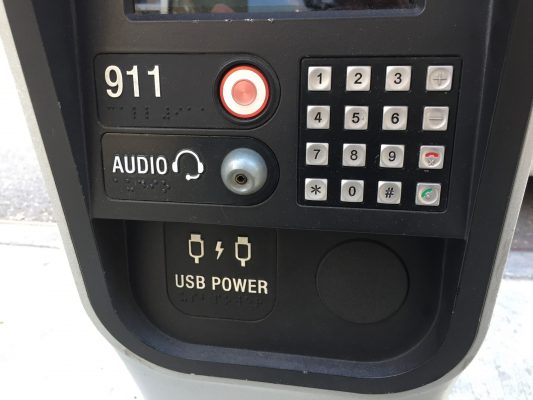
Local governments are using kiosks too. As I reported in the March 2017 Legal Update about New York City:Public money must not be spent on technology unless all members of the public can use it — including disabled people. We were once again reminded of this important principle on January 17, 2017 when a settlement was announced about the accessibility of New York City’s public info kiosks.The kiosks provide millions of New York residents and visitors free mobile device charging, domestic phone calls, access to city services, and a dedicated function to reach 911. Thanks to a settlement negotiated by Disability Rights Advocate on behalf of the National Federation of the Blind, those kiosks are now available to everyone. (The picture at the top of this post is a close-up of the NY kiosks with accessibility features including a headphone jack and tactile keypad.)
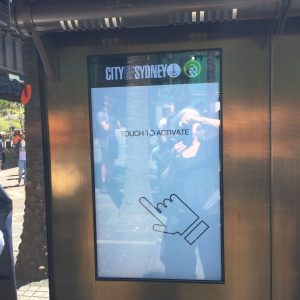
I had the privilege to spend time in Australia last year, and fell in love with the country and made and strengthened friendships with people in the accessibility and disability communities. Advocates, corporate and government champions, and skilled consultants are working hard to ensure accessibility in various sectors and across a host of technology. Special shout out to the Digital Gap Initiative for useful policy links below.
But I was disappointed to encounter a completely inaccessible kiosk in the heart of the Sydney (picture above) — a kiosk that runs contrary to a significant number of forward-thinking policies in my new favorite place to visit.
If these commitments do not translate into actual accessibility on the ground, disabled people are left out. Implementation of international, national, state, and local policies is a crucial step in digital inclusion for disabled people. Plain and simple, governments should not be procuring and/or installing anything that all members of the public cannot use.
In higher education, as in most other sectors, schools increasingly turn to kiosks to provide information, convenience, and services to students. Accessibility agreements in the legal space have been all encompassing when mandating accessibility and accessible procurement policies.
These agreements, both private and through the US Department of Education, include kiosks in the definition of electronic and information technology (EIT), and serve as a reminder that a system-wide policy is needed to avoid inaccessible purchases in the higher education setting.
I read many higher education policies on line about accessible technologies generally, web technologies specifically. I recommend putting kiosks into the specific category to avoid the purchase of any technology falling through the cracks!
Using new and advanced technology, enhancements to existing accessibility features include screen-reading software, tactile keypads and the ability for customers to connect their headphones or ear buds to the kiosk and independently place their orders by responding to audio prompts.
No lawsuit was needed in the effort with McDonald’s.
In January, 2018 the National Federation of the Blind announced a partnership with a major manufacturer of table-top tablets increasingly used in restaurants for ordering, payment and more. The partnership will “produce a text-to-speech capability for the PrestoPrime EMV System that will be incorporated into all current and future Presto tablets, including those used in Applebee’s Grill + Bar restaurants nationwide.” The settlement agreement outlining the details shares that the parties used Structured Negotiation to reach agreement. Download the settlement agreement from the case announcement.
The new functionality will enable “blind persons to interact with the Presto System.”
The basic right to shop independently without having to disclose confidential financial information or rely on sighted assistance has long been the subject of legal advocacy. This includes shopping via kiosks, as a 2014 settlement with Redbox movie kiosks demonstrates.
In August of that year Disability Rights Advocates and the San Francisco Lighthouse for the Blind announced a settlement with Redbox in which the company agreed to make all its movie rental kiosks in California accessible to people with disabilities. Read the Redbox accessibility press release.
The settlement also included a 1.2 million dollar fund to be used to compensate blind customers prevented from using Redbox kiosks due to lack of access. And the California settlement was followed by a national settlement that brought accessible talking kiosks to the rest of the country.
Talking ATMs: Accessible Financial Technology Still Needed Around the World
Talking ATMs have shown since 1999 that financial kiosks must — and can be — accessible. In the United States the Americans with Disabilities Act has long required that ATMs talk, and advocates made that law a reality with significant numbers of Structured Negotiations and some lawsuits in the late 1990’s and throughout the 2000s.
But financial technology is global, and accessibility must be global too. Last month came news of the first Talking ATMs in the United Arab Emirates. The machines spoke in Arabic and English, and the Braille was in two languages too.
But the devices were manufactured by Diebold – one of the early Talking ATM manufacturers in the United States. What took so long for Talking ATMs to get to the UAE?
That country ratified the UN Convention on the Rights of People with Disabilities in 2008. Accessible technology is embedded in the Convention. Manufacturers should not be shipping financial technology (#FinTech) without access. The UNCRPD must be implemented to ensure technology remains available to disabled people.
[Curious about the history of Talking ATMs? Visit the Talking ATM topic page on this website for more than 60 posts about this bedrock of accessible financial industry technology.
It’s ironic. In 2013 I wrote a post bemoaning the molasses-like regulations that gave airlines too much time to install accessible kiosks. Read “It’s hard to be Optimistic about the New DOT Web and Kiosk Regulations.” But even with all the time alotted them some airlines did not meet initial deadlines, and thus the DOT’s settlement announcement.
Accessible airline kiosks have been on the market for years. Disabled people travel. Let’s make accessible airline kiosks a reality everywhere.
Resources for Accessible Kiosks
Here are some resources for those seeking to advocate for and develop kiosks that can be used by everyone, including people with disabilities. Please use the Contact Page to send other resources.
The American Council of the Blind’s lawsuit against Quest Diagnostics about the companies inaccessible kiosks continues, with new rulings that allow the case to continue. First, in September 2021, Quest asked the Court to rule that Quest’s kiosks did not violate the ADA. On October 15, 2021, the Court rejected Quest’s request, finding that Quest’s kiosks are a part of the service that Quest provides. Because of that, Quest must provide what is legally referred to as “auxiliary aids and services” to render the kiosks accessible to blind patients.
Auxiliary aids and services are methods that allow a company to effectively communicate with its blind or deaf customers. In this case, auxiliary aids and services would make the visually delivered content and features of the kiosks usable by people who cannot see. The parties can still fight over the precise methods, but this is a big win for the plaintiff to move the case forward. (The judge even found that Quest has conceded that its kiosks, as originally developed, did not provide “effective communication” with blind individuals.)
In a different court order in December, 2021, the court certified a class of blind people, meaning the case can go forward as a class action on the issue of fixing the kiosks. In the class action ruling, the court wrote that “This is a civil rights action against a party charged with unlawful, class-based discrimination based on the use of a specific auxiliary aid or service, and is a prime candidate for certification.” By certifying a nationwide class of blind Quest customers, the court has expressed its opinion that modifications to Quest’s kiosks must be made at all locations across the country.
Updated to include a link to an article on this website about a U.S. court opinion in the case about Walmart self-check kiosks. On October 12, 2021 a federal judge ruled that Walmart was not required under the ADA to make its kiosks usable by blind people. Read the article about the Walmart kiosk case, U.S. Federal Judge Rules for Walmart, against Blind Shoppers, in Self-checkout Kiosk Case
(1) Updated the Healthcare Kiosks section of this article to include United States Department of Justice activity supporting a lawsuit about healthcare kiosk accessibility. (2) Updated the Restaurant Kiosks section to include McDonald’s commitment to accessible kiosks.
Updating to include the April 20, 2021 announcement from the National Federation of the Blind titled California DMV Kiosks to Become More Accessible to the Blind. Note that this was not a lawsuit, but a collaboration between the NFB, California Department of Motor Vehicles and Intellectual Technology, Inc., a provider of self-service kiosks. Congratulations to Tim Elder of the TRELegal Practice for representing the NFB in this case.
After the NFB filed its lawsuit against Walmart described in the October 2018 update below, the company tried to get the case thrown out of court. After legal briefing and argument, the court ruled on October 18, 2019 that the case can move forward in court. The case will now move to the discovery phase unless the parties settle.
On October 26, 2018 a federal lawsuit was filed against Walmart challenging the retailer’s self-checkout kiosks that are not independently usable by and accessible to blind customers.The case began when a Walmart employee helping two blind customers stole their money while providing assistance that was requested because the self-checkout technology was not accessible. The case was filed by the National Federation of the Blind and the two blind Walmart customers. Read the press release about the inaccessible Walmart checkout kiosks.
Yesterday, President Joe Biden appointed eight new members to the U.S. Access Board. He also reappointed incumbent Board member, Gregory S. Fehribach who is currently the Board’s Chair.
“I am honored that President Biden has reappointed me to the United States Access Board, and I look forward to working with the new appointees from the Biden-Harris team as we serve Americans with Disabilities. I would also like to acknowledge my colleagues who will be leaving the Board and recognize them for their selfless service and time that they have given our country.”
Elver Ariza-Silva is active in advocacy efforts for all people with disabilities, with a focus on those who are Latino in the District of Columbia. Originally from the Republic of Colombia, Ariza-Silva is a polio survivor and a professional with more than 20 years combined experience in human and social services and in the food industry.
Heather Dowdy
With fifteen years of experience developing and demonstrating accessible technology in mobile, web and artificial intelligence, Heather Dowdy currently leads Accessibility at Netflix, leveraging technology to connect people with disabilities to their next favorite story. As the oldest daughter of Deaf parents, Dowdy is fluent in American Sign Language (ASL).
Mozhdeh Amelia Hamraie
Dr. Aimi Hamraie (they/them) is a disabled designer and scholar, with expertise in architectural and digital media accessibility. They are the author of Building Access: Universal Design and the Politics of Disability (University of Minnesota Press, 2017), a history of the Universal Design movement and accessibility standards in the United States. Hamraie works as Associate Professor of Medicine, Health, & Society and American Studies at Vanderbilt University.
Hannah Raissa Ibañez
Hannah Raissa Ibañez, Esq. currently works as a Senior Staff Attorney on the Tenant Defense Project for Inner City Law Center, a non-profit law firm that provides free legal services to vulnerable residents of Los Angeles. In this role, she provides litigation defense to low-income tenants, working poor families, immigrants, people who are living with HIV/AIDS, people with disabilities, and veterans facing homelessness and eviction.
Alexis Ander Kashar
Alexis Kashar is a civil rights attorney, business leader, and technologist. She grew up in a multi-generational Deaf family that encouraged her interest in civil rights and accessibility from an early age. For over two decades, she was among a small group of Deaf attorneys in the world practicing civil rights and special education law in the private sector, where she fought for a more accessible world.
KR Liu
KR Liu is a leader in the area of disability inclusion and LGBTQ rights. Diagnosed with severe hearing loss at the age of three, she’s made it her life’s work to be a strong advocate for disabled people. As the Head of Brand Accessibility at Google, Brand Studio she drives innovation of representation for diverse disabled audiences, a segment that historically has been overlooked.
Benjamin William Julian Nadolsky
Benjamin Nadolsky of Knoxville, Tennessee is the principal of Nadolsky Consulting Group LLC, a firm specializing in education, accessibility, and disability rights. He is on the Board of Directors for the World Institute on Disability and the Pennhurst Preservation & Memorial Alliance Advisory Board.
Madeline Rose Ruvolo
Madeline Ruvolo is a transportation planner on the Accessible Services team at the San Francisco Municipal Transportation Agency. She specializes in the accessibility of active transportation and emerging mobility projects and programs.
Gregory S. Fehribach
Board Chair Gregory S. Fehribach of Indiana is a leader in accessibility and inclusion for people with disabilities. An attorney for over thirty-five years who is affiliated with the Indianapolis law firm Tuohy, Bailey, & Moore, LLP, Fehribach founded The Fehribach Group in 1995, where he provides innovative access solutions to clients nationwide who are seeking to create an accessible environment that is welcoming to all guests.
These appointments succeed Board members Regina Blye, Patrick D. Cannon, Marc D. Guthrie, Christopher Stephen Hart, Mathew McCollough, Howard A. Rosenblum, and Rochelle Gill Siegel.
“I thank these members for their service and time on the Board. They have provided a valuable contribution to the public and future generations in advancing accessibility throughout society,” Board Executive Director Sachin Pavithran remarked. “I also welcome and am excited to work with the diverse group of new members to advance the Board’s mission.”
The U.S. Access Board is an independent federal agency that provides leadership in accessible design under the ADA and other laws. The Board is structured to function as a coordinating body among Federal agencies and to directly represent the public, particularly people with disabilities. Twelve members of the governing Board are representatives from most of the federal departments. The other thirteen are comprised of members of the public appointed by the President to four-year terms. More information can be found on the Board Members webpage.






 A partnership of expertise in assistive technology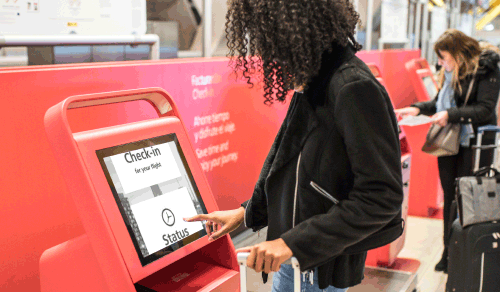



 I had the privilege to spend time in Australia last year, and fell in love with the country and made and strengthened friendships with people in the accessibility and disability communities. Advocates, corporate and government champions, and skilled consultants are working hard to ensure accessibility in various sectors and across a host of technology. Special shout out to the