For the longest time American industry has had a very contradictory relationship with Asia.
Back in the late 70s, we had our own experience with semiconductors (RAM) and Japan and American manufacturers. Needing to collect more seismic data do we purchase 100 devices from a US company or do we purchase 1000 devices from Japan? The outcome was not good for the US semiconductor industry.
In the kiosk industry past it was common at shows to have the Chinese with high-resolution cameras take photos of kiosk units designed by US manufacturers. These photos were later transformed into CAD files and then subsequently offered on Chinese sites, sometimes at 25% the cost. They would break down more often but then you could buy 2 spares at the same cost.
The software application side of things though was and is non-China-provisioned. That has changed.
Currently, there is a “hot market” for temperature screening kiosks. Devices from Belgium and Germany are predominantly used as the temperature sensors and they are integrated into tablets typically running Android on a Rockchip.
The claim is they include AI module and facial recognition along with the temperature measurement. All the sweet spots.
Problem is now that this software is Chinese in origin. Its not just hardware anymore. That brings into play regulations such as HIPAA as well as Federal laws regarding technology (blacklists). Deployments by marquee companies such as Amazon are common, and have included blacklisted technology.
In the temperature kiosk market, we see literally thousands of Chinese units being deployed at schools, state agencies, and federal agencies which employ Chinese software. Software that uses algorithms of blacklisted companies with data that passes thru their servers.
TikTok is an entertainment platform and it has been deemed sufficient national interest to require changes.
Given these “surveillance” platforms for scanning the general population, is it reasonable to suggest they might require changes?
Maybe injecting Chinese software into Smart City technology gets peoples attention. Not sure.
Tablets in general — It can be argued that the closest thing to a U.S. made tablet is an iPad. There are zero Android/Rockchip hardware options in the U.S. and the origin of hardware is now giving Asia and edge in software. It used to be a Dell or HP pc.
Additional Context from legal authority for consideration
For reference HIPAA, the federal statute, only covers those who are deemed to be health care providers under its terms.
Sharing or improperly releasing medical information, or taking biometrics without consent are both potential violations of the law, and could be actionable.
From the Denver Post Oct 2020 — Douglas County man represented by New Jersey firm has filed 52 nearly identical lawsuits since December
James Blanchard had just reopened his Denver winery this summer after being shut down for months because of COVID-19 when he got hit with a different kind of challenge — a surprise lawsuit alleging the website for his family business violated the Americans with Disabilities Act.
The lawsuit said David Katt, a resident of Douglas County who is blind, couldn’t use the downtown winery’s website because it was not compatible with screen-reading programs that allow people who are visually impaired to navigate online.
“We were caught out of the blue by this lawsuit,” Blanchard said. “There was no advanced warning, no contact, no communication from the plaintiff or their attorneys, it was just served on the front door of my apartment.”
Now he’s facing a potentially expensive legal fight at a time when sales at his 2-year-old Denver winery are down 30% because of the coronavirus — and he’s not the only one. The same Douglas County man, represented by a New Jersey law firm, has filed 52 nearly identical lawsuits against companies operating in Colorado since December.
From banks to mattress manufacturers to marijuana dispensaries, all sorts of businesses are facing lawsuits from Katt over their websites’ ADA compliance in what some attorneys say is a predatory pattern designed to push businesses into agreeing to quick cash settlements in order to close cases without racking up big legal bills.
“Plaintiff is not a bona fide patron, but a serial plaintiff who filed this lawsuit to try and extort a monetary settlement,” attorney Alice Conway Powers wrote in response to one of Katt’s lawsuits, in defense of an eyeglass shop.
Katt could not be located by The Denver Post, and his attorney, Ari Marcus of the law firm Marcus and Zelman, did not return multiple requests for comment.
“A black eye”
Such “drive-by” or “click-by” lawsuits over the ADA are a growing trend, disability advocates say, and while the lawsuits can highlight real problems — it is difficult for visually-impaired people to navigate many websites — they’re often ineffective at generating widespread change and create backlash against people with disabilities who are bringing more legitimate ADA claims.
“It gives a black eye to those of us who have been working in this profession for many years and who have gained and garnered the respect of the court because they know we don’t do that sort of thing,” said Kevin Williams, legal director at Colorado Cross-Disability Coalition, an organization that advocates for disability rights.
Lawsuits are a critical tool for people with disabilities to force companies to comply with the ADA, said Scott LaBarre, a Denver attorney who is blind and serves as the Colorado president of the National Federation of the Blind.
The Kiosk Association (KMA) is a participating organization with the PCI Security Standards Council. Initiatives include suggesting SIG group for unattended self-service transactions as well as beginning to note considerations for ADA and accessibility as well as unattended transactions.
Why are you issuing this industry threat bulletin?
Troy Leach: We have heard from many of our stakeholders in the payment community that ATM “cash-outs” are a growing concern across the globe. We felt, as a leader in payment security, now was the time to issue a bulletin with our friends and colleagues from the ATMIA who’s industry is well aware of these daily threats.
What are ATM Cash-outs? How do they work?
Mike Lee: Basically an ATM “cash-out” attack is an elaborate and choreographed attack in which criminals breach a bank or payment card processor and manipulate fraud detection controls as well as alter customer accounts so there are no limits to withdraw money from numerous ATMs in a short period of time. Criminals often manipulate balances and withdrawal limits to allow ATM withdrawals until ATM machines are empty of cash.
So how exactly do these attacks work?
Mike Lee: An ATM cash-out attack requires careful planning and execution. Often, the criminal enterprise gains remote access to a card management system to alter the fraud prevention controls such as withdrawal limits or PIN number of compromised cardholder accounts. This is commonly done by inserting malware via phishing or social engineering methods into a financial institution or payment processor’s systems. The criminal enterprise then can create new accounts or use compromised existing accounts and/or distribute compromised debit/credit cards to a group of people who make withdrawals at ATMs in a coordinated manner. With control of the card management system, criminals can manipulate balances and withdrawal limits to allow ATM withdrawals until ATM machines are empty of cash. These attacks usually do not exploit vulnerabilities in the ATM itself. The ATM is used to withdraw cash after vulnerabilities in the card issuers authorization system have been exploited.
What businesses are at risk of this devious attack?
Troy Leach: Financial institutions, and payment processors are most at financial risk and likely to be the target of these large-scale, coordinated attacks. These institutions stand to potentially lose millions of dollars in a very short time period and can have exposure in multiple regions around the world as the result of this highly organized, well-orchestrated criminal attack.
What are some detection best practices to detect these threats before they can cause damage?
Troy Leach: Since ATM “cash-out” attacks can happen quickly and drain millions of dollars in a short period of time, the ability to detect these threats before they can cause damage is critical. Some ways to detect this type of attack are:
Velocity monitoring of underlying accounts and volume
24/7 monitoring capabilities including File Integrity Monitoring Systems (FIMs)
Reporting system that sounds the alarm immediately when suspicious activity is identified
Development and practice of an incident response management system
Check for unexpected traffic sources (e.g. IP addresses)
Look for unauthorized execution of network tools
What are some prevention best practices to stop this attack from happening in the first place?
Troy Leach: The best protection to mitigate against ATM “cash-outs” is to adopt a layered defense that includes people, processes, and technology. Some recommendations to prevent ATM “cash-outs” include:
Strong access controls to your systems and identification of third-party risks
Employee monitoring systems to guard against an “inside job”
Continuous phishing training for employees
Multi-factor authentication
Strong password management
Require layers of authentication/approval for remote changes to account balances and transaction limits
Implementation of required security patches in a timely manner (ASAP)
Regular penetration testing
Frequent reviews of access control mechanisms and access privileges
Strict separation of roles that have privileged access to ensure no one user ID can perform sensitive functions
Installation of file integrity monitoring software that can also serve as a detection mechanism
Strict adherence to the entire PCI DSS
For more information about best practices for detection and prevention, people should review our full bulletin.
How can people learn more about these type of attacks?
Mike Lee: ATMIA has published a detailed alert report on the topic of ATM Cash-outs. I would also encourage stakeholders interested in this topic to read our joint bulletin in its entirety. A link to those helpful resources is included in this blog.
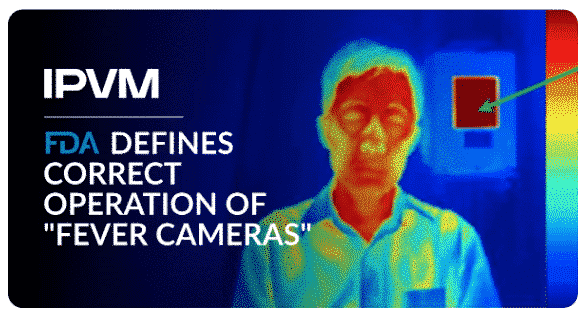
The US FDA has now defined the correct operation of “Thermal Imaging Systems”, colloquially known as “fever cameras”.
Many in video surveillance have interpreted the FDA’s decision to temporarily lift 510(k) clearance requirements for fever cameras to mean that ‘anything goes’, ignoring well-established global standards.
However, this latest FDA guidance show that even amid a fever camera Gold Rush, the agency believes such systems need to be set up and operated “correctly”.
From PCI SSC – The COVID-19 pandemic is quickly changing how many small merchants accept payments. Merchants that previously only had brick-and-mortar locations are moving to accept e-commerce and over-the-phone transactions. PCI Security Standards Council shares key
considerations to help small merchants keep their customers’ payment data secure in this rapidly changing environment.
One tip from Kiosk Industry Group is to understand and know what access, if any, your vendors and supply chain have access to. The Target breach for example was due to a vendor using out-of-date free Malware protection on their PC and getting in via Microsoft infrastructure.
TIP #1: REDUCE WHERE PAYMENT CARD DATA CAN BE FOUND
The best way to protect against data breaches is not store card data at all. Many small merchants are offering curbside pickup now and are accepting telephone payments in lieu of former face-to-face transactions. Avoid writing payment card details down and instead enter them directly into your secure terminal. More Information: PCI SSC Special Interest Group Paper: Accepting Telephone Payments Securely
TIP #2: USE STRONG PASSWORDS
The use of weak and default passwords is one of the leading causes of payment data breaches for businesses. To be effective, passwords must be strong and updated regularly. Weak and vendor default passwords are a frequent source of small merchant breaches. More Information: Strong Passwords Infographic
TIP #3: KEEP SOFTWARE PATCHED AND UP TO DATE
Criminals look for outdated software to exploit flaws in unpatched systems. Timely installation of security patches is crucial to minimize the risk of being breached. One way to keep up with all the necessary changes is by ensuring vulnerability scans are performed regularly to identify security issues. PCI Approved Scanning Vendors (ASVs) can help you identify vulnerabilities and misconfigurations in your Internet-facing payment systems, e-commerce website, and other systems, providing a report of your vulnerabilities and how to address them—for example, what patches to
apply. Be sure to act upon the results of ASV vulnerability scans and keep your software up to date. More Information: Patching Infographic
TIP #4: USE STRONG ENCRYPTION
Encryption makes payment card data unreadable to people without a specific key, and can be used to protect stored data and data transmitted over a network. Ask your vendor whether your payment terminal encryption is done via a Point-to-Point Encryption solution and is on the PCI SSC’s List of PCI P2PE Validated Solutions. If you are setting up a new website, confirm the shopping cart provider is using proper encryption, such as TLS v1.2, to protect your customers’ data. More Information: Information Supplements on Use of SSL/Early TLS
TIP #5: USE SECURE REMOTE ACCESS
To minimize the risk of being breached, it’s important that you take part in managing how and when your vendors can access your systems. Criminals can gain access to your systems that store, process, or transmit payment data through weak remote access controls. You should limit use of remote access and disable it when not needed. If you must allow remote access, ask your vendors to use multi-factor authentication and strong remote access credentials that are unique to your business and not the same as those used for other customers. More Information: PCI SSC Secure Remote Access Infographic
TIP #6: ENSURE FIREWALLS ARE CONFIGURED PROPERLY
A firewall is a device or software that sits between your network and the Internet. It acts as a barrier to keep traffic out of your network and systems that you don’t want and didn’t authorize. Firewall rules can seem complex, but configuring them properly is vital to security. If you require additional assistance to properly configure your firewall, seek help from a network professional. More Information: Resource for Small Merchants: Firewall Basics
TIP #7: THINK BEFORE YOU CLICK
Hackers use phishing and other social engineering methods to target organizations with legitimate-looking emails and social media messages that trick users into providing confidential data, such as payment card number, merchant account number or password. Small merchants should be extra vigilant and be on the look out for common phishing and social engineering hacks. More Information: Beware of COVID-19 Online Scams and Threats
TIP #8: CHOOSE TRUSTED PARTNERS
It’s critical you know who your service providers are and what security questions to ask them. Is your service provider adhering to PCI DSS requirements? For e-commerce merchants (and those of you that recently started accepting e-commerce payments in lieu of face-to-face payments), it is important that your payment service providers are PCI DSS compliant, including the service provider that manages your payment process (your “payment service provider” or PSP). More Information:
November 2020: POI devices must support one or more of four specified techniques for the loading of private or secret keys. Methods a and b are for plaintext key loading and methods c and d are for encrypted key loading. The requirement specifies that EPPs and OEM PEDs intended for use in an unattended environment shall only support methods a, c, and d. It further specifies that SCRPs shall only support the loading of encrypted keying material. Are there any other restrictions?
A Yes. For all new evaluations (i.e., evaluations that result in a new approval) of POI v5 devices, the POI devices must support at least one of the encrypted key loading methods for the loading of private or secret keys
Requirement A9 stipulates that the device must provide a means to deter the visual observation of PIN values as they are being entered by the cardholder. What methods are acceptable?
A The POI Security Requirements provide for several options that may be used separately or in combination to provide privacy during PIN entry. These options are: ▪ A physical (privacy)shielding barrier. Note that in case the privacy shield is detachable, a user’s guide must accompany the device that states that the privacy shield must be used to comply with ISO 9564. Optionally, the user’s guide can also reference PCI device requirements; ▪ Designed so that the cardholder can shield it with his/her body to protect against observation of the PIN during PIN entry, e.g., a handheld device; ▪ Limited viewing angle (for example, a polarizing filter or recessed PIN pad); ▪ Housing that is part of the ATM or kiosk, cardholder’s hand or body (applies to handheld devices only); and ▪ The installed device’s environment.
May (update) 2018: PIN entry devices may physically integrate in the same device other functionality, such as mobile phone, PDA capabilities or POS terminal. Handheld configurations of PIN entry devices may accommodate the attachment (e.g., via a sled, sleeve or audio jack) of a mobile phone, PDA or POS terminal, where the attached device communicates with the PED. Such a configuration appears as a single device, with separate interfaces for input by the clerk and cardholder. What considerations must be taken into account for either of these configurations?
May (update) 2018: PIN Entry Devices that attach to a mobile phone, PDA or POS terminal via a sled, sleeve, audio jack, or wireless connection are required to support SRED. Does this apply to PEDs that are integrated with other devices (such as a tablet or mobile phone) that appear as a single device?
A Yes. An integrated device is one where two physically and electronically distinct devices (e.g., a PED and a commercial off the shelf (COTS) device such as a mobile phone) appear as a single device through the use of the plastics to mask the connectivity. In such a configuration, there is a risk that the cardholder enters the PIN on the wrong interface. Furthermore, the communication interface between the PED and the integrated device may give the latter access to card reader functions without cryptographic controls, allowing skimming of card account data. In this integration model, then either: ▪ Both the PED and non-PED are assessed and validated as compliant to the PTS POI requirements, or ▪ The PED, which must also control the card reader(s), must implement and be validated against the PTS POI SRED module and be both physically and electronically distinct from the non-PED system (for example, it is not acceptable to have the PED firmware execute within the same processor as the non-PED firmware). The PED must enforce SRED functions for encryption of card data at all times. The PED is only allowed one state, and that is to encrypt all account data. It cannot be configured to enter a state where account data is not encrypted. The Security Policy must also state that the non-PED has not been assessed under the PCI PTS program and security guidance is required to ensure the secure operation of the solution. An additional note will be added to the portal noting that the non-PED has not been assessed under the PTS program.
October 2018: Are there minimum requirements for the version of Android to be used within a PTS device?
A Yes, it is expected that the Android version is officially supported with security patches, at a minimum. Any reports, including deltas, where the Android version is not supported with regular security patches will be rejected. Where these patches are not provided by Google, evidence of security patches (implemented at least monthly) provided by the vendor must be documented in the report provided by PCI; evidence for this is expected to be validation of the update code by the laboratory for at least two previous patches, as well as validation by the laboratory that these patches have remediated existing known vulnerabilities in the version of Android used. Vendors should note that this means that consideration for the future patch status of any Android version used must be made during the initial design stages of the device, to prevent unexpected rejection of devices after an Android version becomes unsupported during the development of a solution.
What vulnerabilities must be taken into account for a touchscreen?
A If the sides are accessible, an overlay attack utilizing a second, clear touchscreen could be a problem. The connection/path from the touchscreen to the processor (and any devices used for decoding the signals in between) needs to be verified to be secure. Bezels around the touchscreen are especially dangerous because they can conceal access to areas of concern that are described above. The API for firmware and applications (if applicable) needs to be looked at carefully to determine the conditions under which plain-text data entry is allowed. Example: It should not be possible unless under acquirer display prompt-controlled devices, for a third party to display an image (JPEG) that states “press enter when ready for PIN entry” and then have a plain-text keypad pop up on the next screen. The extra caution is warranted for touchscreen devices because of the desire to make touchscreen devices user-friendly and to run many different, unauthenticated, uncontrolled applications. This is especially true for the devices that are intended to be held because of the tendency to regard them as a PDA that can perform debit transactions.
February (update) 2014: Does the use of protective keypad overlays impact the approval status of a device?
A Yes. In general, overlays are not supported by the device approval program due to the potential for keypad tapping or hiding tamper evidence. Overlays may be used where they do not cover any portion of the PIN entry area. For example, in a touchscreen device where the touchscreen is used for both signature capture and PIN entry, an overlay may be used to protect the signature area from excessive wear. In this example only the area used for signature capture may be protected. The material used must be transparent, and not merely translucent, so as not to obstruct the key-entry area when viewed from any angle
Some devices ship with firmware that may be convertible into a compliant version but is not compliant as shipped. When is this acceptable?
A This is only acceptable where the conversion is one way and cannot be reversed. A device can only be converted to a compliant version. It shall not be capable of converting a compliant version to a non-compliant version. The conversion must be performed at the initial key loading of the acquiring entity’s secret keys. The transformation must result in the zeroization of any previously existing acquiring entity secret keys. The compliant version of firmware must be clearly distinguishable from the non-compliant version. Merely appending a suffix (one or more characters) to an existing firmware version is not acceptable. Rather the conversion must result in a high order version number that is clearly distinguishable to purchasers of such devices. Only the compliant version shall be approved and listed.
January 2015: There are a number of FAQs on the use of wireless technologies, such as Bluetooth and Wi-Fi. What is the intent of these FAQs, and does PCI have any specific requirements for other types of communications technologies?
A The intent of the FAQs on all wireless communications for POI devices is to ensure that the interfaces of the POI are protected such that: ▪ Card data cannot be easily intercepted. ▪ Command interfaces to the terminal cannot be easily accessed, intercepted for attack (such as MITM), or used as an attack vector into the device. ▪ Compromise of the interface does not lead to, support, or facilitate further compromise of security assets of the POI. PCI does not mandate or require the use of any specific communication technology, but any implementation must meet the above requirements through some aspect of the physical or logical layers of communication. Physical or direct wired communication often achieves this through the nature of its physical interface. Wireless communications cannot rely on this and therefore must rely instead on security at the link or application layers through use of a Security Protocol to establish a trusted path for all communications over the wireless link. This Security Protocol must have been tested and approved under the open-protocols module of the PCI PTS evaluation of that device, and examples of acceptable Security Protocol implementations include WPA2 (implemented at the link layer), or VPN encrypted tunnels (implemented at the application layer)
December (update) 2016: Can a PTS device be used as a beacon (iBeacon or BLE beacon) transmitter?
A Beacons for any version of BLE (e.g., 4.0, 4.1) are allowed providing the following conditions exists and are validated by a PTS approved lab: ▪ The beacon is listed as a device interface in the PTS POI report. ▪ Over the Air (OTA) provisioning is not allowed at any time. Provisioning and updating of beacons must be consistent with existing PTS standards. (i.e., Section J, B4 or B4.1) ▪ Must be referenced in the security policy. ▪ Beacons are transmit-only. The lab must validate that BLE communication cannot be used to respond to any external requests, connect, pair, or otherwise provide two-way communication to any other device. ▪ The vendor provides documentation on the secure use and provisioning of the beacon and that the documentation clearly states the beacon is used for transmit only, and that OTA provisioning is not allowed. ▪ The vendor will document the purpose of use of the beacon functionality⎯i.e., its intended use. The documentation must include what data is transmitted and ensure that no sensitive data can be transmitted. ▪ The PTS device is never allowed to receive beacon transmissions.
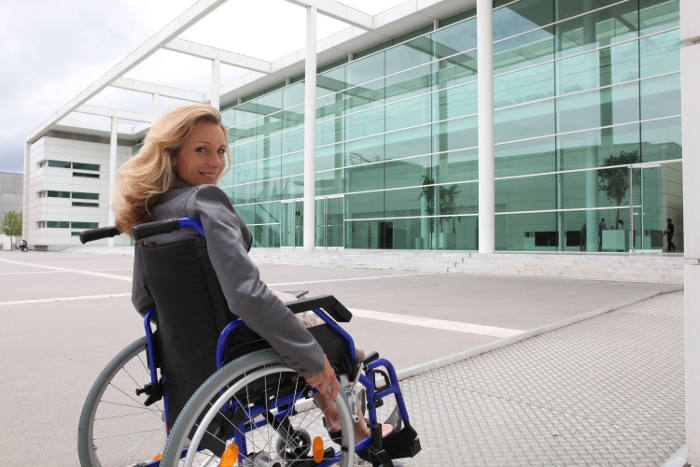
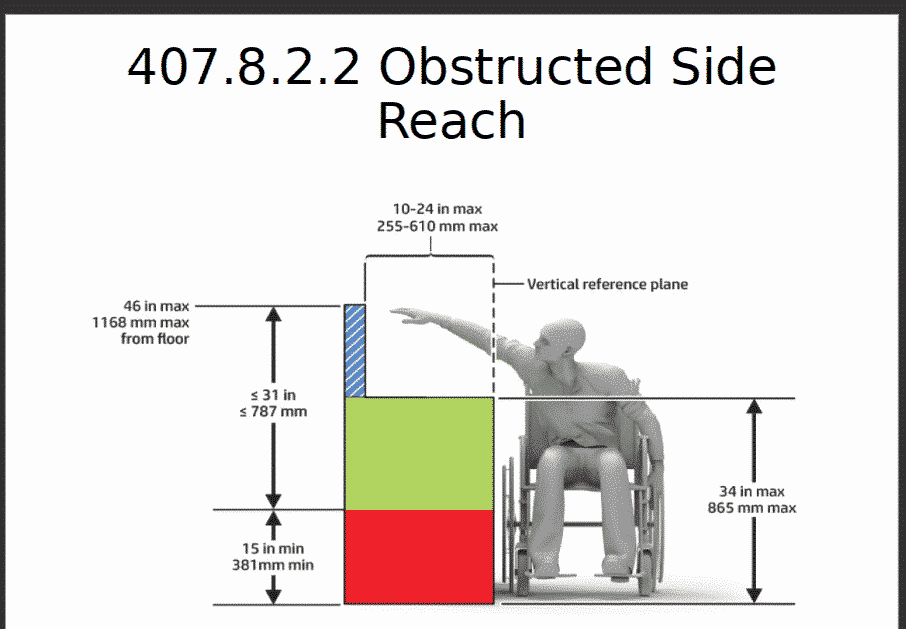
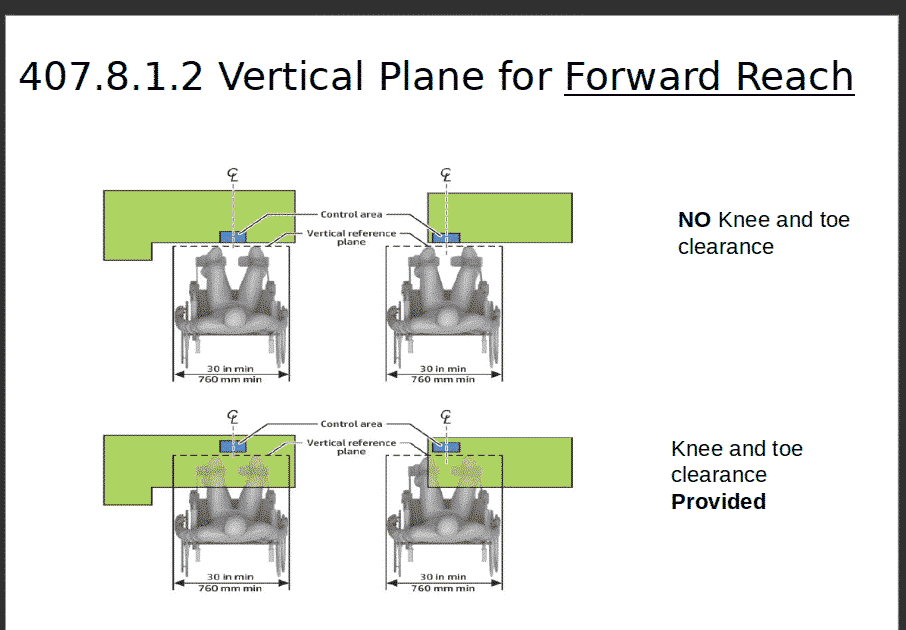
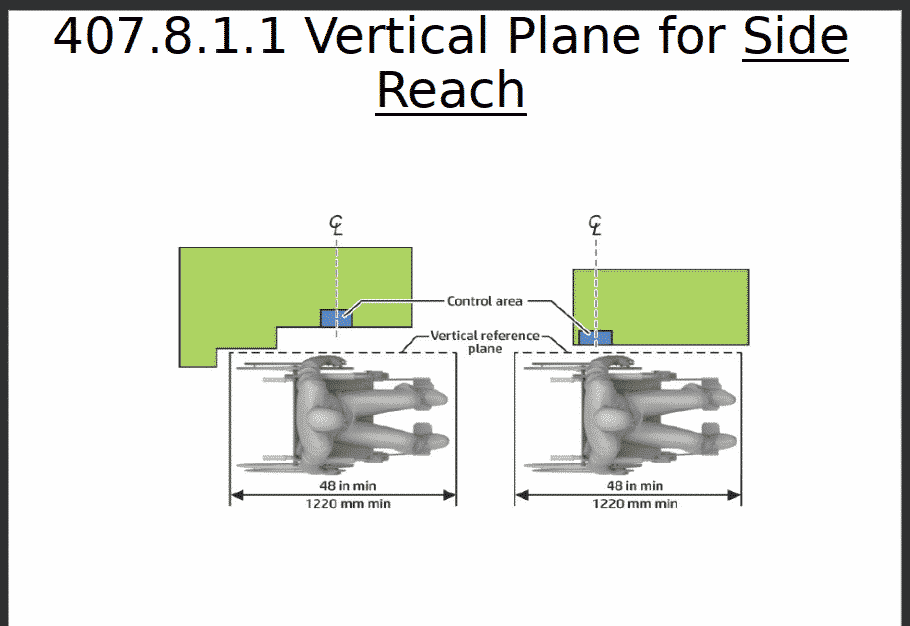
Current updated page located at the Kiosk Association KMA March 2021 — It also includes 4 different images from US Access Board on different reach parameters and distances that need to be observed. To be sure this is only the top-level “first things first” list. Suits are generally initiated by blind people and so naturally audio and tactile are top of the list. Ideally you have multiple tests of multiple transactions by a blind person in a wheelchair. That’s our advice.
Alternate navigation – user controls and aids such as Braille, AudioPad, NavPad
Hardware assistive device inventory – audio jack (3.5mm) and tactile component?
Software
Does your application extend to audio (Example: ICT with a display screen shall be speech-output enabled for full and independent use by individuals with vision impairments or language.)
Have you tested for The Big Seven – captions, contrast, audio, focus, target size, errors and labels
Devices
Do you incorporate any assisted technology products – face devices (AudioPad/Navpad + Braille label sticker)
Have you reviewed the privacy and security characteristics?
Testing
Have you had people with disabilities perform the top ten tasks? – Wheelchair, Blind, Hearing-impaired, Sight-impaired, dexterity, quadriplegic e.g.
Installation
Is there sufficient space, protruding, and maneuvering space?
Have you looked at full-day cycle of sunlight, lighting and any other environmental factors (ambient noise e.g.)
Notes:
Did you answer No to any of the questions?
Providing accessibility is not cost-prohibitive. A simple NavPad provides tactility as well as audio and if you look at legal incidents, audio is the prime remediation with tactility as well.
What about WCAG? — This comes up. 2.1 is the current standard. WCAG is applied to non-web documents and non-web software, but only when the software is running on platforms that are not “closed”. Kiosks, of course, typically are closed, and so (from a 508 perspective), the WCAG 2.0 SC is never applied. The relevant areas of 2.1 are already addressed in Section 508.
What about a screenreader? Do I need one? — Provide speech output and you are fine. Common ATP devices provide audio output e.g.
In recent months, blind people and disability advocates have been speaking out on social media and suing companies that use AccessiBe. Blind people say AccessiBe, which is supposed to automatically make websites more compatible with the screen readers blind people rely on to access the internet, has prevented them from all sorts of normal activities online, like paying rent, teaching a class or buying Christmas gifts.
AccessiBe is the largest automated accessibility company on the market, according to Lucy Greco, who is blind and the head of web accessibility at the University of California, Berkeley.
The situation has gotten so bad that in the past two months more than 400 blind people, accessibility advocates and software developers signed an open letter calling on companies that use automated services, like AccessiBe and other companies with similar products, to stop.
“We will refuse to stay silent when overlay vendors use deception to market their products,” the letter said.
Introduction, definition, and history of web accessibility overlays
Overlays are a broad term for technologies aimed at improving the accessibility of a website by applying third-party source code (typically JavaScript) to make improvements to the front-end code of the website.
Website add-on products purporting to improve accessibility go back to the late 1990s with products like Readspeaker and Browsealoud. Both of which added text-to-speech capabilities to the website(s) on which they were installed.
Later, similar products came to market that added additional tools to their software that allow user-based control of things like font-sizes and changes to the web pages colors so that contrast is improved. Products like Userway, EqualWeb, AudioEye, User1st, MaxAccess, FACIL’iti, Purple Lens, and accessiBe fall into this category. These products are sometimes also white labelled under additional names and the above is not an exhaustive list of products with which this Fact Sheet is aimed at.
Fitness for achieving compliance with accessibility standards
While the use of an overlay may improve compliance with a handful of provisions in major accessibility standards, full compliance cannot be achieved with an overlay.
Among the many claims made by overlay vendors is the claim that the use of their product will being the site into compliance with accessibility standards such as WCAG 2.x, related and derivative standards, and laws that mandate compliance with those standards.
Conformance to a standard means that you meet or satisfy the ‘requirements’ of the standard. In WCAG 2.0 the ‘requirements’ are the Success Criteria. To conform to WCAG 2.0, you need to satisfy the Success Criteria, that is, there is no content which violates the Success Criteria.Understanding WCAG 2.1: Understanding Conformance
Given that conformance is defined as meeting all requirements of the standard, these products’ documented inability to repair all possible issues means that they cannot bring a website into compliance. Products marketed with such claims should be viewed with significant scepticism.
DENVER, Colo., June 18, 2021 (SEND2PRESS NEWSWIRE) — The Unattended Self-Service and Kiosk Association is participating in two major upcoming events for Retail and Restaurants in the next week – NRF Retail Converge and CREATE by Nations Restaurant News. Learn from speakers such as CVS, Walgreens, Macys, Alibaba and others at Retail Converge. CREATE speakers include Yum! Brands, Chipotle, McDonald’s, Wendy’s, Dominos and many more. Retail Converge begins next week and CREATE has just launched.
In other news for the Association a resource page for Assistive Technology is now available listing provider companies, noted consequences for not providing and additional resources. A companion page covering the latest Legal News is now available. This page is a running log with personal commentary on legal, privacy and patent situations. We keep track of legal news that affects the unattended self-service market.
Examples this week include the lawsuit against McDonalds for improper use of biometric data and a class action suit against over 125 Wendy’s franchisees for ADA violation. Learn about PPI which is how we abbreviate Prosecution Probability Index. Our new DOJ is expressing interest in cases never before expressed.
Outdoor EMV Liability Shift Increasing — A CMSPI analysis found that chargebacks have tripled since January 2021. “If you look at January as the baseline month, May is almost triple of what January was in terms of overall chargebacks. There was a pretty substantial increase of about 50 percent in April, and that really ballooned in May,” Pynn said, explaining that chargebacks are often delayed because it takes some time for the consumer to realize the fraud and file a report. “The feedback loop takes some time.”
EMV liability shifts are not new to the convenience and fuel retailing industry. The in-store EMV deadline occurred in 2015; however, the shift for at-the-pump transactions was pushed back multiple times to April 2021. While the most recent delay was driven by the COVID-19 pandemic, Pynn pointed out that becoming compliant at the pump is a more difficult undertaking than becoming compliant in the store.
“Chargebacks have not only grown in volume, but they have grown in value. The average value of every chargeback hovered somewhere around $50 before April. Then, in April and May, they grew to over $70. That’s an almost 40-percent increase,” he noted.
(Reuters) – The California attorney general’s office started enforcing the California Consumer Privacy Act (CCPA) on July 1, 2020. Does your app or website collect data?
The majority of businesses that received notices from the California Department of Justice of an alleged violation of the state’s privacy law have addressed the issue within the 30-day statutory window, California Attorney General Rob Bonta said on Monday.
The California attorney general’s office started enforcing the California Consumer Privacy Act (CCPA) on July 1, 2020. Since then, 75% of businesses that the state notified acted to comply, while the other 25% are “either within their 30-day window or are under an active investigation,” Bonta said during a press conference about the first year of enforcement of the law.
Under the privacy law, businesses have 30 days to “cure” an alleged violation after being notified, before the attorney general’s office can start an enforcement action.
PCI Compliance Kiosks – CAT or Cardholder Activated Terminals FAQ — Link
There are two primary classifications of Point of Sale Terminal Types: Attended and Unattended Payment Terminals are classified into two major types, depending on the situation:
Attended Terminals
A POS Transaction occurring at an attended POS Terminal is a face-to-face Transaction, since a Sales Person or Representative is present at the time of the Transaction.
Unattended Terminals or Cardholder Activated Terminals (CATs)
A POS Transaction occurring at an unattended POS Terminal is a non-face-to-face Transaction, as NO Sales Person or Representative is present at the time of the Transaction. Examples of unattended POS Terminals include ticket dispensing machines, vending machines, automated fuel dispensers, toll booths, kiosks, and parking meters.
Saying Yes to a McDonalds, Costco or a Home Depot
Quasi Classification of “Semi-Attended” — This is a gray area coined by processors in order to permit use of Attended Terminals in an Unattended Mode. Typically this is seen by large corporations (e.g. Home Depot, Costco) where they wish to use the same terminals throughout the business case with the same liability. The processors will “concede” to the use but only with additional stipulations for use. Preconditions for obtaining such a classification by the processor is directly related to leverage the corporation may exert. Small business is not in that position.


 For the longest time American industry has had a very contradictory relationship with Asia.