One of the most interesting opportunities at the HIMSS annual conference is the chance to see demos of a wide variety of health IT solutions. At this year’s event, we decided to film a number of demos of interesting health IT products that we thought readers of Healthcare IT Today would find useful. If you want to see all of these demos as we share them, be sure to subscribe to the Healthcare IT Today YouTube channel.
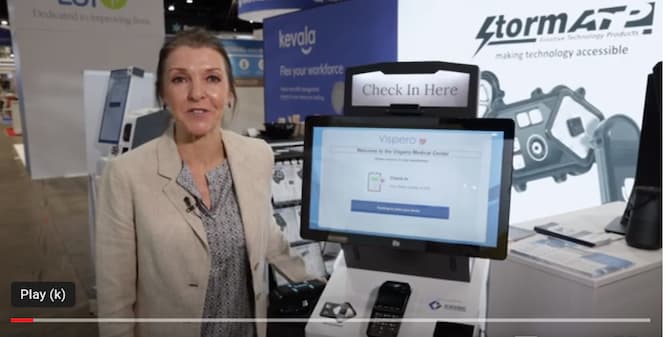
The first demo I’m excited to share is by Nicky Shaw, US Operations Manager at Storm Interface. Shaw demonstrates how you can take a healthcare kiosk and make it accessible for those who may have visual or other impairments.
New York, March 31, 2023: The American National Standards Institute (ANSI) released today for public review and comment a draft of the Roadmap of Standards and Codes for Electric Vehicles at Scale developed by the Institute’s Electric Vehicles Standards Panel (EVSP). The roadmap identifies key safety, performance, and interoperability issues; notes relevant published and in-development standards; and makes recommendations to address gaps in codes and standards. This includes recommending pre-standardization research and development (R&D) where needed. It also proposes prioritized timeframes for when standardization work should occur and standards developing organizations (SDOs) or others that may be able to lead such work. Working groups have been developing the draft roadmap since a kickoff event held in June 2022.
Comments Invited by May 1, 2023
The request for comment specifically invites comments that represent critical revisions and needed clarifications on the roadmap content. Comments on the draft roadmap may be submitted to evsp@ansi.orgby close of business on Monday, May 1, 2023. Use of the comment form (see below) is required to better manage and review comments. The EVSP working groups are currently on hiatus and will reconvene in May to address the comments submitted and finalize the document for publication by the end of June 2023. While all comments are welcome, the EVSP reserves the right to hold disposition of comments in reserve for a future iteration of the document if they cannot be addressed within the time available. This might include, for example, comments on the document’s organization, or issues not addressed.
The draft roadmap and related materials may be downloaded as follows:
Comment Form (required)(Excel file). When accessing the comment form, you may be prompted for credentials; just hit “Cancel” one or more times to download and open the document
Building on ANSI EVSP roadmaps developed in the 2011-14 timeframe, the draft document seeks to describe the current and desired future standardization landscape that will support and facilitate EVs at scale. The roadmap’s primary focus is on light duty, on-road plug-in electric vehicles (PEVs) that are recharged via a connection to the electrical grid, as well as the supporting charging infrastructure needed to power them. Medium and heavy-duty EVs are also covered. Topics covered include standards to address high power DC charging, storage (i.e., microgrid, distributed energy resource management systems) integrated with DC charging, vehicle grid integration, high power scalable/interoperable wireless charging, and vehicle-oriented systems. The broad target audience includes vehicle manufacturers, entities that will be installing and operating charging infrastructure; SDOs; U.S. federal, state, and municipal government agencies; electric utilities; and others.
To advance the Biden Administration’s goal for a clean energy future, the U.S. Department of Energy (DOE) Office of Energy Efficiency & Renewable Energy (EERE) Vehicle Technologies Office (VTO) issued a June 2021 lab call funding opportunity announcement. The lab call included a pillar on codes and standards with the goal to “identify and address challenges and barriers to the integration of EVs@Scale charging with the grid created by uncoordinated development of codes and standards and the rapid advances in vehicle and charging technologies.” An EVs@Scale lab consortium was formed in response with Argonne National Laboratory (ANL) as the lead lab for the codes and standards pillar supported by other national labs. The consortium committed to develop a 2022 roadmap like earlier roadmaps developed by the ANSI EVSP.
The EVs@Scale effort supports funding initiatives associated with deploying a nationwide EV charging infrastructure, including the National Electric Vehicle Infrastructure (NEVI) Formula Program, which provides $5 billion in Federal money to that end. As part of the Bipartisan Infrastructure Law, the Federal Highway Administration was directed to release a set of minimum standards and requirements for the implementation of the NEVI program. The NEVI Final Rule was issued on February 28, 2023, and appropriate references are included in the EVSP roadmap.
ANSI serves as administrator and coordinator of the U.S. private-sector voluntary standardization system. As a neutral facilitator, the Institute has a successful track record of convening stakeholders from the public and private sectors to define standardization needs for emerging technologies and to address national and global priorities. The ANSI EVSP is a cross-sector coordinating body whose objective is to foster coordination and collaboration on standardization matters among public- and private-sector stakeholders to enable the safe, mass deployment of electric vehicles and associated infrastructure in the United States with international coordination, adaptability, and engagement.
The ANSI EVSP does not develop standards. Rather, it serves as a forum for facilitating coordination among SDOs and others. ANSI’s facilitation of the EVSP is partly supported by VTO/ANL and UL Standards & Engagement.
“Standards and related conformity assessment programs have an important role to play in advancing electric vehicle technologies. ANSI invites all affected stakeholders, regardless of geographic location, to review the draft roadmap and make their views known,” said S. Joe Bhatia, ANSI president and CEO.
For more information, visit the EVSP webpage www.ansi.org/evsp or reach out to ANSI staff: Jim McCabe, senior director, standards facilitation (jmccabe@ansi.org; 212-642-8921), or Christine Bernat, associate director, standards facilitation (cbernat@ansi.org; 212-642-8919).
About ANSI
The American National Standards Institute (ANSI) is a private non-profit organization whose mission is to enhance both the global competitiveness of U.S. business and the U.S. quality of life by promoting and facilitating voluntary consensus standards and conformity assessment systems, and safeguarding their integrity. Its membership is comprised of businesses, professional societies and trade associations, standards developers, government agencies, and consumer and labor organizations.
The Institute represents and serves the diverse interests of more than 270,000 companies and organizations and 30 million professionals worldwide. ANSI is the official U.S. representative to the International Organization for Standardization (ISO) and, via the U.S. National Committee, the International Electrotechnical Commission (IEC). For more information, visit www.ansi.org.
Small business is by far the hardest hit since they are the lowest volume. Rates went up 26% in the last 12 months and 180% over the last decade. Monopolies do not exist for the benefit of consumers and lower inflation. Visa and Mastercard, which control 80 percent of the U.S. credit card market, centrally price-fix the swipe fees charged by banks that issue their cards even though many legal experts say the practice violates federal antitrust law.
Example case
“As the use of credit cards has become more and more prevalent, the credit card companies are making more and more money from merchants. When we first opened our business, credit card transactions accounted for approximately 40 percent of our business. Now the credit card share is about 80 percent of transactions. At the same time, fees have risen and the time taken before funds appear in our accounts gets longer. This is one more burden for merchants.” John Morman, owner of Celtic Tides gift shop, Lexington, Va.
2023 NRF Small Business Fly-in
July 11-12, 2023
Grand Hyatt, Washington, D.C.
The National Retail Federation is convening 50 small retailers in Washington, D.C., at the 2023 Small Business Fly-in on July 11-12, 2023. Attendees will focus on improving competition in the credit card payments system for retailers. They will learn about legislation and regulatory processes to address payments competition and share their stories directly with lawmakers. Attendees will be able to connect with fellow small retailers from across the country.
We encourage small businesses to sign up to advocate with us. NRF is pleased to be able to provide a limited number of travel scholarships to cover transportation and lodging for selected small business owners. Apply today using our application link. The application closes April 28, 2023.
Why attend?
Attendees will advocate for swipe fee reform and encourage Congress to support the Credit Card Competition Act (CCCA). This bipartisan bill will address the broken and unfair credit card market that’s currently dominated by two major players that set the fees and terms with which all merchants must comply. Lack of competition means credit card swipe fees continue to rise year after year, soaring 25% last year alone.
The bipartisan Credit Card Competition Act would infuse competition into the marketplace by simply requiring there be at least two competing processing networks enabled on each credit card. These reforms have the potential to save American businesses and consumers an estimated $11 billion per year.
We are convening small retailers to share their stories on how excessive swipe fees stifle growth and expansion for small businesses and make it difficult to invest in their companies by hiring more staff, buying more inventory, competing on price and even keeping their doors open in today’s uncertain and inflationary economic climate.
I hope you’ll consider applying today. If you have any questions, don’t hesitate to contact me.
We shop at Whole Foods from time to time. Part of our Costco-WholeFoods equation.
Seemed like a good time to “check out” the SCO there and the return lockers.
Notes on the SCO
Modified unit from NCR (same as Walmart)
No cash (unlike Walmart)
We didn’t have a chance to test while in wheelchair and do the measurements.
They have an “Accessibility Mode” which you can select but other than bring up the diamond navigation there is no audio. Perhaps there is a headphone jack we missed.
The diamond nav does tab between interface options but there was no audio. There is an audio button and we made sure volume all the way up but nothing.
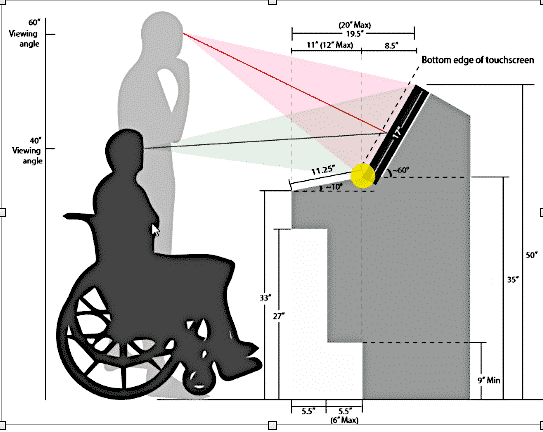
The measurements matter but reach and range (only) are what have been the very problems forever. Those NCR’s POS readers are way out of use for wheelchairs and highly probable for a lot of little people.
It also does not comply with PCI-POI (“must be able to PIN shield using the body”. As well as ADA 302.8 limited reach and strength and 508 (ICT) 302.2 aka: ADA Visual Accommodation.
Seriously, these mfg’s and businesses including IT dept are just clueless to accessibility being correctly provided.
The reasons for ADA 309 and 309.4 are in place for very good reasons.
Comments from accessibility expert
That NCR SCO is a really poor example of how to tackle accessibility isn’t it??! If I had a ‘rogues gallery’ of horribly designed SCOs, I’d be adding that to it. I saw KIS’s returns kiosk at the NRF Show and it looked really slick, I must start looking out for them. I haven’t been to a Whole Foods for a while, but maybe I’ll stop by one when I’m out and about at the weekend.
Comments from NCR
Comments from Whole Foods
Whole Food Self-Check Out SCO
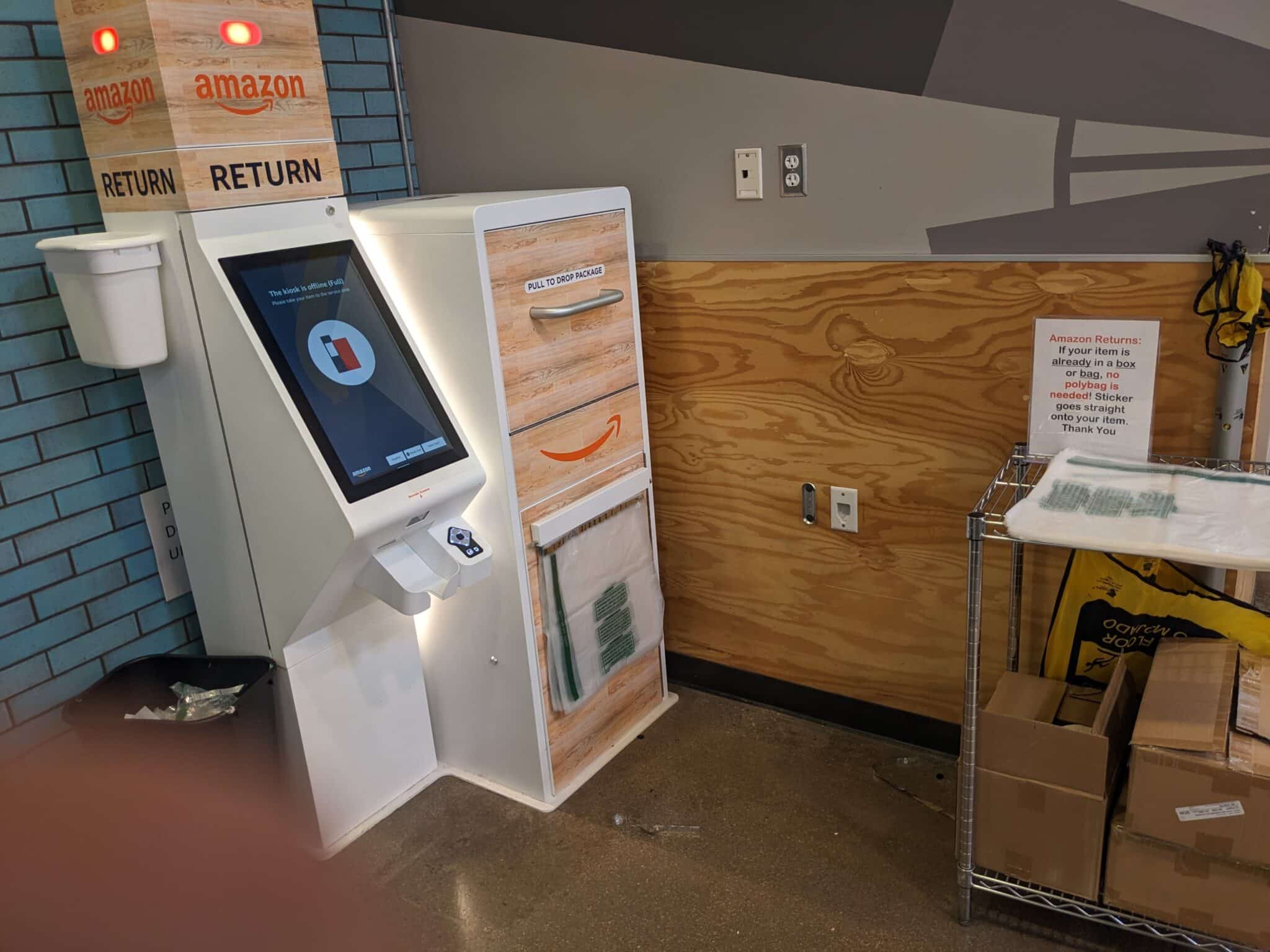
The Drop Off Return Locker
Nice unit and it was very busy.
Returning multiple items took very few minutes.
Seemed like some customers tried to open locker before time
We watched multiple customers and given the “Pick you Satisfaction” level review at the end they all opted for Very Satisfied.
Eventually the locker ran out of space and took itself offline.
Definitely free’s up the customer service people to deal with other issues
See full post on Amazon Dropoff and Return Lockers
This report looks at CFO Act Agencies and their progress or lack of in web conformance.
In Brief Summary
PDFs are still a problem with only 30% of pdfs accessible
14% of agencies do not test intranet pages
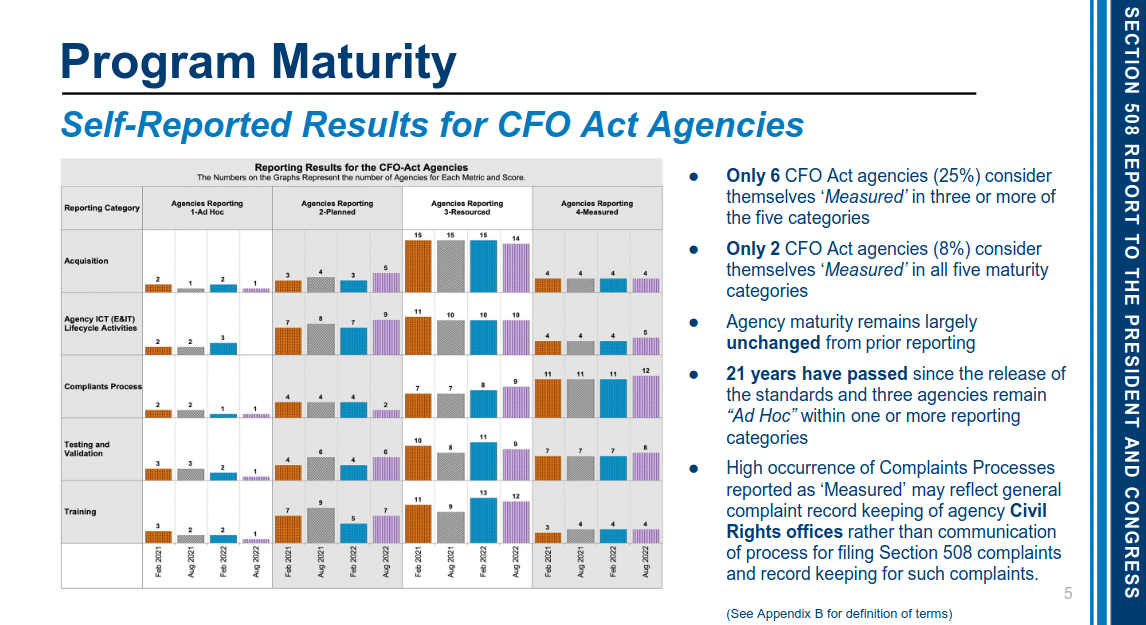
Only 2 agencies consider themselves “Measured” in all five maturity areas (e.g. FCC and SEC)
Conforming pages increased 0.6%
Non-conforming increased 13%
90% (58 agencies) have an accessibility statement
Among the “top 10 downloads,” 77% were PDFs
Among the PDF documents, 20% were conformant
Among the 57% non-conformant PDFs* ○27% were found to contain at least one issue ○73% of the PDF documents wereuntagged
section 508 program maturity
Preamble
Section 508 Report to the President and Congress: Accessibility of Federal Electronic and Information Technology
The Department of Justice and the General Services Administration submit this Section 508 Report to the President and Congress: Accessibility of Federal Electronic and Information Technology to Congress and the President pursuant to the reporting requirement in 29 U.S.C. §794d(d)(2).
Section 508 of the Rehabilitation Act requires federal agencies to ensure that their information and communication technology (ICT) is accessible to people with disabilities unless certain exceptions apply. Specifically, Section 508 requires federal agencies to ensure that ICT they develop, procure, maintain, or use allows employees with disabilities and individuals with disabilities who are members of the public to have access to and use of information and data.
This access should be comparable to that available to employees and members of the public without disabilities.1
Section 508 requires the Attorney General to submit to the President and Congress reports containing information on and recommendations regarding the state of federal department and agency compliance with Section 508.2 The last such report was submitted by the Department of Justice in 2012. Since 2013, however, the Office of Management and Budget (OMB) and the
General Services Administration (GSA) have led a program to track federal agency efforts to maintain accessible ICT and improve management of Section 508 programs. Beginning in December 2013 and continuing every six months thereafter, GSA has collected and analyzed data provided by all 24 Chief Financial Officers (CFO) Act federal agencies, which are required to participate, as well as additional agencies that choose to participate, concerning the accessibility of their ICT.3 The Department of Justice and GSA have worked together to submit this report based on data from February, 2021 through August, 2022 that was collected and analyzed by GSA.
Noted on W3C website – What’s New in WCAG 2.2 – Interesting inputs from “personas” and navigating a website. Typical “disabilities” include repetitive stress injury, low contrast for seniors. Repetitive stress injury persona using speech recognition software, hand tremors, supermarket user with cognitive disorder. Thanks to William Goren.
For an introduction to Web Content Accessibility Guidelines (WCAG) and more about versions 2.0, 2.1, and 2.2, see the WCAG Overview.
WCAG 2.2 is scheduled to be completed and published in April 2023. Current versions:
Accessible design for self-service interactive devices including automated banking machines
CSA of Canada released their updated B651 standards in December for Canada. It applies to self-service interactive devices including ABMs and ATMs. It is aimed at banks and is a close representation of what the modern ABMs in Canada incorporate (compared to 2009). Updating the standards to reflect better what is deployed. The 2009 set of standards had IBM as the chair. 2022 has Diebold as Chair. Not often you see Swipe readers in banking these days.
The title seems inverted. Maybe should be — Accessible design for ABMs and including self-service interactive device
For reference ATMIA has an ADA document for accessibility. Last updated in 2017 and accessible for members only.
The ADAtile site has good references to ADA Canada, and we almost used their graphic.
Summary Points
Committees have one industry person (non-voting) for ATMs who also serves as Chair for Subcommittee.
A couple of banks are represented
Word Counts
75 – Key (includes keypad, key, keyboard, etc)
35 – Audio
31 – Self-Service
30 – Reader (swipe, dip, barcode, etc)
28 – Voice
22 – Tactile
15 – Touch
9 – Privacy
9 – Contactless
8 – Braille
7 – ABM & ATM
6 – Biometrics
1 – kiosk
1 – enclosure (stability)
1 – WCAG (Contrast Requirements)
1 – Screen Reader
1 – Mobile
0 — Bitcoin
0 – *attended*. We were looking for definitions of self-service and “unattended”. Europe adds “semi-attended” to attended and unattended self-service for example
2 – recommend* – just knee and toe space for ABM
Demographics
More than one in five Canadians aged 15 and over — an estimated 6.2 million people, or 22% of the adult population — has one or more disabilities (S. Morris, G. Fawcett, L. Brisebois and J. Hughes. November 2018). The highest rate of disability occurs in the age group 75 and over, where almost one-half of men and women report a disability.
Statistics Canada reports that the median age of Canada’s population continues to climb, with the average age of Canadians reaching 41.7 years (Statistics Canada, 2021), the median age is one of many indicators that signifies the December 2022 population is aging. It is expected that the proportion of people aged 65 and over will continue to increase, with the advancing age of the large baby boomer cohort. Shifts in population size within various age groups have far-reaching social, economic, and policy impacts. The number of individuals within an age group has a profound effect on the demand for products and services. People with disabilities and older people are coalescing as an economic and social force and constitute a significant portion of the consumer market. Therefore, it makes good business sense to increase access for all customers.
Benefits
Accessibility is an important consideration in the design of products, systems, environments, and facilities because it affects usability for people with the widest possible range of capabilities. Many accessibility features benefit those who do not have a disability by enhancing usability and providing possibilities for customized design. For example, taking into account the needs of people who are partially sighted helps all users trying to read a display in poor lighting conditions or without their reading glasses. Involving users with a range of abilities during the design and development phase can reduce development time and costs and ensure the early detection of problems, thus avoiding expensive redesign. Improvements implemented during the design phase are less costly than those implemented after production.
Accessible design also helps organizations and businesses develop or maintain global markets by making their products compliant with legal accessibility requirements in force in other countries. For example, accessible design is a requirement for acceptance into the U.S. market (e.g., under the Americans with Disabilities Act of 1990 and Section 508 of the Rehabilitation Act of 1973). Accessible design is also covered by European Commission Mandates M/273 and M/283.
Scope
This Standard specifies technical requirements applicable to the design, manufacture, site preparation, and installation of self-service interactive devices.
This Standard does not cover
a) physical environment of drive-through self-service interactive devices; and
b) websites and web applications that are beyond the control of the service provider and accessed from public devices.
About this edition
This is the first edition of CSA/ASC B651.2, Accessible design for self-service interactive devices including automated banking machines. It supersedes the second edition of CSA B651.1, published in 2009 under the title Accessible design for automated bank machines, and the first edition of CSA B651.2, published in 2007 under the title Accessible design for self service interactive devices. This new edition of CSA/ASC B651.2 includes the following major changes:
a) consolidation of CSA B651.1 and CSA B651.2, as noted above, into one new standard;
b) updates to the contents of both standards noted above; and
c) improvements to the standard on access to devices.
This Standard is intended to be used in conjunction with CAN/CSA-B651.
Here is the outline for the doc. Begins on page 10 of 80
Contents
CSA Technical Committee on Accessibility
6
CSA Subcommittee on Accessible Design for Self-Service
Interactive Devices and ABMs 11
Preface
14
0 Introduction 16
0.1 Legislation 16
0.2 Demographics 16
0.3 Benefits 17
0.4 Copyright permissions
18
1 Scope 18
1.1 Purpose 18
1.2 Application 18
1.3 Limitations 19
1.4 Terminology 19
1.5 Alt text 19
2 Reference publications
3 Definitions
19
21
4 Design requirements 25
4.1 General 25
4.1.1 Design requirements compliance 25
4.1.2 Language 25
4.2 Functional performance of interactive devices
4.2.1 Instructions 26
4.2.2 Output 26
4.2.3 Important notifications 26
4.2.4 Customization 26
4.2.5 Input 26
4.2.6 Simultaneous access 26
4.2.7 Physical operation of controls 27
5 External and internal access 27
5.1 Parking 27
5.2 Signage 27
5.2.1 International Pictogram of Access
5.2.2 Signs 28
5.2.3 Tactile signs 28
5.3 Exterior route 28
5.4 Interior route 28
27
6 Lighting 28
6.1 General 28
6.2 User space 29
6.3 Interface panel 29
7 Doors 29
7.1 General 29
7.2 Security access for door entry
29
8 User space 30
8.1 General 30
8.1.1 Headroom and protruding objects
8.1.2 User operating space 30
8.2 Floor surfaces 30
8.3 Lineup guides 30
8.4 Ambient noise 30
8.5 Waste receptacle 31
9 Installation 31
9.1 Approach and reach 31
9.1.1 General 31
9.1.2 Forward approach clearances
9.1.3 Reach distances 31
9.2 Protruding objects 32
9.2.1 General 32
9.2.2 Protrusion distance 32
9.3 Grab bar 32
9.4 Shelf 32
December 2022
30
31
9.5
Site installation manuals
32
10 Hardware components 33
10.1 General 33
10.1.1 Interface 33
10.1.2 Height of controls 33
10.1.3 Biometrics 33
10.2 Enclosure stability 34
10.3 Displays 34
10.3.1 Position of monitors 34
10.3.2 Touch screen displays 34
10.3.3 Privacy filter 34
10.4 Insertion slots 35
10.4.1 Slot location assistance 35
10.4.2 Media insertion orientation 35
10.4.3 Tapering 35
10.5 Card reader 35
10.5.1 General 35
10.5.2 Motorized readers 36
10.5.3 Flatbed document scanners 36
10.5.4 Barcode scanners 36
10.5.5 Swipe readers 37
10.5.6 Dip readers 37
10.6 Dispensers 37
10.6.1 Identification 37
10.6.2 Slot dispenser 37
10.6.3 Tray, pocket, or bin dispensers 38
10.7 Data entry devices 38
10.7.1 General 38
10.7.2 Keys for keypads and keyboards 38
10.7.3 Function keys 40
10.7.4 Audio interface 41
10.8 Contactless identification and authentication
10.8.1 Card or device clearance 41
10.8.2 Indication of location 42
11 Software42
11.1 General 42
11.2 Colour contrast 42
11.2.1 Contrast requirements 42
11.2.2 Colour coding 42
11.3 Input/control devices and input feedback
11.3.1 Accidental activation 42
11.3.2 Adjustable time 42
11.3.3 Feedback 43
11.3.4 Confirmation 43
11.3.5 Warning tones 43
11.3.6 Warning information 43
11.4 User options 43
11.5 Audio output sequence 43
11.6 Dynamic display of information 44
11.6.1 Long text 44
11.6.2 Background 44
11.6.3 Advertising 44
11.6.4 Font 44
11.6.5 Written text and instructions 45
11.6.6 Graphics and video 45
11.7 Audio 46
11.7.1 Automatic initiation 46
11.7.2 Order of instructions 46
11.7.3 Frequency 46
11.7.4 Voices 47
11.7.5 Abbreviations 47
11.7.6 Numbers 47
11.7.7 Coordination of information 47
11.7.8 Repeated instructions 47
11.7.9 Advertising 47
11.7.10 Audio interruption 47
11.8 Printed output 47
Information
CSA/ASC B651.2:22
National Standard of Canada
Title: Accessible design for self-service interactive devices including automated banking machines. To register for e-mail notification about any updates to this publication
• go to www.csagroup.org/store/
• click on Product Updates
The List ID that you will need to register for updates to this publication is 2430258. If you require assistance, please e-mail techsupport@csagroup.org or call 416-747-2233. Visit CSA Group’s policy on privacy at www.csagroup.org/ legal to find out how we protect your personal information.
Kiosk Manufacturer Association with ADA, NRF, and Emergency Kiosk updates
EASTLAKE, Colo., Oct. 8, 2018 /PRNewswire/ — The Kiosk Manufacturer Association (aka KMA) is pleased to announce the appointments of inaugural Chairpersons for the ADA and Accessibility Committee.
Laura Miller of KioWare (https://kioware.com) and Randy Amundson of Frank Mayer, Inc. (https://frankmayer.com) have been named as Co-Chairperson for the ADA and Accessibility Committee. Both Laura and Randy have extensive experience in both software and hardware aspects of self-service technology and how assistive technology best serves the public.
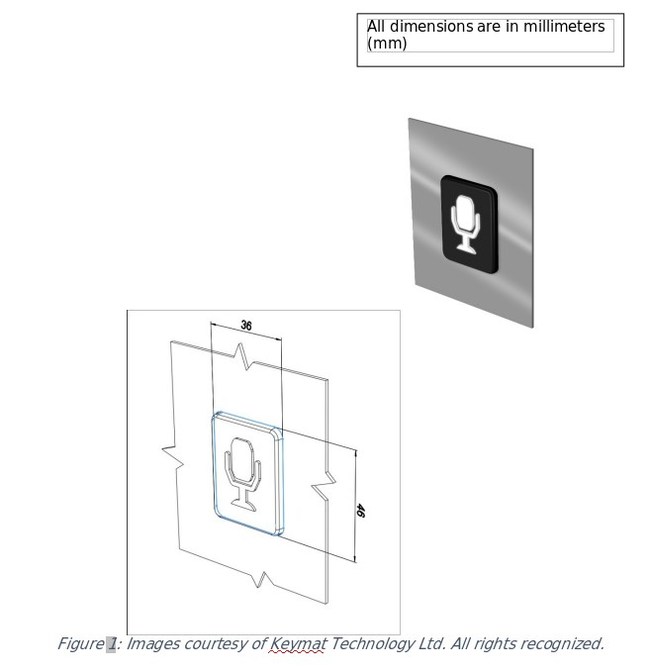
Informing users of voice operation options
For shooter detection and more detection by wayfinding systems in large people venue.
As of 2015, according to U.S. Census surveys, over 12% of all persons in the United States have some type of disability and that number is growing.
To help address disabilities and the ADA regulations, the KMA has recently released a proposed framework for Voice Recognition and Speech Command. Working with the U.S. Access Board directly, the KMA is hopeful that a proposed Code-of-Practice can be adopted for this type of assistive technology. Public comment and working group participation is encouraged and only requires expertise and experience.
This is intended for global adoption with much of the input by the UK’s Royal National Institute of Blind People (RNIB).
In another related public service, the KMA recently released a white paper describing emergency alert and detection technologies for public terminals for use in education, government, retail, transportation, hospitality and entertainment segments. Smart City and smart transportation are target markets. Mission critical public safety tools are the proposed end solution.
The purpose of the document is to define how Wayfinding Technology, Digital Signage and Kiosks can be networked and used to detect and/or prevent active shooter and mass casualty attacks and expedite the response of Law Enforcement and Emergency Services First Responders to catastrophic events in large public venues. We focus on several of the most respected technology providers in the industry and how they would each play a critical role as foundational partners to bring a combined solution to market.
The KMA has joined as a member of the National Retail Federation in order to help communicate education and issues on self-service kiosk technology. The most public iteration of this technology is in the QSR or Fast Casual segment where companies such as McDonalds and Wendy’s have chosen to adopt in order to serve all of their customers as they wish to be served.
In January 2019 in New York, the KMA will be exhibiting on the main floor of NRF’s Big Show and will be accepting members from providers to deployers. An Advisory Panel of companies deploying self-service which can provide their unique perspective on all of the above issues is the objective.
Kiosk Hall of Fame – we are now taking nominations for hall of fame candidates. Marsha Mazz of U.S. Access Board, John Glitsos of FirstWave and Dave Heyliger of Rocky Mountain Multimedia are the initial candidates. See https://kioskindustry.org/kiosk-about/kiosk-hall-fame/
For more information on all of these items, visit https://kioskindustry.org the communication site for the KMA. You can also contact Craig Keefner the manager at craig@catareno.com
“Satellite” websites include RetailSystems.org, Selfservice.io and ThinClient.org. We are hosted at Rackspace, the premier hosting solution (especially during Prime Day). Last month we had 35,000 unique visitors, last 30 days Cloudflare humans = 28,500 Join our LinkedIn Group with over 1600 members.
Related Images
voice-recognition-and-speech.jpg Voice recognition and Speech Command Framework for latest technologies and how to best incorporate into self-service.
voice-icon.png Voice icon Informing users of voice operation options
Reach Ranges – pretty standard and kiosk manufacturers tend to default to them
Interface considerations or Operable Parts (here is tech primer by U.S. Access Board)
Assistive considerations – user controls such as Braille and Tactile guidance
Hardware assistive device inventory (audio jack e.g.)
Is the unit UL-certified? That’s a good indicator.
Software
Does your application use or accomodate assistive technologies ( Example: ICT with a display screen shall be speech-output enabled for full and independent use by individuals with vision impairments.)
The Big Seven to consider – captions, contrast, audio, focus, target size, errors and labels
Devices
Assisted interface – review available tactile interface devices (AudioPad, NavPad e.g. — in early iteration these were what we called “Trace devices”)
Review biometric and proxy interfaces – is there facial or is a mobile device required?
Testing
People with Disabilities – Blind, sight-impaired, deaf, quadriplegic e.g.
Mobility – People in Wheelchair or Quadraplegic user group testing
Can the users (non-blind) visually understand the screen without having to resort to screen magnification or screen readers
Installation
Space, protruding, and maneuvering space? Often overlooked.
Light and any other environmental factors (ambient noise e.g.)
Notes
The above points are meant to provide a brief generalized direction that should be reviewed for any project.
Historically self-service or user-operated projects have been approached with little priority on ADA and accessibility.
More times than not true ADA is only offered as option which has costs in time and money, and generally minimized as much as possible to achieve price and delivery endpoints.
The Kiosk Association recommends beginning with true ADA as overall project scope to start with. Calculate your costs, timeframes and liabilities upfront. If you want to subsequently reduce the accessibility components for cost calculations, then you can always reduce your overall scope from your start point. You could develop a plan/method to accommodate and develop future accessibility for that matter.
As part of our continued involvement with interactive digital signage the Kiosk Association has joined the Digital Signage Federation as a dues-paying member. The Industry Group already has dedicated multiple digital signage channels covering digital signage, menu boards, media players and new touchscreen technologies.
Here is background on the organization
Who we are
We are the only not-for-profit independent voice of the digital signage industry, reflecting the diverse constituencies that make up our industry. Our goal is to continue building a strong foundation for the advancement of the industry. To this end, we partner with our members and key organizations to provide education, networking, and advocacy to continue moving the growth of the industry forward. So whether you are launching a new ad-based network or you’ve been around since the inception of digital signage, our hope is that you will find the resources you need to thrive.
How it works
The DSF is governed by a Board of Directors, a volunteer member board that is elected by the DSF membership in an annual election. The board consists of an Executive Committee-Chairman, Vice-Chairman, Treasurer, Secretary, and Immediate Past Chairman, all of whom serve one-year terms in their roles. At-Large Directors are elected to two year terms on a rotating basis, so that there are four or five directors each year who rotate on/off the board. All of the association’s projects and initiatives are board-driven and supported. Outside of the Board of Directors are our Committees that execute the board’s strategic initiatives throughout the year. Committees consist of additional volunteer members who have raised their hand and give their time to work on these events and projects.
Our volunteers are our lifeblood – without them, we simply wouldn’t exist.
What we do
DSF has a host of projects and initiatives that are going on at all times. We host Regional Networking Events, attend various industry shows, offer educational opportunities, provide industry research, promote our members in a variety of ways, and offer business opportunities to our members. We are the exclusive association sponsor of the Digital Signage Expo, the largest digital signage trade show in the world, and our official certification program is with the Digital Signage Experts Group (DSEG). We are always seeking ways to improve and advance our members and the industry. If you have an idea, send it our way.
Why us?
Because the digital signage industry needs an independent voice. Since our inception in 2010, the DSF has tirelessly worked to promote the industry as a whole. We established Privacy Standards that have since been cited in national publications and before Congress. We established the DSF In-Forum to provide end users a business tool to freely and easily source RFPs for their projects. We established the Seal of Professional Excellence to provide a graphic representation of our members’ commitment to excellence in business practices. We provide monthly educational opportunities in a variety of formats to provide learning opportunities and conversations around topics and case studies important to the industry.