The boutique Avanti Hotel is known for its poolside, dog-friendly rooms. Yet its website uses the valuable opening page not to highlight the Palm Springs inn’s amenities, but to explain, in stark black letters on a plain white background, that the Avanti violated the Americans with Disabilities Act.
Like thousands of other businesses in the United States, the 10-room hotel on East Stevens Road has been sued because it hasn’t fully complied with the 1990 law that requires public places — hotels, restaurants and shops — to be accessible to people with disabilities.
In 2010, the Justice Department began to draft formal regulations for websites to meet ADA goals. But last December, the agency announced it was withdrawing its “rulemaking process,” at a time when the Trump administration was calling for a rollback of federal regulations.
The department said it was killing the regulations because it was “evaluating whether promulgating regulations about the accessibility of web information and services is necessary and appropriate.”
In a June 20 letter, 103 members of Congress — Republicans and Democrats — urged then-Atty. Gen. Jeff Sessions to adopt website regulations, saying the absence of such regulations “only fuels the proliferations of these suits.”
Lawyers who defend ADA lawsuits say the Justice Department’s actions to pull the plug on adopting new regulations may have instigated the latest surge in lawsuits.
Business owners who are sued under the ADA complain that the law allows plaintiffs to demand huge payouts in damages without first giving the business owner the opportunity to fix the websites.
Read full article as originally published on LA Times
Philadelphia just became the first large city in the nation to ban cashless businesses in the city, in part to protect people like some construction workers who don’t have a bank or credit card.
Nearly 13 percent of Philadelphia’s population — close to 200,000 people — are unbanked, according to federal banking data. That’s more than double the regional average.
Excerpt: The following is except from news article from PBS on Philadephia deciding to ban “cashless” stores.
The Unbanked and Underbanked in Philadelphia
Last fall, a veteran lawmaker in PA introduced a bill outlawing cashless businesses — shops and restaurants where customers can only pay with credit and debit cards.
The Mayor of Philadelphia signed it into law last week, making Philadelphia the first big city in the country to ban cash-free stores. Beginning July 1.
The PA lawmaker thought it was discriminatory for businesses to turn away low-income residents who don’t have bank accounts, a population often referred to as the “unbanked” or the “underbanked.”
2017 FDIC National Survey of Unbanked and Underbanked Households
The FDIC is committed to expanding Americans’ access to safe, secure, and affordable banking services. The FDIC National Survey of Unbanked and Underbanked Households is one contribution to this end.
To assess the inclusiveness of the banking system, and in partial response to a statutory mandate, the FDIC has conducted the survey biennially since 2009.1 The most recent survey was administered in June 2017 in partnership with the U.S. Census Bureau, collecting responses from more than 35,000 households. The survey provides estimates of the proportion of U.S. households that do not have an account at an insured institution, and the proportion that have an account but obtained (nonbank) alternative financial services in the past 12 months. The survey also provides insights that may inform efforts to better meet the needs of these consumers within the banking system.
Estimates from the 2017 survey indicate that 6.5 percent of households in the United States were unbanked in 2017. This proportion represents approximately 8.4 million households. Some other estimates put that number as high as 50 million. An additional 18.7 percent of U.S. households (24.2 million) were underbanked, meaning that the household had a checking or savings account but also obtained financial products and services outside of the banking system.
The 2017 survey examines a number of additional topics, including the methods that banked households used to access accounts, bank branch visits, use of prepaid cards, use of alternative financial services, saving for unexpected expenses or emergencies, use of credit, and the methods that households used to conduct financial transactions in a typical month.
See economicinclusion.gov for survey findings, the ability to generate custom tables and charts using 2017 and earlier years of survey data, and data downloads and documentation.
The 2017 survey report, executive summary, and other related materials are linked below. (All items are PDF files. See PDF Help for assistance.)
Access Board to Hold Town Hall Meeting and Training in Indianapolis on May 21
The Access Board will hold a town hall meeting in Indianapolis on the afternoon of May 21 at Bankers Life Fieldhouse. The event will provide an open forum where members of the public can pose questions to the Board or share comments or concerns about accessibility for people with disabilities. There also will be panel discussions with area speakers on accessible recreation and outdoor environments, the Indiana AgrAbility Project, and local compliance initiatives under the Americans with Disabilities Act (ADA).
The event will take place in the Pacers Square Room at Bankers Life Fieldhouse from 2:00 pm to 4:30 pm. Registration is not required. An assistive listening system, computer assisted real-time transcription (CART), and sign language interpreters will be available. Attendees are requested to refrain from using perfume, cologne, and other fragrances for the comfort of all participants. The meeting will not be streamed online, but there will be a call-in option and streaming CART.
Earlier in the day, the Board will also offer free training sessions on the ADA Accessibility Standards at the town hall site. There will be a program on how to apply the standards and common sources of confusion (9:00 am – 10:30 am). This will be followed by a session on recreation facilities and outdoor sites (10:45 am – 12:15 pm). Advance registration is not required, and participants can attend either or both sessions. Qualified attendees can earn continuing education credits (1.5 per session) from the American Institute of Architects.
For further information, contact Dave Yanchulis at yanchulis@access-board.gov, (202) 272–0026 (v), or (202) 272–0027 (TTY).
U.S. Access Board Training and Town Hall Meeting, May 21
Pacers Square at Bankers Life Fieldhouse
125 S. Pennsylvania Street, Indianapolis, IN
Training Session on the ADA Accessibility Standards (free)
• 8:00 – 9:00 Registration & Welcome
• 9:00 – 10:30 Application of the Standards & Common Sources of Confusion
• 10:30 – 10:45 Break
• 10:45 – 12:15 Recreation Facilities & Outdoor Sites
Town Hall Meeting
• 2:00 – 2:15 Opening Remarks
• 2:15 – 3:30 Panel Discussions
• 3:30 – 4:30 Overview of the Access Board & Open Forum
At its March meeting, the Board unanimously elected Board Member Karen Tamley as its new Chair. Tamley just completed a term as Vice Chair of the Board and has served as the Commissioner of the Chicago Mayor’s Office for People with Disabilities since 2005.
“I am honored to serve as the Chair of such a dedicated agency that is a true force for change and that has done so much to advance accessibility both in the U.S. and abroad,” she stated after the vote. “I look forward to working with Board members and staff in the year ahead.”
Tamley joined the Board in 2015 as a public member. As head of the Mayor’s Office for People with Disabilities, she leads numerous disability policy and compliance initiatives in transportation, city infrastructure, emergency preparedness, housing, schools and technology, and other areas. She also oversees the delivery of independent living services to city residents.
She succeeds Lance Robertson who represents the U.S. Department of Health and Human Services (HHS) on the Board and who was named Vice Chair by acclamation. He serves as Assistant Secretary for Aging at HHS and heads its Administration for Community Living and previously was Director of Aging Services at the Oklahoma Department of Human Services.
Board officers serve for a term of one year. The Board is structured to function as a coordinating body among Federal agencies and to directly represent the public, particularly people with disabilities. Half of its members are representatives from most of the Federal departments. The other half is comprised of members of the public appointed by the President.
Ensuring that public streets and sidewalks are accessible to people with disabilities can be a challenge, especially since accessibility guidelines for public rights-of-way have yet to be finalized. The next webinar in the Board’s free monthly series will take place June 6 from 2:30 – 4:00 (ET) and will be devoted to answering the various questions that come up in addressing access to sidewalks and street crossings, pedestrian signals, on-street parking, roundabouts, transit stops and other components of public rights-of-way as well as shared use paths. Board Accessibility Specialists will answer questions submitted in advance or during the live webinar and offer guidance, solutions, and best practices based on guidelines the Board proposed for public rights-of-way. Attendees are encouraged to submit their questions in advance.
Visit www.accessibilityonline.org for more information or to register for the webinar. Webinar attendees can earn continuing education credits. The webinar series is hosted by the ADA National Network in cooperation with the Board. Archived copies of previous Board webinars are available on the site.
Section 508 Best Practices Webinar
The Board also offers a free webinar series on its Section 508 Standards for ICT in the federal sector. The next webinar in this series will be held May 28 from 1:00 to 2:30 (ET) and will review the Trusted Tester for Web and highlight significant updates. Developed by Department of Homeland Security’s (DHS) Office of Accessible Systems and Technology in coordination with other agencies, the Trusted Tester Process provides a scalable, repeatable, accurate process for evaluating web and software products for conformance with the 508 Standards.
Representatives from the Board and DHS will review the latest edition (Version 5) which supports the revised Section 508 Standards and the Web Content Accessibility Guidelines (2.0). Trusted Tester 5.0 improves the format, flow, and construction of the evaluation process and test conditions. Presenters will discuss the new testing tool, the Accessible Name and Description Inspector (ANDI), and how it aids testers with code inspection-based testing. They will also cover the availability of DHS online training and certification. Questions can be submitted in advance of the session or can be posed during the webinar.
Visit the webinar site for further information or to register. The Section 508 Best Practices Webinar Series is made available by the Accessibility Community of Practice of the CIO Council in partnership with the Board. Prior webinars can be accessed on the site.
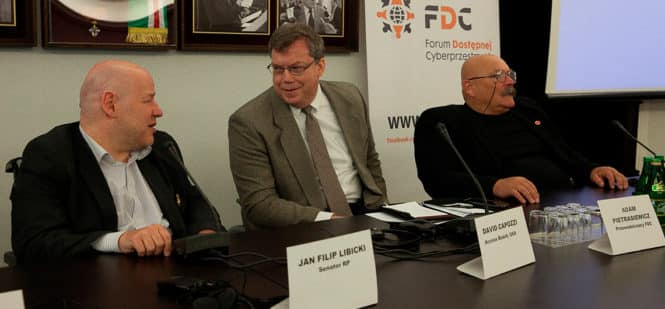
Poland Creates Entity Modeled after the U.S. Access Board
The Polish government has established an agency to promote accessibility that is modeled after the U.S. Access Board. Created in December, the Accessibility Council is responsible for reviewing laws and regulations and making recommendations to the government on implementing a sweeping new law to advance accessibility nationwide. The Council is comprised of 50 members representing ministries and government bodies, disability groups, and academia and meets quarterly. The Council will play a lead role in implementing the Accessibility Plus Program, an new measure that aims to make Poland a leader in accessibility by eliminating barriers in architecture, transportation, education, health care, digital and other services.
Poland’s Minister of Investment and Development Jerzy Kwieciński, who heads the Accessibility Council, credits the work of the U.S. Access Board and a speaking tour by Board Executive Director David Capozzi as the inspiration for the new entity. At the Council’s inaugural meeting in February, he recognized the Access Board’s influence and stated, “I believe that now Poland will become a model for other countries.” He supports a study tour of the U.S. for Council staff, including further consultations with the Board.
Capozzi travelled throughout Poland in 2017 as part of State Department’s speaker program to share the American experience in ensuring accessibility for people with various disabilities. During his weeklong stay in Warsaw, Gdynia, Gdańsk, and Kraków, he met with national and local authorities, advocacy groups, and other representatives, some of whom were instrumental in creating the Council. Capozzi discussed achievements and challenges of ensuring accessibility in the U.S. and shared lessons learned. He participated in dialogues on different aspects of accessibility, including the built environment, information and communication technology, employment, enforcement, and the important role standards play, among other topics.
“It was an honor to travel to Poland on behalf of the State Department and our embassy to meet with those leading the effort to make the country a model for accessibility,” states Capozzi. “The Board looks forward to learning more about their efforts and achievements and exploring how we can further advance accessibility in both our countries.”
Legislation was recently introduced in Congress to supplement the Air Carrier Access Act (ACAA) which prohibits discrimination in air transportation. Congressman Jim Langevin (D-RI) and Senator Tammy Baldwin (D-WI) submitted bills in the House (H. R. 1549) and Senate (S. 669) to amend the ACAA to further improve access at airports and on aircraft. The bills would create accessibility standards for new airplanes, require removal of barriers on existing airplanes where readily achievable, strengthen enforcement mechanisms, including establishment of a private right of action and enhance safety.
Under these measures, the Access Board would be responsible for issuing standards for aircraft and equipment for boarding and deplaning, including seating accommodations, lavatories, stowage of assistive devices, announcements, and in-flight entertainment and video displays. The standards also would address airports, including ticketing counters, gates, customer service desks, audible announcements, kiosks, and websites. The bills were referred to the appropriate House and Senate committees for consideration.
In addition, under a law passed last year, the Department of Transportation (DOT) began reporting data on the number of passenger wheelchairs and scooters that are damaged or mishandled by airlines on a monthly basis. A total of 701 (2.18%) wheelchairs and scooters were damaged last December, an average of more than 25 a day, as reported in DOT’s monthly Air Travel Consumer Report (February issue). The total for January was 681 (2.06%) and for February was 593 (1.7%).
In a statement, Senator Tammy Duckworth (D-IL), who authored the law said, “Every airline passenger deserves to be treated with dignity and respect, but too often they aren’t. Travelers should be able to find out if certain airlines have high rates of breaking wheelchairs and other equipment that people depend on, just like we can find out if certain airlines have high rates of flight delays or cancellations.”
Further information on this reporting is posted on DOT’s website.
Guidelines for Voting Systems Available for Public Comment
Federal guidelines for voting systems implemented under the Help America Vote Act are currently available for public comment. Issued by the U.S. Election Assistance Commission (EAC), the Voluntary Voting System Guidelines (VVSG) provide principles and criteria for assessing the basic functionality, accessibility, and security of voting equipment.
The EAC released the document, referred to as VVSG 2.0, on February 28 for a 90-day comment period, as indicated in a notice published in the Federal Register. The VVSG 2.0 updates guidelines first issued in 2005 and revised in 2015 and features a new streamlined structure comprised of high-level system design goals with broad descriptions of the functions that make up voting systems. The proposal also includes moving technical requirements and test assertions to separate documents that detail how voting systems can meet the new Principles and Guidelines in order to obtain certification. Those requirements and test assertions will be made available for public comment at a later date. The EAC seeks comments on all sections of the Principles and Guidelines including the proposed restructuring. Comments are due May 29.
For further information, visit the EAC’s website or contact Ryan Macias at (301) 563-3931 or votingsystemguidelines@eac.gov.
Updated VPAT Now Available from the IT Industry Council
The Information Technology Industry Council (ITI) maintains a free reporting tool known as the Voluntary Product Accessibility Template (VPAT) to help determine whether information and communication technology products and services satisfy accessibility requirements, including the Section 508 Standards. ITI recently released revised editions of the VPAT (2.3) based on the Board’s revised 508 Standards (VPAT 2.3 508), including the referenced Web Content Accessibility Guidelines (WCAG 2.0). It also offers VPATs for WCAG 2.1 (VPAT 2.3 WCAG), the European Union’s ICT requirements (VPAT 2.3 EU), and another based on all three (VPAT 2.3 INT).
In March 2019 IKEA was praised for partnering with nonprofits to develop accessories that make its products more accessible for people with impairments. It’s a novel step forward but I can’t shake the feeling we need to reframe the conversation on accessibility in technology entirely. Accessibility should be a topic at the forefront of design. Here’s why:
Roughly one in five people in the US have registered with a disability, with a similar figure for the UK. But when creating new products or services, investing resources to make technology accessible for impaired users can seem like taking the scenic route to market. An expensive deviation from a lean go to market strategy.
It’s easy to toss accessibility considerations in the ‘nice to have’ bucket. ‘Accessibility as an afterthought’ is a frustration I’ve heard on repeat for the last decade. But to do this is to abandon a unique opportunity to unlock true innovation and realize a much bolder ambition.
The traits separating tasks that AI excels at, and those that remain distinctly human, are consistently cited as creativity, empathy, imagination, and vision. Indeed the Gospel of Jobs clearly states: “Innovation distinguishes between a leader and a follower.” So before we hand over the reins to AI, why don’t we focus on perfecting the human side of technology solutions.
If you’ve even dabbled in brainstorming techniques — or the hyper-trendy ‘design thinking’ — you’ll be familiar with the art of reframing a problem to see new solutions. What better way to do this than looking at new tech through the lens of our senses, with varying degrees of physical or sensory ability?
Thinking about impairments of sight, hearing, or touch from the outset forces designers, creators, and technologists to ‘look at’ problems from very different perspectives, and that brings opportunity for untold and exciting innovation.
It is also a reminder of why it’s important to keep the pressure on government and private entities to make public places accessible to all.
“The sort of run-of-the mill storefronts, restaurants, retail store, those really should be accessible now and a lot are but too many still are not,” said Kenneth Shiotani, senior staff attorney for the National Disability Right Network, which is based in Washington, D.C.
He said outdoor spaces, such as beaches and trails, pose more challenges than man-made structures when it comes to accessibility and for that reason, new guidelines were set for them in 2013. But Meridian Hill Park, which boasts of having the largest cascading fountain in the country, seems much more structured than other outdoor spaces, he said.
“I think the wedding party had reasonable expectations that 30 years later [after the ADA was passed] a federal park would be accessible,” Shiotani said. “It’s a public park, it’s paid for by public dollars, it should ultimately be accessible for everybody.”
The Department of Justice today announced payments by Greyhound Lines, Inc. totaling $2,966,000 to over 2,100 individuals who experienced disability discrimination while traveling or attempting to travel on Greyhound. The payments were part of a broader settlement from 2016 resolving the Department’s complaint that Greyhound, the nation’s largest provider of intercity bus transportation, engaged in a nationwide pattern or practice of violating the Americans with Disabilities Act (ADA) by failing to provide full and equal transportation services to passengers with disabilities. The $2,966,000 amount is in addition to $300,000 paid by Greyhound in 2016 to specific individuals identified by the Department, bringing the total distributed to individuals to over $3,250,000. To read the press release regarding this event, click here. For more information about the ADA, call the Department’s toll-free ADA Information Line at 800-514-0301 (TDD 800-514-0383) or access the ADA website at www.ada.gov.
New know-how being examined by the Lengthy Island Rail Street goals to provide riders with disabilities additional help when boarding a practice.
The LIRR’s Glen Head station is the primary to host the brand new “Help Point” kiosk function, which assists riders with special wants in getting the eye of railroad personnel on an arriving practice.
The kiosk includes a button marked “boarding assistance” that, when pressed, prompts a flashing yellow beacon that notifies practice crew members who may help the client, together with by establishing a bridge plate to help get wheelchair customers onto a practice.
The kiosk additionally has buttons for patrons to inform authorities of an emergency, or to communicate immediately with LIRR personnel for info.
LIRR president Phillip Eng, speaking about this system at a Might MTA Board assembly, stated it stemmed from suggestions from clients with particular needs, including those who stated that they had specific problem getting crew members’ attention during nighttime hours.
“This can give them extra confidence that they will be observed,” Eng stated. “It’s a method of displaying that we’re listening to clients.”
U.S. Access Board to Conduct Webinars on Website Accessibility (September 5 and 24)
Access to websites is essential in today’s digital environment for obtaining information, downloading data, sharing media, obtaining goods and services, and making other transactions. Many websites, however, remain off-limits to people with disabilities, particularly those with sensory impairments, because they are not structured and coded properly for accessibility. The U.S. Access Board, which maintains accessibility standards for information and communication technology in the federal sector under Section 508 of the Rehabilitation Act, is conducting free webinars in September on how to evaluate websites for accessibility.
An introductory webinar on September 5 from 2:30 – 4:00 (ET) will cover online barriers to accessibility and explain how to check that web content is accessible to all visitors using the Board’s Section 508 Standards. Presenters will review key components of the Web Content Accessibility Guidelines issued by the World Wide Web Consortium, which are incorporated by reference in the Section 508 standards. They will also discuss common problems and easy solutions and share practical tips for improving website accessibility. Attendees can pose questions in advance or during the live webinar. This session is intended for both a general audience as well as website designers and content managers who are experienced, but new to accessibility.
For more information or to register for this session, visit www.accessibilityonline.org. This webinar series is hosted by the ADA National Network in cooperation with the Board. Archived copies of previous Board webinars are available on the site.
Advanced Session – Webinars on Website Accessibility
A more advanced session will take place September 24 from 1:00 – 2:30 (ET) as part of the Board’s Section 508 Best Practices Webinar Series. This session is intended for federal employees involved in procuring web services and products who may not have a technical background but who are responsible for compliance with Section 508. It will follow the “user story” of a non-technical federal employee who has been recently assigned 508 oversight responsibilities for a web services contract. Presenters will review requirements for web content in the 508 Standards and address technical requirements for procurement contracts, how to verify that procured services and deliverables are fully compliant, and available resources and tools for evaluating website accessibility and fixing access issues.
Visit www.accessibilityonline.org/cioc-508 for further details or to register. The Section 508 Best Practices Webinar Series is made available by the Accessibility Community of Practice of the CIO Council in partnership with the Board.
Special thanks to Matt Feldman for his contributions.
From airports and train stations to government offices, restaurants, grocery stores and retailers, the use of kiosk machines is widespread as a convenience for customers and an alternative to human service by the kiosk provider. Long gone are the days where an Automated Teller Machine (ATM) was the only form of kiosk a person might need to use. It is now commonplace to find common service functions are now performed through kiosk solutions. As the use of kiosks grows, so does the need to ensure they are accessible and usable for all people, including those with disabilities.
The application of accessibility standards to kiosk machines
While there is no universal set of standards that provide specific guidance around making kiosks accessible, there are standards that may be useful. The Web Content Accessibility Guidelines (WCAG) 2.0 standards provide direction in making web content accessible. These standards will be most applicable when the kiosk interface is presented in an HTML or web-based format. For example, a bank kiosk may allow customers to access account information from their online banking portal or a hotel might provide a kiosk to allow a customer to manage their stay or account information.
In addition, the U.S. government Section 508 standards may also be used to guide interface development. Specifically, these standards may apply to government related kiosk machines. The Americans with Disabilities Act (ADA) contains standards for physical design considerations that may be useful in determining the physical requirements of a kiosk machine.
In addition to the broadly applied standards such as WCAG 2.0 and the ADA, specific industries may adopt or create specific standards unique to their environment. For example, the U.S. Department of Transportation created the Air Carrier Access Act (ACAA) which provides requirements around the accessibility of airline industry technologies. The ACAA identifies specific standards on how and when their kiosks should be made accessible. Other industries may wish to use standards such as the ACAA as a starting place when developing their own regulations or standards.
Most Kiosks are considered stand alone or closed system, meaning users won’t have the flexibility to use personal assistive technology to access or interact with content or elements. This requires vendors to consider the needs of individual with varying abilities.
Unlike WCAG and Section 508, which provide precise guidelines and technical specifications related to accessibility, the 21st Century Communications and Video Accessibility Act (CVAA) has taken a different approach with performance based objectives, more like the functional requirements in Section 508.
These objectives ensure a wide variety of user needs are built into these closed systems.
Generally – Manufacturers and service providers shall ensure that equipment and services covered by this part are accessible, usable, and compatible as those terms are defined in paragraphs (b) through (d) of this section.
Accessible – The term accessible shall mean that:
Input, control, and mechanical functions shall be locatable, identifiable, and operable in accordance with each of the following, assessed independently:
Operable without vision. Provide at least one mode that does not require user vision.
Operable with low vision and limited or no hearing. Provide at least one mode that permits operation by users with visual acuity between 20/70 and 20/200, without relying on audio output.
Operable with little or no color perception. Provide at least one mode that does not require user color perception.
Operable without hearing. Provide at least one mode that does not require user auditory perception.
Operable with limited manual dexterity. Provide at least one mode that does not require user fine motor control or simultaneous actions.
Operable with limited reach and strength. Provide at least one mode that is operable with user limited reach and strength.
Operable with a Prosthetic Device. Controls shall be operable without requiring body contact or close body proximity.
Operable without time dependent controls. Provide at least one mode that does not require a response time or allows response time to be by passed or adjusted by the user over a wide range.
Operable without speech. Provide at least one mode that does not require user speech.
Operable with limited cognitive skills. Provide at least one mode that minimizes the cognitive, memory, language, and learning skills required of the user.
Kiosk Considerations when making kiosks accessible
Are all controls on the kiosk tactilely distinguishable? For example, is it possible to identify the audio headphone jack by touch or by a tactile symbol?
Do controls have braille or large print labels? While putting braille labels on all keys on a standard QWERTY keyboard may not be necessary, it may be important to label special function keys or controls that are not standard on a traditional keyboard.
Is the height and spacing of the screen and controls appropriate for different types of users? An individual in a wheel chair may be viewing the screen from a lower angle than someone who is standing up.
Is there sufficient physical clearance around the machine for users with assistive mobility devices? A person in a wheelchair, scooter, or other mobility device may need more room to maneuver when approaching or leaving the machine.
Kiosk Interface design
What types of controls are needed to use the interface? For example, is a physical keyboard needed along with a touch screen in order for someone to enter text? Should a mouse, track ball, or touch pad device be present if a pointer is needed to use the interface? A person with a motor skills challenge may find it difficult to move their hand around a touch screen but may have no trouble using a track ball or touch pad pointer.
Can the visual presentation of the interface be customized? For example, can someone with a visual impairment zoom in or out to change the size of the onscreen font? Can someone who is color blind determine the functionality of controls by a method other than color alone?
Does the interface provide speech output? For someone who is blind or low vision, speech output (text-to-speech) may be the only way they can interact with the device. Does the text-to-speech function activate when headphones are inserted into the jack? If not, is there a clearly communicated way such as a braille sign for the user to know how to activate the text-to-speech function?
Does the interface reset to a standard configuration after each person uses it? The interface should always return to a default state after each user completes their tasks.
Accessible Kiosk Conclusion
In addition to the considerations listed above, it is important to ensure that the kiosk design is tested by people with various types of disabilities. This may include testing at various stages during the design and development process but at a minimum, user testing should be done once the design is complete. In addition, it will also be important to ensure that staff who may assist people using the kiosk understand what accessibility features are present and how to help someone use them. An accessibility feature is only as good as a person’s ability to use it and their knowledge that it exists in the first place. Staff may also wish to periodically test the accessibility features to verify they are always working as expected.
An accessible and well-designed kiosk machine can provide an efficient and independent experience for all users. As with all things related to accessibility, it is important to consider an accessible design from the very beginning. It is generally much more costly and inefficient to add accessibility after a product has been developed or is already in use.
Learn more about the state of kiosk accessibility requirements and what can be done to address by registering for our 60 minute webinar scheduled for November 28th at noon ET.
Good article on Title III and how attended kiosks and unattended kiosks can be affected differently. The article starts however with referring to “spate of suits” but doesn’t identify those suits. At one point vending machines dispensing drinks is referenced. Those are meant for unattended use however customers can always request assistance. Does that fulfill DOJ requirements?
Sometimes having an employee assist the customer can serve as opportunity for the employee to take advantage of the disabled (typically blind) customer.
Reasonable accommodation effort would seem to be called for in these situations. Having a POS terminal that allows for a headphone would make it possible for a blind person to materially verify the desired assistance was the actual assistance rendered.
A recent spate of suits against several major retailers has raised questions about whether self-service checkouts and other kiosks must comply with the requirements of Title III of the Americans with Disabilities Act (ADA). Generally, Title III requires that places of public accommodation be equally accessible to all individuals, regardless of physical limitations. In these suits Plaintiffs, who are blind, allege that the retailers’ self-service checkouts or kiosks are inaccessible to blind and visually impaired individuals and, therefore, violate the ADA. Businesses, in turn, have countered that the provision of staffed registers and kiosks through which blind customers can complete purchases with the aid of store personnel satisfies their obligations under the ADA. As an ever-increasing number of businesses turn to self-service kiosks for all manner of customer interactions, the degree to which these kiosks must be accessible to disabled users presents an important issue.
________
1 28 C.F.R. § 36.303(c)(1).
2 28 C.F.R. § 36.303(b)(2).
3 See sections 707 and 811 of the 2010 ADA Standards for Accessible Design set forth at 28 C.F.R. Part 36, Subpart D (2011) and 36 C.F.R. Part 1191, Appendices B and D (2009).
4 See West v. Moe’s Franchisor, LLC, No. 15-CV-2846, 2015 WL 8484567, at *3 (S.D.N.Y. Dec. 9, 2015); West et al v. Five Guys Enterprises., LLC, No. 1:15-CV-02845, 2016 WL 482981 (S.D.N.Y. Feb. 5, 2016).


 News from the U.S. Access Board • March/ April 2019
 The Access Board will hold a town hall meeting in Indianapolis on the afternoon of May 21 at Bankers Life Fieldhouse. The event will provide an open forum where members of the public can pose questions to the Board or share comments or concerns about accessibility for people with disabilities. There also will be panel discussions with area speakers on accessible recreation and outdoor environments, the Indiana AgrAbility Project, and local compliance initiatives under the Americans with Disabilities Act (ADA).
 U.S. Access Board Training and Town Hall Meeting, May 21
  At its March meeting, the Board unanimously elected Board Member Karen Tamley as its new Chair. Tamley just completed a term as Vice Chair of the Board and has served as the Commissioner of the Chicago Mayor’s Office for People with Disabilities since 2005.
 Ensuring that public streets and sidewalks are accessible to people with disabilities can be a challenge, especially since accessibility guidelines for public rights-of-way have yet to be finalized. The next webinar in the Board’s free monthly series will take place June 6 from 2:30 – 4:00 (ET) and will be devoted to answering the various questions that come up in addressing access to sidewalks and street crossings, pedestrian signals, on-street parking, roundabouts, transit stops and other components of public rights-of-way as well as shared use paths. Board Accessibility Specialists will answer questions submitted in advance or during the live webinar and offer guidance, solutions, and best practices based on guidelines the Board proposed for public rights-of-way. Attendees are encouraged to submit their questions in advance.
 The Polish government has established an agency to promote accessibility that is modeled after the U.S. Access Board. Created in December, the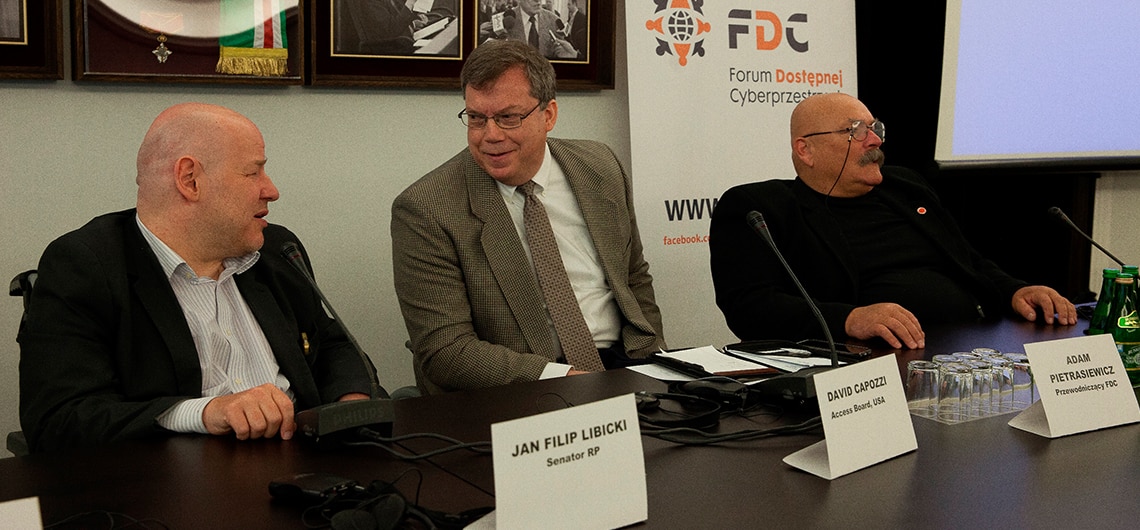
 Legislation was recently introduced in Congress to supplement the Air Carrier Access Act (ACAA) which prohibits discrimination in air transportation. Congressman Jim Langevin (D-RI) and Senator Tammy Baldwin (D-WI) submitted bills in the House (
 Federal guidelines for voting systems implemented under the Help America Vote Act are currently available for public comment. Issued by the U.S. Election Assistance Commission (EAC), the
  The Information Technology Industry Council (ITI) maintains a free reporting tool known as the
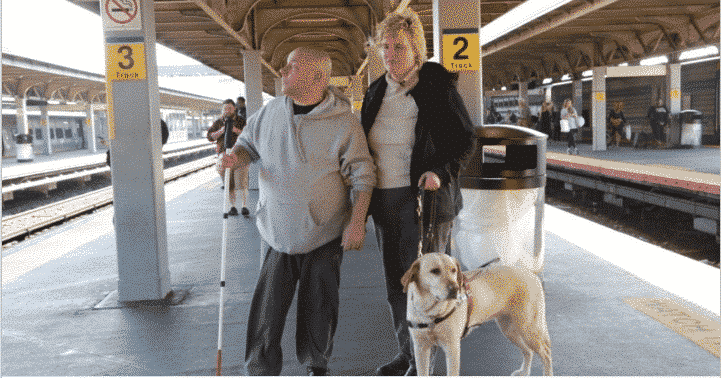 The LIRR’s Glen Head station is the primary to host the brand new “Help Point” kiosk function, which assists riders with special wants in getting the eye of railroad personnel on an arriving practice.
 Access to websites is essential in today’s digital environment for obtaining information, downloading data, sharing media, obtaining goods and services, and making other transactions. Many websites, however, remain off-limits to people with disabilities, particularly those with sensory impairments, because they are not structured and coded properly for accessibility. The U.S. Access Board, which maintains accessibility standards for information and communication technology in the federal sector under Section 508 of the Rehabilitation Act, is conducting free webinars in September on how to evaluate websites for accessibility.