Airlines Bill Of Rights Department of Transportation
This Bill of Rights describes the fundamental rights of air travelers with disabilities under the Air Carrier Access Act and its implementing regulation, 14 Code of Federal Regulations (CFR) Part 382. For more information email info@kma.global
The Bill of Rights consists of:
The Right to Be Treated with Dignity and Respect.
The Right to Receive Information About Services and Aircraft Capabilities and Limitations.
The Right to Receive Information in an Accessible Format.
The Right to Accessible Airport Facilities.
The Right to Assistance at Airports.
The Right to Assistance on the Aircraft.
The Right to Travel with an Assistive Device or Service Animal.
The Right to Receive Seating Accommodations.
The Right to Accessible Aircraft Features.
The Right to Resolution of a Disability-Related Issue.
Click on any of the rights above to be linked to an explanation of that right in this document. The Bill of Rights does not expand or restrict the rights of air travelers with disabilities. Rather, it provides a convenient summary of existing law. Because the explanations in this document may not be as precise as the regulations themselves, the explanations link to the actual regulatory text for your reference.
By Craig Keefner (ex-programmer for Northwest Airlines)
I remember back in early 2000s there were several incidents regarding passengers suffering due to airline mishaps. Being stranded on the tarmac for 10 hours. NWA (later bought by Delta) instituted a bill of rights for passengers back then called Customers First. You can still view it out on the Wayback Machine. Worth noting that Delta has an Accessibility page geared towards usage of website. Delta even has a Advisory Board on Disabilities. Doing a Fast Pass with Edge on accessibility of the Delta homepage yields double-digit failed instances which is surprising. Maybe there is some differential between the WCAG engines.
I am thrilled that the US Department of Transportation has published an “Airline Passengers with Disabilities Bill of Rights.” It is way past time something like this existed since airlines have repeatedly indicated through their actions that they don’t particularly care about their customers with disabilities, though they are happy to take our money and claim they care about us when something negative happens
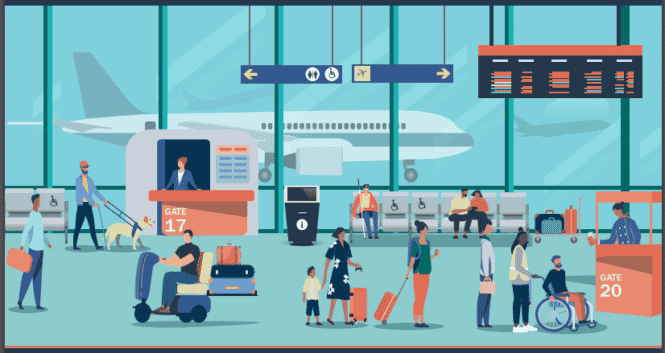
There are a few things that I am definitely not thrilled about. This post is going to address the gender and race bias that appears in the cover image.
1) The only Black-appearing individual on the cover image is a female-appearing person in a safety vest pushing a wheelchair being used by a White-appearing male.
2) All the service staff appear to be women
3) All the people with visible disabilities appear to be male.
Seriously, it never ceases to amaze me that in this modern era that people continually have to bring stuff like this up *after* something is published. There is exactly one way to prevent this, and it is actually quite easy.
Have as many underrepresented groups as possible review the document in advance of publication and LISTEN to what they have to say.
The Kiosk Manufacturer Association announces that it is an Associate Partner sponsor of the ANSI Electric Vehicles Standards Panel with a link to the EVSP landing page EV Standards Panel. We are also signed up for a Working Group (twice a month call). If you are interested in becoming a participating sponsor and/or signing up for Working Group you email info@kioskindustry.org
The ANSI Electric Vehicles Standards Panel (EVSP) is a cross-sector coordinating body whose objective is to foster coordination and collaboration on standardization matters among public- and private-sector stakeholders to enable the safe, mass deployment of electric vehicles and associated infrastructure in the United States with international coordination, adaptability, and engagement. Outputs of the EVSP in the 2011-2014 timeframe included a Standardization Roadmap for Electric Vehicles (Version 2.0, May 2013), a Progress Report (November 2014) against same, and a Standards Compendium. Though the priorities have shifted in many respects with the new focus on EVs@Scale, aspects of the earlier EVSP work may be drawn upon as needed.
Calling All Stakeholders: ANSI to Develop Roadmap of Standards and Codes for Electric Vehicles at Scale
Sign Up for a Working Group. Register for June 15 Kick-off Event. Consider Becoming a Sponsor.
New York, June 8, 2022: The American National Standards Institute (ANSI) announced today the launch of an initiative to develop a roadmap of standards and codes for electric vehicles (EVs) at scale. The ANSI Electric Vehicles Standards Panel (EVSP) will serve as the forum for development of the document.
Argonne National Laboratory (ANL) is the lead lab for the codes and standards pillar, supported by consortium members National Renewable Energy Laboratory (NREL), Oak Ridge National Laboratory (ORNL), Pacific Northwest National Laboratory (PNNL), Idaho National Laboratory (INL), and Sandia National Laboratories (SNL). The EV@Scale initiative supports federal and state funding associated with deploying EV charging infrastructure nationwide.
The priorities of the codes and standards effort will be to identify the most critical standards for EVs at scale, including for standards to address high-power DC charging, storage (i.e., microgrid, distributed energy resource management systems) integrated with DC charging, vehicle grid integration, high-power scalable/interoperable wireless charging, and vehicle-oriented systems. Subject-matter experts interested in participating are invited to review the panel architecture and sign up for one or more working groups. A one-hour virtual kick-off event providing more details will be held June 15, 2022, at 12 noon Eastern. Register here. It is envisioned that the working groups will hold virtual meetings, twice per month, over the course of the coming year. A draft roadmap is targeted for mid-February 2023, which will then undergo public review before being finalized by mid-May 2023. Participation is open to EV stakeholders that have operations in the United States.
The ANSI EVSP is a cross-sector coordinating body whose objective is to foster coordination and collaboration on standardization matters among public- and private-sector stakeholders to enable the safe, mass deployment of electric vehicles and associated infrastructure in the United States with international coordination, adaptability, and engagement. Outputs of the EVSP in the 2011-2014 timeframe included a Standardization Roadmap for Electric Vehicles (Version 2.0, May 2013), a Progress Report (November 2014) against same, and a Standards Compendium. Though the priorities have shifted in many respects with the new focus on EVs@Scale, aspects of the earlier EVSP work may be drawn upon as needed.
ANSI’s facilitation of this initiative is supported in part by VTO/Argonne National Laboratory. Additional, exclusive sponsorship opportunities with appropriate recognition benefits are invited from industry and other directly affected stakeholders to help offset ANSI’s costs of operating the EVSP.
Calling All Stakeholders: ANSI to Develop Roadmap of Standards and Codes for Electric Vehicles at Scale
Page 2
“ANSI is pleased to once again offer its services as a neutral facilitator and bring together interested stakeholders to identify the latest standards and conformance needs and challenges associated with the deployment of electric vehicles,” said S. Joe Bhatia, ANSI president and CEO.
For more information, visit ANSI’s EVSP webpage.
About ANSI
The American National Standards Institute (ANSI) is a private non-profit organization whose mission is to enhance both the global competitiveness of U.S. business and the U.S. quality of life by promoting and facilitating voluntary consensus standards and conformity assessment systems, and safeguarding their integrity. Its membership is comprised of businesses, professional societies and trade associations, standards developers, government agencies, and consumer and labor organizations.
The Institute represents and serves the diverse interests of more than 270,000 companies and organizations and 30 million professionals worldwide. ANSI is the official U.S. representative to the International Organization for Standardization (ISO) and, via the U.S. National Committee, the International Electrotechnical Commission (IEC). For more information, visit //www.ansi.org.
Canada has requirements regarding “accessibility plans. This was first published in December 2021. Here is the main link.
In Brief
Only federal agencies affected (retailers are not for example)
These guidance modules are intended for those to whom the Accessible Canada Act applies, including:
Government of Canada entities, including departments and agencies
crown corporations
every portion of the federal public administration designated under subsection 7(3) of the ACA
the Canadian Forces
parliamentary entities
federally regulated private sector entities
The regulations set different deadlines for the publication of different entities’ first accessibility plans:
government entities, including departments, agencies, Crown corporations, or government-related entities such as the Canadian Forces or Parliamentary entities: December 31, 2022
large federally regulated private sector entities with an average of 100 or more employees: June 1, 2023
small federally regulated private sector entities with an average of between 10 and 99 employees: June 1, 2024
Read sections 1 and 2 of the regulations to learn which entities may be exempt from these requirements.
Sample Accessibility Plan Template
The Accessible Canada Act (ACA) and the Accessible Canada Regulations (regulations) require that federally regulated entities prepare and publish accessibility plans. This template is not mandatory, and is provided as a sample that can be used to prepare your organization’s accessibility plan.
The template clearly indicates all of the required content. For example, your plan must include certain headings (“General,” headings respecting the areas described in section 5 of the ACA, and “Consultations”).
The template also includes content that is recommended, but not required. You can adapt this content to reflect your organization’s needs and resources.
You may also be required to include additional content in your plan if your organization is regulated under the Broadcasting Act, the Telecommunications Act, or the Canada Transportation Act. For more information on these requirements, read sections 42 through 68 of the ACA.
“General” (required heading)
This section must include the position title of the person designated by your organization to receive feedback on barriers and your accessibility plans. It must also include the mailing address of your organization’s publicly accessible place of business, a telephone number, and an email address.
Executive summary (recommended subheading)
You could include a short (1 page or less) summary of your accessibility plan. It could give an overview of the major barriers you identified, the steps you will take to remove and prevent them, and a summary of your consultations with people with disabilities.
Accessibility statement (recommended subheading)
You could include a short (1 page or less) statement describing how accessibility fits into your organization’s operations and activities. It should reflect the current regulations and your organization’s long-term goals.
Areas described under section 5 of the ACA (required headings)
You must include a heading for each of the areas described under section 5 of the ACA:
employment
the built environment
information and communication technologies (ICT)
communication, other than ICT
the procurement of goods, services and facilities
the design and delivery of programs and services
transportation
The ACA requires the publication of an accessibility plan respecting your organization’s policies, programs, practices and services in relation to the identification and removal of barriers, and the prevention of new barriers, in the areas listed above. If you cannot identify any barriers in one of the areas, or if that area is not relevant to your operations, you can note this under the heading. You can also use your consultations with persons with disabilities to ask for advice about barriers within these areas.
It is recommended that you cover the following topics under each area:
barriers: barriers in each area as identified by employees, clients, consultation participants, or others
actions: concrete steps you have taken or will take to remove and/or prevent those barriers, including:
timelines
roles and responsibilities
determining and tracking intended outcomes
“Consultations” (required heading)
You must set out the manner in which your organization consulted persons with disabilities in the preparation of your accessibility plan. While maintaining respect for consultation participants’ right to privacy, we recommend that you describe how you consulted (in-person or virtual meetings, surveys, or other means), whom you consulted (individuals, experts, and organizations), and what comments or data you received. You could include more details about your consultations in an annex. ESDC will publish additional guidance on consulting persons with disabilities.
Additional headings (recommended)
Glossary (recommended heading)
You could include definitions of words or expressions in your plan with which people may not be familiar. The definitions should be written in simple, clear, and concise language.
Budget and resource allocation (recommended heading)
You could include a description of the money and resources your organization plans to allocate for accessibility improvements.
Training (recommended heading)
You could include training that you will provide to your staff, such as training about accessibility and about communicating with people with different types of disabilities. You could also include training about intersectionality and unconscious biases.
Areas other than those identified under section 5 of the ACA (recommended heading)
Your organization may identify, remove, or prevent barriers in areas that are not listed in the ACA. You can include headings for these areas, and cover the same topics that are listed above: consultations, barrier descriptions, and actions.
Nice article centered on Britain but applicable to all countries. Looking at all the ways that a person with some sort of disability must face when driving an electric car is a good source of insight, especially with EV Charging Stations.
We take readers through everything they need to know:
The driving gap between adults with and without a disability
Benefits of and barriers to driving an EV for someone with a disability
How to make EVs more accessible
Support that’s currently available for disabled EV drivers
We explore a whole range of stats and figures:
Adults with a pre-existing condition drive an average of 2,203 miles per year, about half the average distance driven by someone without a disability.
An EV can be a great financial choice. The Motability scheme helps disabled drivers lease cars with a large variety of expenses included. Plus, it’s already up to £756 cheaper a year to run an EV.
It’s unsurprising that only 25% of drivers with a disability feel comfortable driving in an electric vehicle. Promisingly, though, if changes were made to the infrastructure of the charging system, this figure would increase to 61%.
10 million – total number of registered electric cars on the road globally (as of 2020)
This guidance describes how state and local governments and businesses open to the public can make sure that their websites are accessible to people with disabilities as required by the Americans with Disabilities Act (ADA).
Inaccessible web content means that people with disabilities are denied equal access to information. An inaccessible website can exclude people just as much as steps at an entrance to a physical location. Ensuring web accessibility for people with disabilities is a priority for the Department of Justice. In recent years, a multitude of services have moved online and people rely on websites like never before for all aspects of daily living. For example, accessing voting information, finding up-to-date health and safety resources, and looking up mass transit schedules and fare information increasingly depend on having access to websites.
People with disabilities navigate the web in a variety of ways. People who are blind may use screen readers, which are devices that speak the text that appears on a screen. People who are deaf or hard of hearing may use captioning. And people whose disabilities affect their ability to grasp and use a mouse may use voice recognition software to control their computers and other devices with verbal commands.
The ways that websites are designed and set up can create unnecessary barriers that make it difficult or impossible for people with disabilities to use websites, just as physical barriers like steps can prevent some people with disabilities from entering a building. These barriers on the web keep people with disabilities from accessing information and programs that businesses and state and local governments make available to the public online. But these barriers can be prevented or removed so that websites are accessible to people with disabilities.
Examples of Website Accessibility Barriers
Poor color contrast. People with limited vision or color blindness cannot read text if there is not enough contrast between the text and background (for example, light gray text on a light-colored background).
Use of color alone to give information. People who are color-blind may not have access to information when that information is conveyed using only color cues because they cannot distinguish certain colors from others. Also, screen readers do not tell the user the color of text on a screen, so a person who is blind would not be able to know that color is meant to convey certain information (for example, using red text alone to show which fields are required on a form).
Lack of text alternatives (“alt text”) on images. People who are blind will not be able to understand the content and purpose of images, such as pictures, illustrations, and charts, when no text alternative is provided. Text alternatives convey the purpose of an image, including pictures, illustrations, charts, etc.
No captions on videos. People with hearing disabilities may not be able to understand information communicated in a video if the video does not have captions.
Inaccessible online forms. People with disabilities may not be able to fill out, understand, and accurately submit forms without things like:
Labels that screen readers can convey to their users (such as text that reads “credit card number” where that number should be entered);
Clear instructions; and
Error indicators (such as alerts telling the user a form field is missing or incorrect).
Mouse-only navigation (lack of keyboard navigation). People with disabilities who cannot use a mouse or trackpad will not be able to access web content if they cannot navigate a website using a keyboard.
When the ADA Requires Web Content to be Accessible
The Americans with Disabilities Act applies to state and local governments (Title II) and businesses that are open to the public (Title III).
State and local governments (Title II)
Title II of the ADA prohibits discrimination against people with disabilities in all services, programs, and activities of state and local governments. State and local governments must take steps to ensure that their communications with people with disabilities are as effective as their communications with others. Many state and local government services, programs, and activities are now being offered on the web. These include, for example, things like:
Applying for an absentee ballot;
Paying tickets or fees;
Filing a police report;
Attending a virtual town meeting;
Filing tax documents;
Registering for school or school programs; and
Applying for state benefits programs.
A website with inaccessible features can limit the ability of people with disabilities to access a public entity’s programs, services and activities available through that website—for example, online registration for classes at a community college.
For these reasons, the Department has consistently taken the position that the ADA’s requirements apply to all the services, programs, or activities of state and local governments, including those offered on the web.
Businesses that are open to the public (Title III)
Title III prohibits discrimination against people with disabilities by businesses open to the public (also referred to as “public accommodations” under the ADA). The ADA requires that businesses open to the public provide full and equal enjoyment of their goods, services, facilities, privileges, advantages, or accommodations to people with disabilities. Businesses open to the public must take steps to provide appropriate communication aids and services (often called “auxiliary aids and services”) where necessary to make sure they effectively communicate with individuals with disabilities. For example, communication aids and services can include interpreters, notetakers, captions, or assistive listening devices. Examples of businesses open to the public:
Retail stores and other sales or retail establishments;
Banks;
Hotels, inns, and motels;
Hospitals and medical offices;
Food and drink establishments; and
Auditoriums, theaters, and sports arenas.
A website with inaccessible features can limit the ability of people with disabilities to access a public accommodation’s goods, services, and privileges available through that website—for example, a veterans’ service organization event registration form.
For these reasons, the Department has consistently taken the position that the ADA’s requirements apply to all the goods, services, privileges, or activities offered by public accommodations, including those offered on the web.
How to Make Web Content Accessible to People with Disabilities
Businesses and state and local governments have flexibility in how they comply with the ADA’s general requirements of nondiscrimination and effective communication. But they must comply with the ADA’s requirements.
The Department of Justice does not have a regulation setting out detailed standards, but the Department’s longstanding interpretation of the general nondiscrimination and effective communication provisions applies to web accessibility.1
Businesses and state and local governments can currently choose how they will ensure that the programs, services, and goods they provide online are accessible to people with disabilities.
Even though businesses and state and local governments have flexibility in how they comply with the ADA’s general requirements of nondiscrimination and effective communication, they still must ensure that the programs, services, and goods that they provide to the public—including those provided online—are accessible to people with disabilities.
Businesses and state and local governments should consider a variety of website features when ensuring that their websites are accessible.
Web Accessibility for People with Disabilities is a Priority for the Department of Justice
When Congress enacted the ADA in 1990, it intended for the ADA to keep pace with the rapidly changing technology of our times. Since 1996, the Department of Justice has consistently taken the position that the ADA applies to web content. As the sample cases below show, the Department is committed to using its enforcement authority to ensure website accessibility for people with disabilities and to ensure that the goods, services, programs, and activities that businesses and state and local governments make available to the public are accessible.
Miami University in Ohio: The Department reached an agreement with Miami University in Ohio to resolve the United States’ lawsuit alleging that the university discriminated against students with disabilities by providing inaccessible web content and learning management systems.
Nueces County, Texas: The Department reached an agreement with Nueces County, Texas, to address claims that the County used an online conference registration form that was not accessible to people with disabilities who use software that reads text out loud.
Louisiana Tech: The Department reached an agreement with Louisiana Tech University to address claims that the university violated the ADA by using an online learning product that was inaccessible to a blind student.
Title III Sample Cases
Rite Aid Corporation: The Department reached an agreement with Rite Aid Corporation to address accessibility barriers in Rite Aid’s COVID-19 Vaccine Registration Portal.
Teachers Test Prep, Inc.: The Department reached an agreement with Teachers Test Prep, Inc., regarding complaints that the test prep company’s online video courses did not provide captions and were inaccessible to people who are deaf.
HRB Digital and HRB Tax Group (H&R Block): The Department reached an agreement with H&R Block to address claims that the company failed to code its website so that individuals with disabilities could use assistive technology such as screen reader software, refreshable Braille displays, keyboard navigation, and captioning.
Peapod: The Department reached an agreement with Peapod to address claims that its online grocery delivery services were not accessible to some individuals with disabilities.
Resources
18F Accessibility Guide: a comprehensive accessibility guide with resources published by 18F, a digital services agency under the General Services Administration (GSA).
Digital.gov: this site, which is part of the Technology Transformation Services at the GSA, has resources on design of products, devices, services, or environments for people with disabilities.
The Access Board held a town hall meeting in Phoenix on May 23 that featured presentations by local speakers on various topics and a public “open mic” forum. It was held at Ability360, a Center for Independent Living. Board Vice Chair Karen Tamley and Executive Director David Capozzi opened the meeting with introductions and an overview of the Board and its work.
The first two speakers addressed access for people with heightened sensitivites to chemicals and electromagnetic fields. Dr. Ann McCampbell, Co-Chair of the Multiple Chemical Sensitivities Task Force of New Mexico, described the debilitating physical reactions experienced by those with an acute sensitivity to various chemicals in the environment, aslo known as Multiple Chemical Sensititvites (MCS). These include chemicals used in fragrances, personal care products, deodorizers, cleaners, pesticides, wall and floor coverings, and building materials. Dr. McCampbell, who has had MCS for almost 30 years, also called attention to sensitivity to electromagnetism from cell phones, security equipment, utility meters, florescent lighting, and other sources. She noted that the prevalence of Electromagnetic Hypersensitivity (EHS) appears to be increasing.
Susan Molloy, M.A., an advocate for people with MCS and environmental illness for 35 years, discussed design recommendations that can improve access for people with MCS. These include installing fresh-air ventilation systems and operable windows, allowing more natural light, avoiding carpet, and pesticide-free landscaping. To improve access for people with EHS, smart meters should be avoided or shielded. Molloy called attenion to an earlier project on indoor environmental quality that was conducted by the National Institute of Building Sciences with funding from the Access Board. She outlined findings and recommendations from the project, which are provided in a report that is avaialble on the Board’s website.
The following presentations addressed ADA compliance in the cities of Phoenix and Tempe. Phoenix ADA Coorindator Peter Fischer reviewed recent initiatives by the city to enhance accessibility under its ADA Compliance Program. He noted that the city regularly surveys facilities for compliance with the ADA and that transition plans are continuously updated to reflect city projects and programs. Several Phoenix tranportation departments have undertaken transition plans, including a city-wide program to install curb ramps and accessible pedestrian signals. Last year, over 2,000 curb ramps were replaced. Other city initiatives include a new committee on integrating accessibility in emergency planning and response, an annual awards accessibility showcase, and a “Save Our Space” campaign that enlists volunteers to help enforce accessible parking.
Michele Stokes, an ADA Compliance Specialist with the Tempe Office of Strategic Management and Diversity, noted an online resource the city has launched to collect data on accessibility issues on city property for self-evaluations and tranisiton planning. It includes a newly launched interactive map with data from digital surveys of sidewalks, curb ramps, cross walks, bus stops and pedestrian signals that will help city planners with transition planning. The surveys collect data on running and cross slopes, changes in level, such as joint heavings, surface gaps, and other features along with geographic coordinates. The city also allows the public to report access issues online and offers other resources on local accessibility.
The final speaker, Bob Hazlett of the Maricopa Association of Governments, addressed autonomous vehicles and opportunities they may offer people with disablitities, including those with vision impairments. He noted that a lot of testing of driverless vehicles is done in Arizona which is becoming known as the place “where self-driving vehicles go to learn.” While it is not known when autonomous vehicles may fully take to the road, the potential impacts on public policy and planning at the local level are being assessed, including those pertaining to parking, infrastructure, public transportation, and cybersecurity, among others.
During the public forum that followed, members of the public raised areas where more needs to be done for accessibility. Many urged action to address access for people with MCS and EHS and described how exposure to certain commonly-used chemicals and to elemtromagnetic fields jeopardize their health, limit access to health care, housing, and other services, and lead to isolation. Some commenters submitted information on the subject and endorsed the work of organziations such as the National Center for Environmental Health Strategies.
Other issues noted included the need for entrance doors to be automated, hotel beds that are too high for transfer, access to casinos, and the lack of electronic shopping carts. The Board was urged to do more outreach and training on access to medical care equipment which remains problematic despite new standards the Board issued last year for medical disagnostic equipment.
In addition, concerns were raised about access for people who are deaf or hard of hearing. Several comments focused on the sound quality and availability of assistive listening systems in meeting spaces. They also addressed connectivity issues that impact video remote sign language interpretation in hospitals and the lack of communication access in pharmacies to instructions for taking medications.
Board to Host Information Meeting on Assembly Areas September 6
On September 6 the Access Board will hold a public forum on accessibility and assembly areas. The day-long event will focus on accessibility issues related to the design of such facilities, including movie theaters, dinner theaters, performing arts centers, lecture halls, grand stands, stadiums, arenas, and other assembly venues. It will offer an open dialogue to review design challenges and identify potential solutions.
“Our goal is to bring everyone together to find ways of resolving accessibility issues that are unique to different types of assembly spaces,” states Board Executive Director David Capozzi. “The Board will use this information to enhance the technical assistance and training it provides to the public.”
Persons with disabilities, advocacy groups, designers and architects, trade groups, codes organizations, industry, and other interested parties are welcome to attend. Registration is not required. Additional details, including the agenda, will be posted in coming weeks. This event will be in-person only and will not be streamed online. Direct any questions to Dave Yanchulis at yanchulis@access-board.gov or (202) 272-0026 (v), or (202) 272-0027 (TTY).
Information Meeting on Assembly Area Accessibility September 6, 9:30 – 5:00 (ET)
Access Board Conference Center 1331 F Street, NW, Suite 800 Washington, D.C. Note: For the comfort of all participants and to promote a fragrance-free environment, attendees are requested not to use perfume, cologne, or other fragrances.
Bill Botten Named Board’s Coordinator of Training and Technical Assistance
Bill Botten, a long-time Board Accessibility Specialist, has been appointed Training and Technical Assistance Coordinator. In this dual role, he will oversee both the agency’s training program and its provision of technical guidance to the public. The Board regularly provides training on its accessibility guidelines and standards upon request at various events and conferences across the county. It also conducts a monthly webinar series in partnership with National Network of ADA Centers. Botten will field training requests, coordinate educational sessions and webinars, and assign Board staff.
In addition, Botten will manage the Board’s technical assistance program. The Board regularly provides technical guidance on its accessibility guidelines and standards and accessible design through its toll-free help line and by email. Accessibility specialists are available to answer questions on accessibility as it relates to the built environment, outdoor sites, streets and sidewalks, transportation vehicles and vessels, information and communication technology, and medical diagnostic equipment.
Botten has served as an Accessibility Specialist at the Board for 18 years and was active in the development of new guidelines and guidance documents for outdoor developed areas and for recreation facilities. He has trained extensively in these and other areas and is a top-rated and highly-requested presenter.
The next webinar in the Board’s free monthly series will take place July 12 from 2:30 – 4:00 (ET) and will review requirements in the ADA and ABA Accessibility Standards for transportation facilities. Presenters will cover provisions for bus stops and shelters, rail stations, and train stations.
The following webinar on August 2 will feature an open question and answer session. Questions are welcome on the Board’s accessibility guidelines and standards, including those issued under the ADA and ABA, as well as other topics related to the Board’s work.
Visit www.accessibilityonline.org for more information or to register for the webinars. Questions can be submitted in advance of the session or can be posed during the webinar. Webinar attendees can earn continuing education credits. The webinar series is hosted by the ADA National Network in cooperation with the Board. Archived copies of previous Board webinars are available on the site.
Section 508 Best Practices Webinar The Board also offers a free webinar series on standards issued under Section 508 of the Rehabilitation Act which requires access to information and communication technology in the federal sector. The next webinar in this series is scheduled for July 31 from 1:00 to 2:30 (ET) and will address how federal agencies can update policies for the revised 508 Standards. For more details or to register for this or other sessions, visitwww.accessibilityonline.org/cioc-508/schedule. The Section 508 Best Practices Webinar Series is made available by the Accessibility Community of Practice of the CIO Council in partnership with the Board.
The Access Board will hold its next meeting July 11 from 1:30 – 3:00 (ET) at the Board’s conference space in downtown Washington, D.C. The public is welcome to attend in person or through a live webcast of the meeting.
A public comment period will be held during the final 15 minutes of the meeting. Those interested in making comments in person or by phone should send an email to Rose Bunales at bunales@access-board.gov by July 5 with “Access Board meeting – Public Comment” in the subject line. Please include your name, organization, state, and topic of your comment in the body of the message.
DOJ Rules for Movie Theater Captioning and Audio Description Take Effect
As of June 2, movie theaters showing digital movies must provide a means for delivering closed captioning and audio description underrules issued under the ADA by the Department of Justice (DOJ). Issued 18 months ago, the rules supplement provisions in DOJ’s ADA regulations on provision of auxiliary aids and services. Movie theaters that show digital movies equipped with closed captions and audio description must acquire and maintain equipment for displaying captions and transmitting audio description.
Closed captions are displayed individually to patrons with hearing impairments at their seats. Open captioning displayed on the movie screen is not required. Audio description provides additional narration of a movie’s visual elements to patrons with vision impairments and is typically transmitted by infrared or FM systems to wireless headsets. The rule specifies the minimum number of closed captioning and audio description devices that must be provided based on the number of auditoriums in a theater. The rule does not apply to theaters showing analog movies only, nor does it require such theaters to convert to digital projection systems. For further information, visit DOJ’s website or contact its ADA hotline at (800) 514-0301 (v) or (800) 514-3083 (TTY).
W3C Releases Updated Web Content Accessibility Guidelines
On June 5, the World Wide Web Consortium (W3C) released an update of its Web Content Accessibility Guidelines (WCAG) 2.0, a globally recognized, technology-neutral accessibility standard for web content. WCAG 2.1 builds upon guidance developed by W3C’s Web Accessibility Initiative by expanding coverage of mobile device accessibility and enhancing access for people with low vision and who have cognitive or learning disabilities.
“The Board applauds the progress made by the W3C Accessibility Guidelines Working Group in its release of the WCAG 2.1,” said Board Executive Director David Capozzi. “The efforts to broaden the range of disability needs currently addressed by WCAG 2.0 will benefit many individuals who still encounter barriers to accessing the web.”
The Board’s updated Section 508 Standards for information and communication technology in the federal sector reference the WCAG 2.0 and apply it to websites, electronic content, and software. In developing WCAG 2.1, the Accessibility Guidelines Working Group ensured backwards capability so that content meeting WCAG 2.1 also satisfies WCAG 2.0.
W3C’s Web Accessibility Initiative works with organizations around the world to promote accessibility of the Web. It helps ensure that web technologies support access, develops accessibility guidelines and related resources, and promotes harmonization of international standards. For further information, visit www.w3.org/WAI/ or contact Amy van der Hiel, W3C’s Media Relations Coordinator at w3t-pr@w3.org or (617) 253-5628.
NEW to KioWare for Android – Support Added for Storm Assistive Technology Products
“Accessibility should be a strong consideration for any kiosk deployment. With this release, both KioWare for Windows and KioWare for Android support the heavily tested and well-respected Storm ATP suite of keypads, keyboards & other accessibility products.” ~ Laura Miller of KioWare.
KioWare has released a new version of KioWare for Android kiosk software supporting Storm Assistive Technology Products such as the Nav-Pad, Nav-Bar and AudioNav. KioWare kiosk software products lock down your device into kiosk mode, turning your tablet into a secure kiosk or purposed device for self-service, digital signage, or mobile device management deployments.
Kiosk Accessibility Made Easy
Version 3.16 of KioWare Basic & KioWare Full for Android now includes support for Storm’s ATP devices. These ADA compliant devices allow users with impaired vision, reading difficulties or impaired fine motor skills to navigate through menus or directories that would typically be presented on a visual display or touch screen. They are designed to provide a tactile/audio interface for any accessible self-service application. Devices supported include the Nav-Pad, Nav-Bar and AudioNav. KioWare for Android offers out of the box compatibility for those that want to make their Android self-service or purposed device experience accessible. Prior to this integration, devices running the Android OS were quite limited in their ability to provide an accessible self-service solution.
Additional New Features and Improvements
Improved Provisioning
KioWare for Android 3.16 has also added features to improve the ability to provision Android devices. Android devices may now be provisioned via a USB storage device. Provisioning support has also been added for running shell scripts.
Secure File Browser
A secure file browser has been added to allow users to open a file browser and select a file to upload. With new security features, users can be restricted to browse only allowed files and folders on the file system. New functionality includes the ability for users to take new photos and videos or browse this file system for existing files.
Multiple Exit Passcodes & Actions
Different exit passcodes can now be used to call different exit actions. This allows for actions to be taken based on the exit passcode entered. Deployers can vary permissions based on user need.
Reboot Schedule Management
Reboot schedules can now be used on devices that are rooted.
View all updates to KioWare for Android version 3.16 here.
Over the past year, the number of website disability access lawsuits has surged across all industries, but the problem is particularly intense in the food service industry and QSR sector suits are well represented. In short, being in this business today means knowing the law and its requirements when it comes to website accessibility, lest you leave your brand highly susceptible to a court case.
First off, understand that website disability access lawsuits or web access lawsuits allege that a consumer-facing website is discriminatory because it contains certain barriers that prevent access to individuals with visual, auditory or other disabilities. This type of action is brought under Title III of the Americans with Disabilities Act (ADA), as well as under the stipulations of any state’s non-discrimination laws, like the Unruh Civil Rights Act in California.
The costs associated with these lawsuits can be significant, as plaintiffs seek legal remedies that will bring inaccessible sites into compliance, along with any number of attorneys’ fees. Additionally, certain state non-discrimination laws — like the Unruh Act — also add minimum statutory penalties.
The Use of Voice Recognition and Speech Command Technology as an Assistive Interface for ICT in Public Spaces.
A whitepaper published by Peter W Jarvis (Senior Executive VP, Storm Interface) and Nicky Shaw (Operations Manager North America).
September 2018.
Introduction.
The emergence and increasing use of smart speakers (AI) in the home environment has delivered significant benefits for those with mobility, sensory, cognitive or dexterity impairment. For millions of disabled people voice recognition and speech command technology, allied with audible confirmation and presentation of requested information, permits more informed decision making and personal control of their immediate environment.
This improved access to information and control opens a new world of communication, entertainment, education and opportunity for those who are unable to see, read or interact with content presented on a display screen and for those who lack the mobility or dexterity to manipulate tactile system interface devices (such as keyboards, trackballs or touch screens etc.). Speech Command Technology creates significant new opportunities for independent living.
This improved accessibility also creates unique challenges for system designers, legislating authorities and those concerned about privacy and misuse of personal data. As Voice Recognition and Speech Command technology moves beyond the domestic environment into public spaces and the urban infrastructure we will need new guidelines to increase public awareness and new regulation to protect the general population against the misuse of recorded information.
This whitepaper explores the implementation and integration of Speech Command technology within ICT kiosks and self-service applications. It is intended to provide a framework for a proposed Code-of-Practice. This CoP to be drafted for public consultation and possible adoption by the Kiosk Manufacturer Association (KMA) as an addendum to its Accessibility Guidelines.
To illustrate certain devices or technologies there are some references in this document to products manufactured by Storm Interface. These are intended as exemplars only. Other brands and products are available.
1. Who’s Listening
1.1 When a private citizen purchases a connected smart speaker device for home use, he/she makes an informed decision to install that device into their home environment. Before connecting their new device to the manufacturer’s cloud-based AI applications new customers are required to agree and accept many terms and conditions of service. By doing so they make a decision to accept a listening device into their home; albeit with an option to mute that device or switch it off at any time. The customer knows where the device is located, what its connected status is and how to switch it off.
1.2 However, to overcome the latency (delay) inherent in delivering cloud-based AI services to a device that has just been switched on, these devices (by default) usually remain in a powered and connected configuration. Amazon have referred to this default configuration as “Always on, always ready”. This configuration is sometimes referred to by more cynical commentators as “Always on, always listening”. The device needs to be configured in this way to operate as an effective ‘hands free’ Voice Recognition and Speech Commanded information system.
2. In a Public Environment.
2.1 Speech Command and Voice Recognition technology will provide an effective and valuable improvement in accessibility to public ICT systems. Applications such as public transport ticketing and airline check-in terminals would be typical examples.
2.2 As part of a multi-modal approach to accessibility, Speech Command will provide an additional option for those with disabilities (and those without) to confirm their biometric identity and to interface with the kiosk’s application software. The kiosk user will be able to choose from a combination of tactile, audible or visual interface devices to best meet their specific accessibility needs.
2.3 However, it will be essential that all kiosk users and those members of the public in proximity to the kiosk be made aware that the terminal includes Voice Recognition and/or Speech Command technology and that the Speech Command facility is “on and listening”. This awareness is essential for two reasons:
2.3.1 To inform the kiosk user that Speech Command / Voice Recognition technology is available for their use and convenience.
2.3.2 To warn members of the public (in proximity) that their conversations may/will be picked up by the Speech Command / Voice Recognition facility and may be transmitted to a remote server for analysis, processing and possible retention.
2.4 This awareness must be provided for members of the public who are sighted, partially sighted, non-sighted or hearing impaired.
3. A Universal Symbol
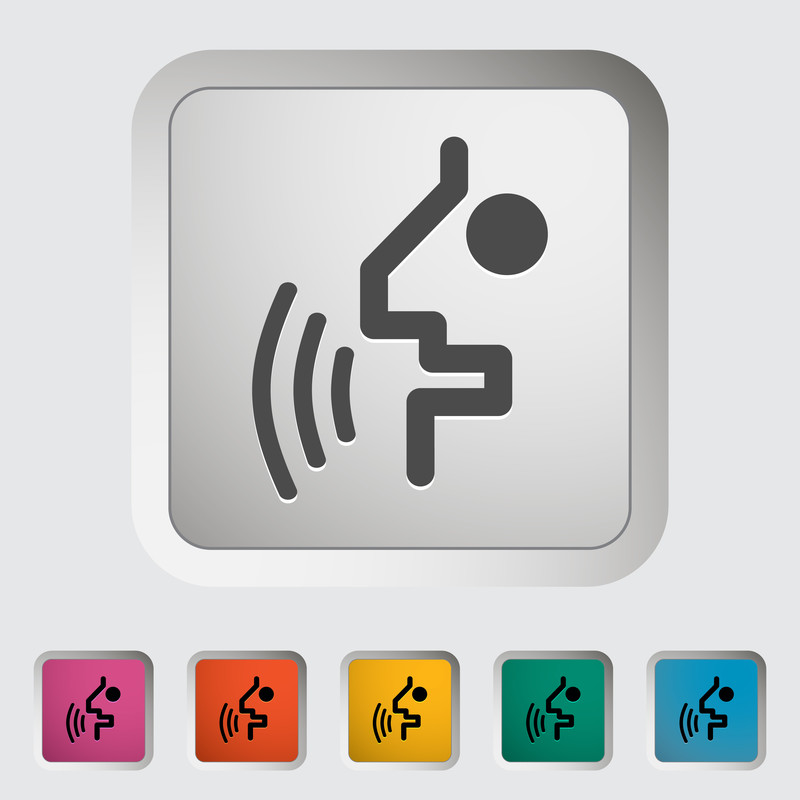
3.1 It is proposed that a universally recognized symbol for Speech Command functionality be adopted by the Kiosk and Self Service industry.
3.2 The symbol’s purpose is to indicate the presence of Voice Recognition or Speech Command technology.
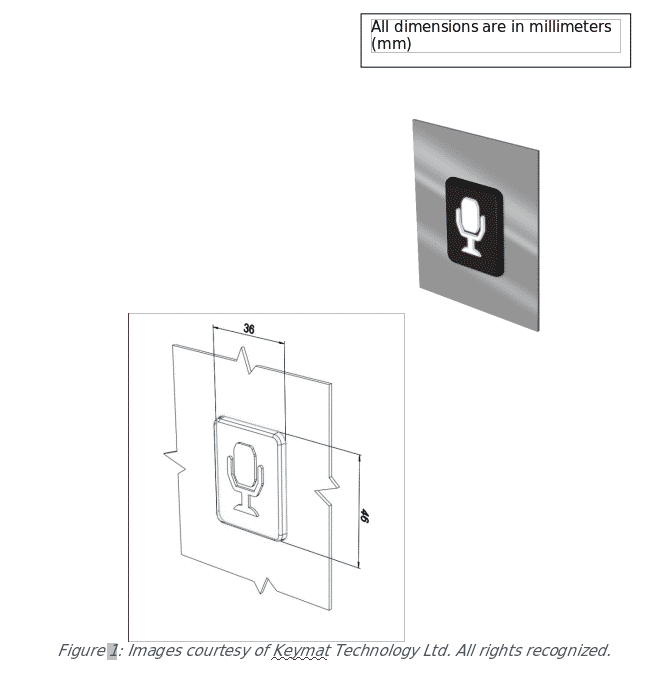
3.3 Storm Interface have designed a high contrast, highly visible and tactilely discernible symbol that can be easily applied to the kiosk. During the development of this logo, Storm Interface worked closely with the UK’s Royal National Institute of Blind People (RNIB). Feedback received from the RNIB has influenced the logo design. This to aid recognition and ease of use, and to ensure that all contours and edges are rounded to make it comfortable to the touch.
3.4 As with any new logo, but in particular tactile logos, people will need to learn its meaning. This highlights the importance of introducing a standard logo which can be used across all kiosks and sectors to ensure that blind people need only learn one symbol.
3.5 When Voice Recognition or Speech Commanded services are activated the symbol will be illuminated with bright white LEDs.
3.6 The applied symbol should be positioned such that it can be easily seen or tactilely located as a user approaches or addresses the kiosk.
3.7 When the kiosk is in home screen or screen saver mode, with no detected user activity, an audible signal or statement to indicate the presence of an activated Voice Recognition or Speech Command facility should be played periodically. Alternatively, a proximity sensing device could be used to un-mute a VR or SC device only when a kiosk user approaches the kiosk interface zone.
3.7.1 Similar audible indicators of a functioning Voice Recognition or Speech Command technology should also be given when such a facility is activated (switched on or un-muted) after a period of non-functionality.
3.8 A proposed specification for the symbol is reproduced below. Storm Interface and the RNIB propose to make this symbol available as a “free-to-use” graphic device. Storm Interface propose to offer a physical, manufactured version of the graphic device, in the form of an illuminated tile, for sale to and use by kiosk manufacturers, specifiers or operators.
Figure 1: Images courtesy of Keymat Technology Ltd. All rights recognized.
4. Hardware
4.1 Microphones
4.1.1 Kiosks that offer Speech Command or Voice Recognition technology must support and provide the means for voice input.
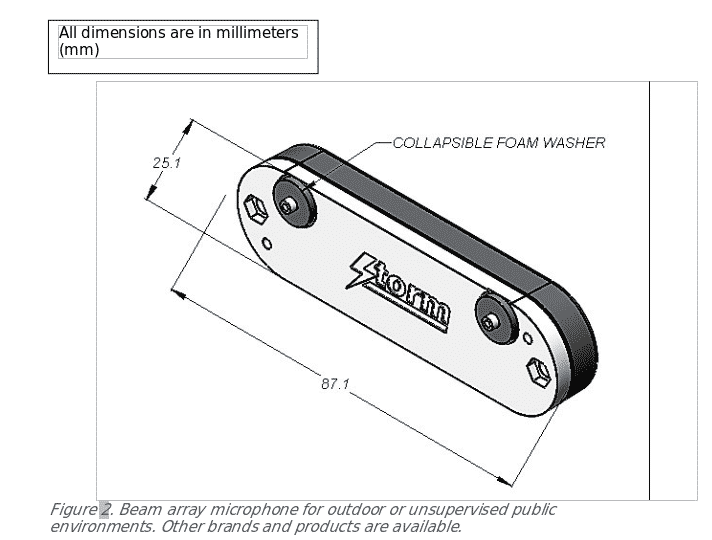
4.1.2 This should be by provision of a suitable standard connection point for an audio headset or ear piece (equipped with its own microphone) and by provision of a suitable microphone (or microphone array) permanently installed as a fixture of the kiosk.
4.1.3 In many public kiosk locations or applications it will be necessary to employ advanced noise cancelling and beam focusing technology to enable effective operation of the Speech Command or Voice Recognition technology.
4.1.4 Connection of a headset or assistive hearing device (equipped with its own integrated microphone) should be detected by the host kiosk and the functionality of any permanently installed microphone (or microphone array) should be automatically adjusted to accommodate and allow correct functioning of the headset or hearing aid device
4.1.5 To facilitate reliable and continued functionality, provision and installation of audio device connection points and/or permanently installed microphone devices should accommodate requirements for regular sanitation (wash-down) procedures and should resist the hard use and abuse associated with ICT installations in public spaces. As a minimum requirement, water and dust resistance in accordance with IP54 (or equivalent) should be achieved. A minimum impact resistance of 10J should be achieved.
Figure 2. Beam array microphone for outdoor or unsupervised public environments. Other brands and products are available.
4.2 Speakers
4.2.1 Kiosks that offer Speech Command or Voice Recognition technology must support and provide the means for audible reproduction of sound or speech.
4.2.2 This should be by provision of a suitable connection point for an audio headset or earpiece and by provision of a suitable amplified speaker system permanently installed as a fixture of the kiosk.
4.2.3 In many public kiosk locations or applications it will be necessary to employ sound directing or sound focusing technology to prevent noise pollution or irritation to those in the local vicinity of the kiosk.
4.2.4 Connection of a headset or assistive hearing device (equipped with its own integrated speakers) should be detected by the host kiosk and the functionality of any permanently installed amplified speakers should be automatically adjusted to accommodate and allow correct functioning of the headset or hearing aid device.
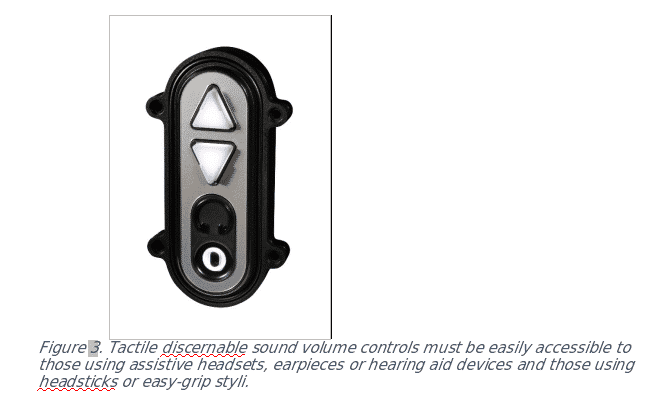
4.2.5 Tactile discernable sound volume controls must be easily accessible to those using assistive headsets, earpieces or hearing aid devices. Tactile sound volume controls should be accessible and functioning throughout the kiosk user session. Wherever possible tactile discernible controls should be suitably shaped to enable function with headsticks or assistive easy grip styli.
Figure 3. Tactile discernable sound volume controls must be easily accessible to those using assistive headsets, earpieces or hearing aid devices and those using headsticks or easy-grip styli.
4.2.6 To facilitate reliable and continued functionality, provision and installation of audio device connection points and/or permanently installed amplified speakers should accommodate requirements for regular sanitation (wash-down) procedures and should resist the hard use and abuse associated with ICT installations in public spaces. A minimum requirement for water and dust resistance in accordance with IP54 (or equivalent) should be achieved. A minimum impact resistance of 10J should be achieved.
4.3 Wireless Devices
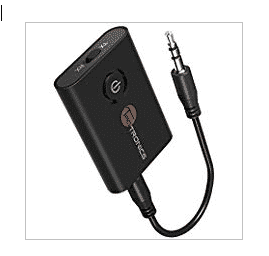
4.3.1 For those kiosk users who prefer to use wireless headsets, earbuds or implants in preference to wired devices with a cable and jack-plug connector, it should be possible to connect a personal wireless transponder (powered by a button cell battery) into the jack-plug socket. These personal devices provide encrypted communication between the transponder and a paired personal headset. The transponder would be removed and retained by the kiosk user when the kiosk session is completed.
Figure 4: Compact wireless transponder. These devices can be paired with a wireless headset or earpiece to provide a private listening capability. The transponder can be plugged directly in to the kiosk’s audio jack socket. Other brands and types of transponder are available.
5. Conclusions:
The emergence of Voice Recognition as a means of biometric confirmation of identity, coinciding with the profound impact of AI on speech commanded ICT, will drive adoption of speech command technology in public spaces and applications. Whereas this presents many challenges and risks to privacy and protection of personal data, it will lead to a new era of equality in access to information, freedom and independence for those with disabilities. It will be necessary for accessibility mandates, regulation and standards to be adapted in support of this revolutionary change in the way humans interface with the digital world. Speech Command Technology creates significant new opportunities for independent living.
Copyright Peter W Jarvis 2018. All rights retained.
Contact: Peter Jarvis: peterJ@storm-interface.com
Nicky Shaw: nickys@storm-interface.com
We welcome any comments and feedback which can assist us in evaluating this proposed framework.
A new breed of accessibility apps can make life easier for people with disabilities. They can also make it harder.
Excerpt:
A group gathers on a Nashville street corner, some rolling in wheelchairs and others walking. They have arrived holding their smartphones and make friendly chatter while a coordinator helps them log in to an app. Dispersing in small groups, they examine restaurants, cafes, and shops, looking for features signaling that disability is welcome there: a parking sign with the International Symbol of Access, a wheelchair ramp, an automatic front door, a wide bathroom stall with grab bars, braille text, low-flicker lighting, glare-free floors, scent-free soap. The groups use the app to document and rate these features. Once submitted, the information accumulates in a database that others can use to find accessible locations.
Excerpt:
But even if all these problems were solved, digital-accessibility apps still pose one final threat to disability advocacy in urban environments. Apps can make cities more navigable, but they do not change the material features of that environment. Most of the time, they record the current conditions in the built environment rather than advocate for better ones. Before apps came on the scene, disability activists used mapping to catalog injustices and to imagine alternative futures: new environments in which accessibility was the norm, rather than the exception. Contemporary projects should incorporate that lesson, too. By incorporating knowledge from broad groups of people with disabilities, digital mapping could do more than just record the world as it is today. It could also drive political, design, and policy improvements. After all, to deserve the name, a smart city ought to be a better city, not just a more technological one.




 The Access Board held a town hall meeting in Phoenix on May 23 that featured presentations by local speakers on various topics and a public “open mic” forum. It was held at
  On
On  Bill Botten, a long-time Board Accessibility Specialist, has been appointed Training and Technical Assistance Coordinator. In this dual role, he will oversee both the agency’s
  The next webinar in the Board’s free monthly series will take place July 12 from 2:30 – 4:00 (ET) and will review requirements in the ADA and ABA Accessibility Standards for transportation facilities. Presenters will cover provisions for bus stops and shelters, rail stations, and train stations.
 As of June 2, movie theaters showing digital movies must provide a means for delivering closed captioning and audio description under
 On June 5, the World Wide Web Consortium (W3C) released an update of its Web Content Accessibility Guidelines (WCAG) 2.0, a globally recognized, technology-neutral accessibility standard for web content.


 A whitepaper published by Peter W Jarvis (Senior Executive VP, Storm Interface) and Nicky Shaw (Operations Manager North America).