Generally we stay focused on kiosks here at the KMA. Having said that, oftentimes in-house development projects for “unattended customers” which involve kiosks, often involve mobile apps and even websites for that matter. Here is a look from kioskindustry on mobile accessibility
Excerpt:
Accesssible Apps From LinkedIn Collaboration
Your team values speed over accessibility. How can you ensure inclusivity while meeting tight deadlines?
Accessible apps – When time is of the essence, it’s essential to identify the accessibility tasks that will have the most significant impact. Start by implementing keyboard navigation and ensuring that all content is accessible through assistive technologies. This doesn’t have to be time-consuming; simple adjustments to HTML can make a big difference, such as using <header> , <nav> , and <footer>elements for better document structure.
Our perspective on accessible apps (747 words)
Start with identifying main channels and percentages. How much desktop versus mobile? Probably more mobile (60%?) and accessibility considerations are different for both. Is it Europe or US? They are different. https://kioskindustry.org/standards/ is good start point to learn how we think about kiosk accessibility and standards. Most of them apply in part to mobile.
For testing mobile I suggest the Section 508 Mobile Standards Testing summary by VA. Checking mainstream web accessibility use google pagespeed and MS edge. Generally just tune your stylesheet. Simple and easy. Takes 20 minutes. Arias and menu picklists are the real pains and they are easy too.
A slow site is less accessible as well.
New standards from US Access Board come out in next 60 days. New legal liabilities. Large companies are often held for ransom by lawyers.
Reply
Don’t forget iOS versus Android either. Great thing about pagespeed is it looks at it from Mobile perspective, then Desktop. Plus it tells you how fast or slow. Lighthouse in developer tools is another option and so is ARC from Vispero. All free.
Editors Note: We do recommend experienced consultants in unattended customer input space and those would be TPGi, Tech For All and Dolphin. Very useful and in particular for kiosk applications. Often – the overall project codebase will include not only mobile but POS, kiosks and web. It is also worth noting that while no definitive stats the general consensus is that the disabled community grew up on iOS and uses it more than Android.
Editors Note:Being able to think critically about ADA is good practice. There are many forms of accessibility and many of those are ignored in favor of the more popular. The writer is expressing their own opinion and not Kiosk Industry Group/Self Service Kiosk Machine. Discussion was stimulated (see comments below) and that was outcome we sought.
Christoph Nussbaumer CEO of Alpine Kiosk
About the Writer: Christoph Nussbaumer is the CEO of REINGroup based in Austria. Alpine Kiosk boasts a diverse array of designs, each is highly adaptive and radiating elegance and sophistication. Alpine Kiosk – Where each design is a testament to premium craftsmanship. Alpine Kiosk is Gold Supporter of Kiosk Industry Group and member of the KMA Kiosk Association. His viewpoint from Europe and US is invaluable. His viewpoint and opinion is his own.
Recently, I attended the Passenger Terminal Expo in Frankfurt, Germany. I spoke with most of the self-check-in kiosk manufacturers and found out that many intend to build only ADA-compliant kiosks in the future. They worried about the risk involved if a wheelchair user caannot immediately find an accessible kiosk, so better make them all ADA.
This raises an important question: Is this approach practical? Should ADA regulations specify a percentage of kiosks that must be wheelchair accessible? Is it discriminatory if a company installs only ADA kiosks?
airline kiosks ada
Consider this scenario:
A visually impaired person who is 6 foot one (1.85 meters) tall is at an airport searching for a self-check-in kiosk. The ADA-compliant kiosk’s screen is set very low, with the Storm ADA interface even lower. The ticket and bag tag printers are nearly at ground level (seen in real life at the Passenger Terminal Expo in Frankfurt).
Nowadays, most kiosks at ADA height have a Storm interface or other tactile/voice/sound input/output possibilities, but standard height ones do not. Again, a tall visually impaired person might not be happy. Isn’t this discriminatory towards a visually impaired person?
A few statistics:
50% of the U.S. population is over 1.68 meters tall and 25% are over 1.75 meters tall. For all these people, whether disabled or not, using a low kiosk is uncomfortable.
My Call for AIA!!!
I advocate for the Americans Inclusion Act (AIA), which would ensure that self-service devices are designed for all people. It shouldn’t be permissible to have kiosks set only at wheelchair height. There should be a rule specifying what percentage of kiosks should be at ADA height and what percentage at standard height.
Ergonomics at the Workplace
Over decades, workplace ergonomics have evolved and, in some cases, been codified into regulations or laws. Why should these principles be ignored for self-service kiosks?
An ADA kiosk is currently uncomfortable for the average person or at least for 25-50% of the population. Therefore, a “one size fits all” approach is not practical; we need kiosks at two different heights.
Neck Problems in Younger Generations Due to Smartphone Use
Studies show that younger generations are developing neck problems from looking down at their phones. We are repeating this with ADA kiosks and tilted screens, requiring users to look down. The only ergonomically correct and comfortable way is to look straight at a vertical screen, or if tilted, at a comfortable height.
Height-Adjustable Kiosks as an Alternative?
This seems like a good theoretical solution. It meets ADA legal requirements, but in practice, it may fall short. Self-service kiosks aim to increase efficiency and customer flow, so they need to be quick to use.
Height-adjustable kiosks, like adjustable desks, are usually motorized. Imagine standing in line, waiting as each person adjusts the height (cue motor noise). Waiting 10 seconds can feel like an eternity. And what are the additional costs of these height-adjustable kiosks?
The Department of Transportation (DOT) and Airports:
Interestingly, the Department of Transportation (DOT) already mandates that at least 25% of all kiosks in airports be accessible. This higher percentage ensures better accessibility and reduces wait times for individuals with disabilities. So, why doesn’t ADA make similar clear requirements for all environments?
Conclusion:
A one-size-fits-all concept is impractical. Dear manufacturers, please don’t offer your clients only ADA-compliant kiosks. That has nothing to do with ergonomics!
Recommend a certain percentage of ADA kiosks and make some kiosks at standard height with a convenient Storm ADA interface – 50% of visually impaired people over 1.68 meters will thank you. To the ADA committee, please specify in your guidelines what percentage of kiosks at a location should be wheelchair accessible. The term “sufficient” is not specific enough.
Comments Welcomed – Discussion is a Good Thing
Seriously, the old adage I hear thrown around all the time is “tall people can bend down”. At 6’-1” I’m not super tall, but tall enough that ADA compliant Kiosks are often hard to use. I recall being in Italy last summer and using a Kiosk set way above ADA and thinking how luxurious it was to not bend over. But I also think that way about tall showers, taller bathroom counter tops and the like. This world is not well tailored to the tall. Frank Olea
I do believe one size can fit all when Universal Design Principles are applied at the concept phase of development. And I don’t think pushing a button to adjust the height of a kiosk would critically impact the queue time, it’s a matter of seconds not minutes. The idea though, that the solution is modification instead of innovation, is what gets us stuck. What if a kiosk sensed the position of the user? Possibilities open up when the design is based on the user experience with full inclusion at the beginning. Also, I feel like percentages [what percent of kiosk should be ADA] is a futile discussion, there will never be consensus. Moreover, how is it an equitable experience when a user has to hunt for the kiosk that will “work” for them? Will there be kiosks for people using wheelchairs and those who are short, a few for people with sight loss, and then some for tall people too? Imagine if spell check was only available on two of the office computers! Universal Design benefits everyone. MJ Barry, Dolphin Computer Access
Craig Keefner — Seems like always exceptions. One of the complaints about the Little Clinic check-in kiosks is that some find them too short. This is Colorado and maybe people are higher than the base the ADA standards used (5 foot 4″ is my guess but I will check.
Craig Keefner — Philippe Boileau With increased use of cameras many have to crouch to get in focus. Eye level for a woman at 64″ still has to “reach” down to the 48 (or 44) max. I understand the most good for the most people but the min/max parameters still have problems. THere are short urinals in bathrooms but not all of them are short. The 48 reach is generally derived from person in wheelchair extending arm. Also consider less than 3% of US public uses a wheelchair. Its a tough equation no matter how you view it.
Frank Olea — Is it at all possible that ADA compliant kiosks are not inclusive to tall
Patient Check-in with Riser for Elevated Height
people? I’m 6’-1” and when I stand in front of my own product I have to stoop and I’m not really “tall”. We build this check in kiosk for a very large healthcare chain and they got complaints from taller patients, so they had us make a riser for some of the kiosks that go out to accommodate taller patients. Christoph Nussbaumer recently wrote an article about it and it started a lot of debate with us Kiosk types. See image to the right. If I were to guess I would say Kaiser Permanente
Chad Behling, PMPView Sr. PMP Certified Project Manager & Program Manager – When I worked at Uber and was helping run kiosk pilots, we utilized a stool for taller people to confortably use the kiosk but the experience was different as they were mostly used for driver onboarding, which took more time than something like check in.
Thanks to the Americans with Disabilities Act, departments of motor vehicles cannot deny a person a driver’s license simply because of a disability.
What are some disabilities that people drive with?
Many people with a disability can drive safely. The type and severity of a disability can determine whether driving is safe for you. These are some of the disabilities that people have who are still able to drive.
Alzheimer’s disease and dementia
Individuals with mild cases of dementia (such as Alzheimer’s disease) may still be able to drive. But as memory loss increases or decision-making skills deteriorate, they should stop driving. If you’re not sure about whether it’s safe for you or a loved one with dementia to drive, ask the patient’s doctor to make this determination.
Epilepsy
Each state has regulations on how a person with epilepsy can get a driver’s license. Many states require people with epilepsy to be seizure-free for a specific length of time and submit a physician’s evaluation of their ability to drive safely. Other common requirements include ongoing medical reports while they have their driver’s license.
More than 50 million people across the globe, with 1.1 percent of U.S. adults live with epilepsy. Driving with this condition requires careful consideration and adherence to safety guidelines to help minimize the risk of accidents or injury. By staying informed and working closely with your healthcare provider, individuals with epilepsy can navigate the road safely and confidently. We made a new guide about the risks and safety tips on driving with this condition. Check it out below:
Having any loss of hearing will affect your ability to hear your surroundings while driving, such as another vehicle honking or a train horn if you’re about to drive over train tracks. If you are hard of hearing, don’t drive if your doctor believes it would put you and others at risk for an accident.
Paralysis
Paralysis may prevent a driver from controlling certain vehicle functions while driving, like steering or using the gas and brake pedals. However, modern assistive devices, such as foot wheels, are available to help overcome many situations.
Reduced limb or finger function
It can be challenging for drivers to use a car’s control functions — such as the turn signal, windshield wipers, and cruise control — if they have reduced limb or finger function. Assistive tools, such as control extensions, can help make driving more accessible.
Weakened muscles
Those who have recently had a stroke may have weakened muscles and therefore may experience challenges with vehicle control functions. Depending on the level of weakness, assistive tools, such as a tri-pin steering device, may make driving more accessible.
Parkinson’s disease
People with Parkinson’s disease may have tremors and/or stiffness in their limbs, which can be a driving risk. People with Parkinson’s disease are often able to safely drive during the early stages of their diagnosis or if medications help control their symptoms, but as the disease progresses, their symptoms may become too severe for safe driving.
Driving With Developmental Disabilities
It is becoming more common for people who have developmental disabilities to drive. Autism and ADHD are common disabilities that people have while still being able to drive safely. However, someone with a developmental disability should not drive if the symptoms of their disability can cause them to be at a higher risk for a vehicle crash.
Teens with developmental disabilities can learn how to drive, but parents should ensure they’re ready first. The Children’s Hospital of Philadelphia recommends a few questions for parents to ask before deciding if their teen is ready:
Do you believe your teen is consistently showing good judgment and maturity in social settings?
How receptive is your teen to constructive criticism and instruction?
How well does your teen show knowledge of the rules of the road and other skills taught in driver education classes?
Does your teen agree to practice driving with a skilled adult before driving independently?
Are there any medical or behavioral conditions that you believe may prevent your teen from being able to drive safely?
Does your teen need any medical interventions to ensure safe driving behaviors?
Autism
People with autism are still able to drive safely. In fact, a study from the Children’s Hospital of Philadelphia’s Center for Autism and Research and the Center for Injury Research and Prevention found that young drivers with autism were 45 percent less likely to be issued citations for a moving violation than the average for people of their age.
Nonetheless, people with autism may experience some challenges while driving, including:
Becoming easily distracted by things happening around them
Having difficulty with hand-eye-foot coordination
Some driving instructors specialize in teaching people with autism how to drive and overcome some of their challenges. They suggest some simple tasks during driver training:
Practicing the same skill many times
Using driving simulation experiences such as video games to become familiar with vehicle controls and driving functions
Identifying the specific areas the individual needs to work on to help them overcome their driving challenges
ADHD
People with ADHD are capable of driving. However, they can be easily distracted, act on impulse, and struggle to regulate their emotions. These characteristics have led teen drivers with ADHD to be more likely to engage in risky behavior while driving, such as not wearing a seatbelt, speeding, and driving while intoxicated. A Children’s Hospital of Philadelphia study found that teen drivers with ADHD were more likely to be issued traffic and moving violations or be involved in vehicle crashes.
Managing symptoms of ADHD is crucial for a person with ADHD to drive safely. People learning to drive while taking ADHD medication need to regularly check in with their doctor to make sure their medication is working properly.
If you believe you or your teen are ready to begin learning how to drive, consult with a driving instructor who is familiar with teaching individuals with ADHD how to drive.
Driving With Physical Disabilities
People who are missing a limb or body part or have some form of paralysis are often able to find ways to drive safely. Additionally, those who have experienced a stroke, spinal cord injury, or brain injury are often able to drive with accommodations. With the advancement of technology and new tools, modifications to vehicles are available for easier navigation and better accessibility so that people with various kinds of disabilities can safely operate a vehicle.
Adaptive Equipment and Modifications for Individuals Driving With Disabilities
Lift pedals: lifts that extend vehicle pedals to be closer to the driver’s body, making them easier to reach for drivers who have lost their foot or the lower part of their leg
Wheelchair lift: a mechanical device that raises a wheelchair from the ground and into the vehicle
Wheelchair securement: a tool that clips a wheelchair into the vehicle to keep it from moving around while driving
Foot wheels: a rotating wheel placed near the pedals that can be used by a person’s foot to steer the car, often used by someone who has lost the use of their upper body
Joysticks: allow people with limited hand or arm mobility to operate steering, brakes, and acceleration more easily
Left foot accelerator: an accelerator pedal placed on the left side of the brake for a driver that has lost the function of their right leg or foot
Turn signal adapter: allows the driver to control the turn signal from the top, bottom, or the opposite side of the steering wheel, for those who have limitations of hand or arm mobility
Control extensions: small wheels placed on control buttons, such as windshield wipers or headlights, so that the driver can access these controls without having to bend their finger
Steering ball: an extension of the steering wheel that makes it easier for the driver to steer while using just one arm
You will need to ensure that you’re trained to properly use your new adaptive equipment. A driver rehabilitation specialist can help you to learn to drive safely, whether you’re learning to drive for the first time with this equipment or are re-learning how to drive after losing some physical abilities.
Paying and Obtaining Funding for Adaptive Driving Equipment and Modifications
The cost of installing modifications or buying a new vehicle with adjustments to help people with disabilities drive varies based on the individual needs and type of equipment needed. Smaller adjustments, like a seat cushion, can be as low as $50, while more complex hand controls may be as much as $1,000. If you’re buying a new vehicle with adaptive equipment already installed, the total cost for both the new car and needed equipment may range between $20,000 to $80,000.
There are several opportunities for people looking to buy adaptive driving equipment to receive financial help:
Nonprofits: Nonprofits that focus on disability advocacy may have programs to provide funding. To learn more, try contacting disability-specific organizations to see if they offer funding support or know other organizations that do. You can also check with your state’s vocational rehabilitation agency to get support finding assistance.
Insurance companies: Some insurance companies will cover part of the costs associated with adaptive driving equipment. Insurance companies are more likely to cover some costs for adaptive equipment if the need for the equipment is because of a crash or a job-related accident. Reach out to your car insurance provider to find out more.
Major vehicle manufacturers: Many offer rebates of up to $1,000 for adaptive tools. Your automobile dealer can provide you with more information and an application to apply for the rebate.
State and federal agencies: Governmental grants may be available to support funding for needed equipment. Reach out to your state’s vocational rehabilitation agency, department of developmental disabilities, or department of mental health. If you are a veteran, you can also try contacting the U.S. Department of Veterans Affairs.
Consult with a driver rehabilitation specialist before buying any adaptive equipment or a vehicle with modifications so that you can be sure you are getting the right equipment for your specific needs.
Driver Licensing Requirements for Individuals With Disabilities
The rules for getting a driver’s license for someone with disabilities will vary by state. Anyone applying for a driver’s license will need to pass a written and driving exam. Some states will have specific driver’s education courses and exams for people with disabilities. State DMVs, including Minnesota’s, may allow individuals with disabilities to ask for more time to take the driving test if it’s needed.
Contact your local Department of Motor Vehicles for your state’s specific laws on obtaining a driver’s license.
How to Get a Handicapped Parking Permit
Contact your local DMV to obtain a handicapped parking permit. Costs, timelines, and regulations will vary depending on your state. You will generally need a signed letter from your doctor (or another healthcare provider). Some DMVs will only issue handicapped parking permits for a particular period of time, while others offer permanent handicapped parking permits.
Steps To Getting On the Road With a Disability
If you or your teen have a disability but want to learn how to drive, here are a few steps to follow:
Speak with your doctor so they can evaluate if you or your teen can safely drive. The doctor may test vision, muscle strength, range of motion, hand-eye coordination, and decision-making abilities.
If you’re able to drive, find a driving instructor who has experience working with people who have disabilities.
You will then have to complete a written driver’s test as well as a physical driving test to get certified. Make sure you’re aware of any additional requirements or paperwork you’ll need depending on how your state regulates driving with you or your teen’s disability.
Pick the right vehicle. Look at different options to find the one best for you or your teen. Be mindful of the basic features that make all driving easier, such as power steering, windows, and locks.
Consider if you will need any adaptive equipment and vehicle modifications to make driving more accessible. Talk with your car dealer about modifications they can make or what you may need to have customized. If you require the use of a wheelchair, larger vehicles, such as a van or SUV are best.
Other Resources
These resources may help you get your driver’s license and fund any adaptive modifications to your vehicle that you might need:
With the new regulations coming soon this year, KMA has issued a draft revision of its 17 point ADA checklist. Best advice in plain english.
Begin your project updates or initial design phase with accessibility in mind – a developer’s proverb says that you can spend time planning at the beginning or fixing at the end. While you may perform a cost/benefit analysis to guide you, the liability of being inaccessible at this time in history is too great.
Reach Ranges – ensure a sitting or standing persons can access the kiosk.
Alternative Navigation and Inputs – operable controls must be tactilely discernible, ex. navigation pad, arrow keys, and other touchscreen alternatives.
Audio Jack – plugging in headphones is the standard action that triggers a speech output mode for users who are blind.
Software: accessibility principles for software state that it must be perceivable, operable, understandable, and robust.
UI/UIX Design – while WCAG 2.2 is the current standard for web accessibility, many of the guidelines can be applied to kiosk software development, paying particular attention to contrast, errors, focus, labels, and target size.
Speech Output Enabled – speech output is required for people with visual impairments, but it also provides ways to support people with other print barriers like dyslexia, low literacy, and language learners.
Mobile Proxy – if leveraging a mobile application as an additional means for making self-service accessible, ensure your app meets WCAG 2.2 guidelines.
Added Hardware Devices: kiosks are integrated solutions, meaning there are often many hardware components working together to create the total self-service experience.
Devices and Components– can the kiosk user complete every task independently? This includes biometric or other authentications, scanning, transactions, cash in and out, etc.
Privacy and Security – confirm a user’s personal information safe when using the kiosk.
Installation: logistical considerations should be made prior to installation
Light – the position has been assessed in daylight ensuring the screen can be read and also after dark to assess screen lighting.
Sound – can speech output be heard against ambient noise in the location and environment.
Temperature – if the kiosk is in direct sunlight are the controls cool enough to touch.
Testing: Conformance and usability testing are paramount to the success of any kiosk project
Conformance Testing: should be done by independent accessibility experts – there are many organizations, public and private who perform conformance testing.
User Testing – have users with and without disabilities (including deaf and hard of hearing, blind and visually impaired, those with physical disabilities and neurodiversity).
Compliance:
Accessibility Audit Log & Development Milestones– Dolphin strongly recommend companies agree to a full accessibility audit of their software at concept phase of a kiosk development project. In addition to being able to fix known accessibility issues that will create a barrier for accessibility software, organizations who provide accessibility audits will provide you with a log of your accessibility testing outcomes and development targets to provide as proof of intent to comply with accessibility laws to authorities in the case of litigation.
Having an accessibility program, internally, can help address long-term kiosk deployments, employee workstations, your website and and your mobile apps. Too often accessibility is tucked into its own separate silos. Accessibility can no longer be delegated to a third party in the legal sense.
The Kiosk Association’s mission is to inform and educate on self-service. Membership is open to all companies. If you follow accessibility guidelines and encourage ADA contact us at info@kioskindustry.org
Accessibility is in the news and we’re happy to announce new members of the KMA Accessibility Committee as well as a new Chairperson. Our new chairperson is Mary Jo Barry of Dolphin. To the general committee, we welcome Elo and Vincent Pallaver, manager for Touch Product Compliance as well as David Swallow Principal UX Consultant at TPGi.
“I’m looking forward to the upcoming term as co-chair of the KMA Accessibility Committee. Accessibility is an important aspect of a kiosk integration and it’s good to have a pool of experts representing each facet of self-service at the table to discuss critical issues and lead change” said Mary Jo of Dolphin.
Mike O’Hare assumes the main Chairperson role from Nicky of Storm Interface who has completed her 2 terms according to bylaws. Thank you Nicola for your service. Oscar Rozo of LG Business is #2 chairperson.
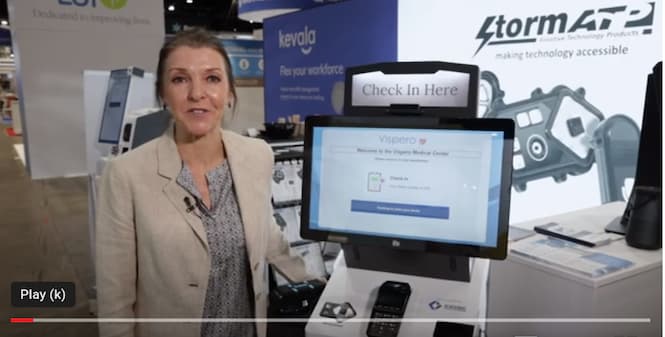
In accessibility news there is news from US and from Europe. Storm has a new manager assisting with Europe and upcoming EAA accessibility requirements.
Featured: May 18th is booth 5536 at the NRA show. See six demos for self-order, digital menus and accessibility. In US we have the new New Rule on the Accessibility of Web Content and Mobile App. No doubt this will be extended to private business. July is the expected release date for new rules for ATMs, Kiosks and POS machines. Also EV charging stations.
Contact info@kioskindustry.org with questions. From Kiosk Industry and Kiosk Manufacturer Association.
About Kiosk Industry
Kiosk Industry is the source for opinions, insights, news, and market trends for self-service kiosks, digital signage, POS, and more. Learn from the experts. We are a “co-op” of over 500 companies.
Our mission is to inform and educate. Accessibility, ADA, PCI, UL are some of our focus points. Join us for informative Q&A webinars and weekly emails.
Storm’s New European Sales Manager Prioritizes EAA
Although the deadline for complying with the European Accessibility Act (EAA) is June 2025, suppliers and deployers of self-service technology in the EU seem mostly unaware of its existence. This is a situation that Storm’s newly appointed European Sales Manager, Matthijs Verhagen, is determined to remedy.
Having previously worked for a leading provider of screen reading software, Matthijs knows only too well the challenge that a touchscreen only interface can present to people with a sight impairment. This purely visual interface can also be difficult to use by people who cannot read and those who have mobility restrictions which prevent effective interaction with touchscreen technology.
The inaccessibility of touchscreen only self-service terminals has become the focus of lawmakers on both sides of the Atlantic, as well as many other territories globally.
With its range of globally recognized Assistive Technology Products, Storm is often seen as the first choice for accessibility knowledge by self-service suppliers and deployers.
This ‘best in class’ product pedigree, combined with Matthijs’ software knowledge, puts him in the perfect position to advise suppliers to the EU of their obligations under the EAA.
‘Anyone supplying self-service technology to any country of the European Union must be made aware of the EAA. I look forward to raising awareness of the need for accessibility, and to helping Storm’s European customers with compliance. The EAA is not a law that should be ignored, because it gives countries of the EU the ability to punish non-compliant businesses, for example by way of fines.’ Said Verhagen.
Having developed a product range with a proven track record for complying with disability regulations in the USA, Storm believes that Europe must now follow suit. Accessibility of public use, self-service applications is a legal requirement which must not be ignored. The appointment of Verhagen to support Storm’s European efforts is excellent news for its customers in that territory.
Background Information:
About Storm Interface
For more than 35 years Storm Interface have designed and manufactured secure, rugged and reliable keypads, keyboards and interface devices. Storm products are built to withstand rough use and abuse in unattended public-use and industrial applications. Storm Assistive Technology Products are recognized by the Royal National Institute for Blind People under their ‘RNIB Tried and Tested’ program. Storm’s products are in use in over 65 countries worldwide. https://www.storm-interface.com
Recommended Resources
Latest Web Rule on Accessibility by US — Great news [MJ Barry of Dolphin on LInkedIn]! The Attorney General has signed a final rule to update regulations for Title II of the Americans with Disabilities Act (ADA), requiring digital content to meet certain guidelines to ensure accessibility for people with disabilities. This is a huge step forward in ensuring that people with print impairments, such as sight loss and neurodivergence, can actively participate in our digital world. At Dolphin, this aligns perfectly with our mission and we are excited to see progress being made towards a more inclusive future. #accessibility#ADA#inclusion
Fact Sheet: New Rule on the Accessibility of Web Content and Mobile Apps Provided by State and Local Governments
ADA Accessibility Update – U.S. Access Board Timelines
It pays to underestimate the completion of a government regulatory process and once again that is true. Both upcoming timelines for official guidance from the U.S. Access Board have been pushed back to January and June. We want to thank Steve Taylor with TaylorPOS for pointing it out to us. Thanks Steve!
Title: Accessibility Guidelines for Electric Vehicle Charging Stations (January)
Title: Accessibility Guidelines for Electric Vehicle Charging Stations
Abstract:Electric vehicle (EV) charging stations are becoming commonplace with the rising production and use of electric and plug-in hybrid vehicles. According to the U.S. Department of Energy, there are nearly 50,000 public EV charging stations with almost 127,000 charging ports across the country. The Infrastructure Investment and Jobs Act, signed into law in November 2021, allocates $7.5 billion to construct a national network of 500,000 EV charging stations to accelerate the adoption of EVs. It is expected that the installation and use of EV charging stations will continue to expand; however, at present, there are no federal regulations specifying accessibility requirements for EV charging stations to ensure that they are accessible to and useable by persons with disabilities. The Access Board thus intends to publish a notice of proposed rulemaking to supplement its Accessibility Guidelines under the Americans with Disabilities Act (ADA) and Architectural Barriers Act (ABA) with scoping and technical requirements for electric vehicle charging stations.
Agency: Architectural and Transportation Barriers Compliance Board(ATBCB)
Priority: Other Significant
RIN Status: Previously published in the Unified Agenda
Title: Accessibility Guidelines for Self-Service Transaction Machines
Abstract:This rulemaking would amend the Architectural and Transportation Barriers Compliance Board’s existing accessibility guidelines for buildings and facilities under the Americans with Disabilities Act (ADA) and the Architectural Barriers Act (ABA), located at 36 CFR part 1191, to include guidelines for the accessibility of fixed self-service transaction machines, self-service kiosks, information transaction machines, and point-of-sale devices. The U.S. Department of Transportation and U.S. Department of Justice are expected, via separate rulemakings, to adopt these amended guidelines as enforceable standards for devices and equipment covered by the ADA.
Agency: Architectural and Transportation Barriers Compliance Board(ATBCB)
Priority: Other Significant
RIN Status: Previously published in the Unified Agenda
장애인을 위한 보조기기(점자스마트워치, 촉각 디스플레이)를 처음으로 선보였고, 국내 최초로 배리어프리 …
Dec, 13, 2023
The Kiosk Manufacturer Association (KMA) is pleased to announce the addition of a new participant, Dot Inc., to its Accessibility Committee. Dot Inc., a renowned industry leader in relevant industry, has joined forces with KMA to support the advancement of accessible and inclusive technology solutions for all.
The KMA Accessibility Committee plays a critical role in guiding the KMA’s efforts to promote compliance with the Americans with Disabilities Act (ADA) and ensure that kiosk technologies are accessible to individuals with disabilities. By providing expertise, resources, and strategic guidance, the Committee aims to foster an environment where innovation and accessibility go hand in hand.
With the addition of Dot Inc. to its Accessibility Committee, the Kiosk Manufacturer Association gains a valuable partner with extensive experience and a deep commitment to accessibility. As a leading provider of relevant products and services, Dot Inc. brings a wealth of knowledge and expertise to the table, further strengthening the board’s ability to drive positive change in the industry.
“We are thrilled to welcome Dot Inc. to the Accessibility Committee,” said Craig Keefner, Executive Director of KMA Kiosk Association. “Their dedication to accessibility aligns perfectly with our mission, and their contributions will be instrumental in shaping the future of inclusive kiosk technologies.”
Dot Inc. is known for its innovative solutions like Dot Pad, the first tactile graphic device for the visually impaired. It shows maps, images, and graphics in braille and tactile formats. Their Accessible kiosks combine tactile displays with other tech, making info easily accessible in stores and public places. At CES 2023, Dot Inc. received three awards, including one for Best Innovation in Accessibility.
Through its partnership with the Kiosk Manufacturer Association, Dot Inc. will have the opportunity to contribute to the development of industry-wide guidelines, standards, and educational resources that promote accessibility and compliance with ADA regulations. Together, the KMA Accessibility Committee and Dot Inc. will work towards creating a more inclusive future where kiosk technologies are accessible to everyone.
About the Kiosk Manufacturer Association: The Kiosk Manufacturer Association is a not-for-profit organization dedicated to promoting the common interests of the kiosk industry. With a focus on education, advocacy, and networking, the association strives to foster innovation and collaboration among stakeholders to advance the industry as a whole.
[Photo 1] An accessible kiosk featuring a tactile display, a voice-assisted keyboard that automatically adjusts upon sensor detection.
[Photo 2] Showcasing the traditional vessel as an artistic treasure through a tactile display.
[Photo 3] Showcasing the traditional style of Korean housing through tactile display.
For media inquiries or more information, please contact:
Contact Name: Ahrum Choi
Contact Title: Director
Contact Email: ahrum@dotincorp.com
From KI — October 26th, 10am – The courts find for ACB in suit against Quest. The case involved injunctive relief. So, that means an order telling quest to fix it and attorney fees for the plaintiff. We are checking with ACB to make sure we are identifying the correct unit (aka unit violating ADA). As for an appeal, it would go to the Ninth Circuit, which tends to be more on the side of persons with disabilities than not. We imagine there could be post verdict motions. As far as cost goes, plaintiffs would be entitled to their attorney fees and the defendant would have to pay their own attorney fees as well. A relevant blog entry is here. Just What Is a Sales Establishment Anyway per Title III of the ADA?
Thanks to Bill for alerting us. He is a great and recommended resource. William D. Goren, Esq., J.D., LL.M., Attorney and Consultant, Americans with Disabilities Act (ADA), https://www.understandingtheada.com/
ALEXANDRIA, Va., Oct. 25, 2023 /PRNewswire/ — Following a week-long bench trial in Los Angeles, a federal court in California found Quest Diagnostics in violation of the Americans with Disabilities Act and permanently enjoined Quest from continuing to violate the ADA.
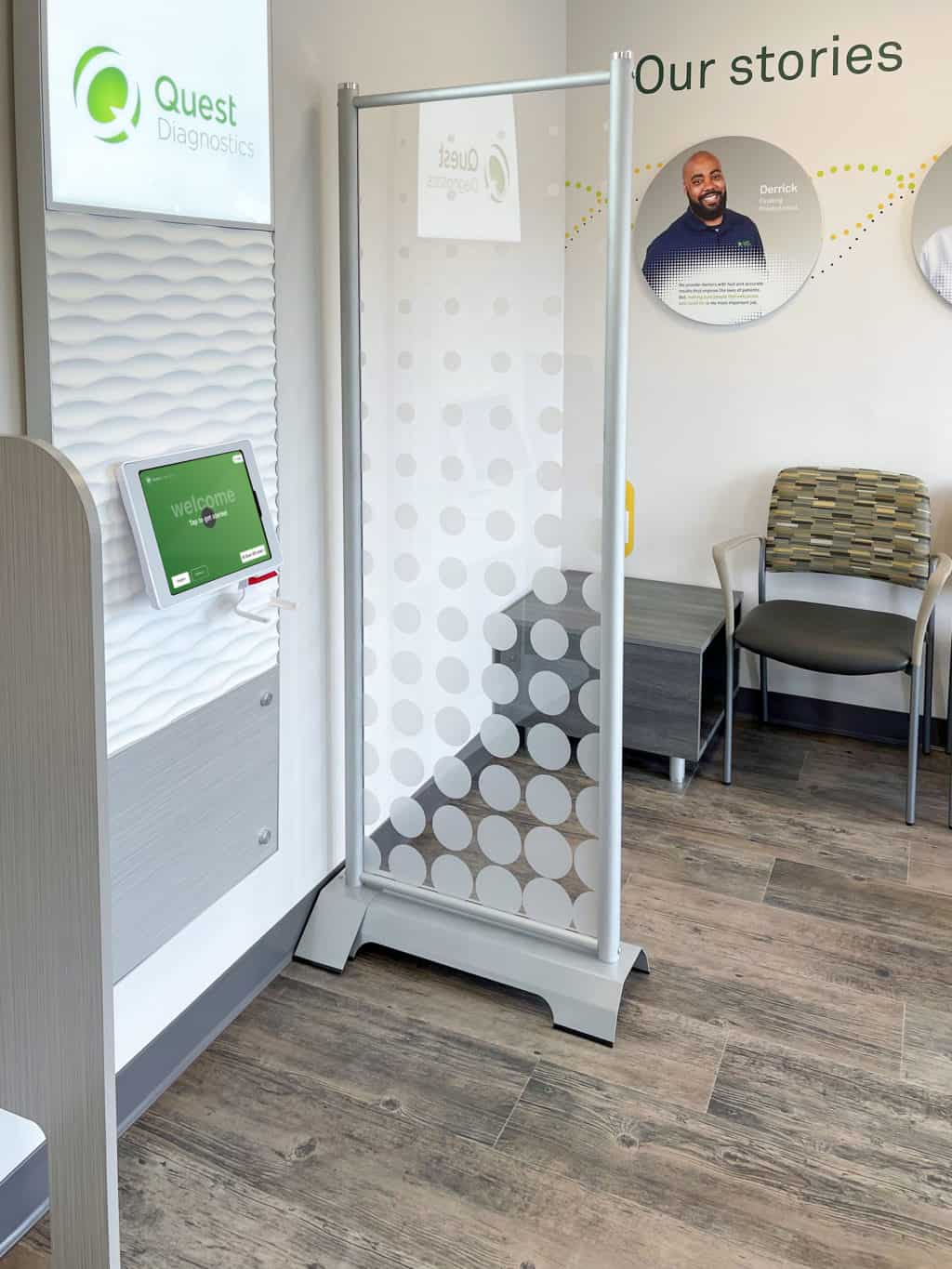
Beginning in 2016, Quest Diagnostics began to install self-service kiosks at its Patient Service Centers, which allow patients to, among other things, check in for phlebotomy appointments in a private and independent manner. Following complaints from ACB’s members that these kiosks as designed prevent people who are blind from accessing their services, ACB joined a civil rights complaint in federal court alleging that Quest’s kiosks deprived members of the blind community full and equal enjoyment of Quest’s services and failed to provide effective communication.
quest kiosk
The Court ruled in favor of ACB and a nationwide class of blind and low-vision Quest patients. The court found that Quest violated Title III of the ADA in that Quest failed to provide people who are blind with full and equal enjoyment of Quest’s services and facilities because of their disability.
“Self-service kiosks are being used more and more in many aspects of daily public life,” said Dan Spoone, Executive Director for the American Council of the Blind. “The Court’s decision that Quest violated the ADA and that the check-in services of these kiosks must be accessible to people who are blind is a significant step towards ensuring that the rights to full and equal enjoyment and effective communication are protected.”
Deb Cook Lewis, ACB’s president, added, “Although the ADA is more than 30 years old, people who are blind are still forced to fight for full and equal access to healthcare. This judgment sends a clear message that full and equal enjoyment is required by law, and health care providers must ensure access for people with disabilities.”
This litigation has been led by ACB’s counsel at Nye Sterling Hale Miller and Sweet and at Handley Farah & Anderson.
Matthew Handley, one of ACB’s attorneys in the litigation, added, “Touchscreen kiosks are an ever-increasing aspect of our daily lives – this decision ensures that accessibility of those kiosks will need to be front and center in the minds of every company wishing to make use of self-service technology.”
About the American Council of the Blind
The American Council of the Blind is a national member-driven consumer organization representing Americans who are blind and visually impaired. During the organization’s 60-year history, ACB has become a leader in national, state, local, and even international advocacy efforts. With 66 affiliates, ACB strives to increase independence, security, equality of opportunity, and to improve the quality of life for all people who are blind and visually impaired. For more information, visit ACB’s website.
About Handley Farah & Anderson
Handley Farah & Anderson are lawyers who seek to improve the world. Based in Washington, D.C., they fight for: workers deprived of wages, consumers deceived about products, tenants denied access to housing, parents deprived of adequate parental leave, persons with disabilities denied access, and women and communities of color subject to discrimination.
SOURCE American Council of the Blind
More Background
ID Card Scanning
Always a pain here is a video on how Acuant used in Quest kiosk
Quest Diagnostics Streamlines Patient Check-in with Aila’s Interactive Kiosk
Quest Diagnostics selected Aila’s Interactive Kiosk as a rugged, adaptable self-service platform to create its next-generation patient check-in experience. Aila’s expertise in patient check-in for enterprise healthcare providers gave Quest the confidence that Aila could provide the technology and support to deploy a major new experience in its patient service centers. “Aila was a known solution that would work for us,” said Congersky, “this helped us avoid a lengthy product exploration process.”
The Interactive Kiosk was able to save phlebotomists’ time by automating a range of customer experiences that previously required face-to-face interaction:
ID and insurance card scanning
Smartphone scanning for pre-registered patients
Digital check-in and wait list queuing
The Interactive Kiosk also provided a platform that was adaptable for Quest’s evolving check-in experience. This includes, a way for patients to check in for someone else, such as a child or parent, schedule service times on-site, and give patients the option to wait in their vehicle after checking in where they’ll receive a text message when it’s their turn.
In combination with Aila’s Interactive Kiosk and floor stand, Quest further improved the check-in experience by developing a welcome center that also included wall-mounted Interactive Kiosks. This helps guide patients to the self-service center and provides a welcoming environment to check in. Having a range of mounting options to choose from further illustrates Aila’s ability to enable ideal solutions across thousands of locations with differing layouts.